Log in
Close

Doctor Nowhere Addon

Mods 1.21 / Mods 1.20 / Mods 1.19 / Mods 1.18 / Mods 1.17


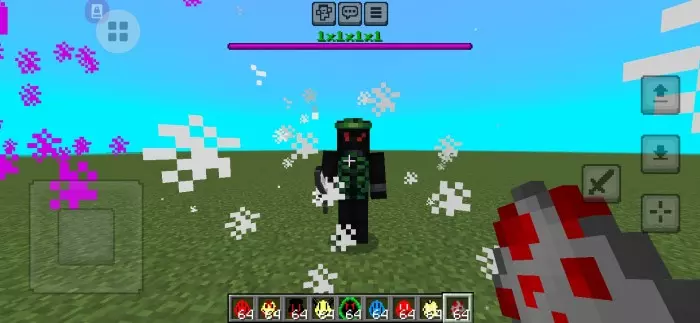
Doctor Nowhere Addon horror characters from Doctor Nowhere to your Minecraft Bedrock. A warning flashes across your screen telling you to run. Something has spotted you, and you probably don’t have much time to stand there reading it. Doctor Nowhere brings three hostile horror characters into Minecraft Bedrock, making an ordinary survival trip a lot more nerve-racking.

The add-on features T.O.E., The Boiled One, and The Boy, each inspired by the unsettling world of Doctor Nowhere. All three are hostile toward players and some other mobs, so don’t expect a friendly introduction if one notices you. Their shared behavior makes every encounter dangerous, even if you recognize which creature is approaching. Whether you’re exploring a forest or working near your base, spotting an unfamiliar figure is a good reason to check your surroundings and decide where you can retreat.

Disciples of the Void, Volume II Addon

Mods 1.21 / Mods 1.20 / Mods 1.19 / Mods 1.18


Disciples of the Void, Volume II Addon many unique strong bosses to the game and craft new weapons to battle against bosses. The first boss is down, but the fragment it dropped is a warning: something stronger is waiting. Disciples of the Void: Volume II brings a chain of challenging boss fights to Minecraft Bedrock, with powerful weapons to earn along the way.

Your journey begins with four disciples, each summoned using a corresponding manifest. Erian, the Disciple of Rage, is a mutated wither skeleton who prefers melee combat. Hit him enough and he can become enraged, gaining speed and damage as his bones begin to smoke. Roxantria, the Disciple of Chaos, is peaceful until provoked, but that changes quickly once the fight starts. Dubtrox can power himself up during battle, while Prismatica offers another opponent to overcome. These aren’t fights to rush into wearing your spare iron armor; bring your best equipment, plenty of food, and room to move.

LEGENDARY RT SCI-FI Addon

Mods 1.21 / Mods 1.20 / Mods 1.19 / Mods 1.18


LEGENDARY RT SCI-FI Addon very good HD quality realistic RTX furniture in Minecraft Bedrock. Your futuristic Minecraft mansion has the glass walls and the view, but its kitchen still looks suspiciously like a row of crafting blocks. Legendary RT Sci-Fi gives that room the kind of detail its architecture deserves.

This Minecraft Bedrock furniture addon brings realistic 3D models into your builds, with a focus on modern interiors. The selection includes cabinets, drawers, appliances, and other kitchen pieces that can turn an empty room into a convincing living space. Whether you’re building a luxury villa or a sleek apartment above the city, you can finally give the kitchen as much attention as the exterior.

Megalodon Monster Jam Truck Addon

Mods 1.21 / Mods 1.20 / Mods 1.19 / Mods 1.18 / Mods 1.17


Megalodon Monster Jam Truck Addon is a very cool and big monster truck for Minecraft Bedrock. A giant shark on four enormous tires is rolling toward your Minecraft base, and the driveway suddenly looks way too small. Megalodon Monster Jam Truck brings the shark-themed monster truck into Minecraft Bedrock, ready to take center stage in your own arena.

Megalodon has the kind of design that makes you stop and stare before you even think about getting behind the wheel. The shark-inspired body gives it a fierce look, while its oversized tires make an ordinary car seem tiny beside it. Park the truck next to a garage, a grandstand, or the entrance to your stadium, and it instantly becomes the main attraction. There’s plenty to look at underneath, too: the model includes details inspired by a racing chassis, with suspension, an engine, axles, and driveshafts. It’s the sort of vehicle you’ll want to circle once or twice before taking it out for a drive, especially if you’re a Monster Jam fan who appreciates the machinery as much as the spectacle.

Project Elmo Addon

Mods 1.21 / Mods 1.20 / Mods 1.19 / Mods 1.18 / Mods 1.17 / Mods 1.16


Project Elmo Addon new monster, it will be your new enemy in Minecraft Bedrock. You were expecting a creepy Minecraft monster, not Elmo chasing you through the trees. Project Elmo takes a familiar face and gives it one very unfriendly goal: hunting you down.

This Minecraft Bedrock horror addon introduces an evil Elmo as a new enemy. When he comes after you, the encounter is straightforward: he’ll chase you and try to kill you. That’s enough to make an otherwise ordinary survival trip feel a little more unpredictable. You might leave your base to gather wood or explore a cave, only to find yourself deciding whether to stand your ground or get moving. There’s something especially unsettling about being chased by a character you’d normally associate with a much friendlier kind of entertainment. The contrast is ridiculous, creepy, and exactly the kind of surprise that can make a Minecraft session memorable.

The Forsaken Roblox Hackers! Addon

Mods 1.21 / Mods 1.20 / Mods 1.19 / Mods 1.18


The Forsaken Roblox Hackers! Addon of new bosses - Hackers from Roblox in Minecraft. A Roblox hacker has shown up in your Minecraft world, and your diamond armor might not impress them. The Forsaken Roblox Hackers brings dangerous boss encounters to Bedrock, giving your next fight a crossover nobody in the village asked for.

The addon introduces bosses inspired by infamous Roblox hacker characters, with special abilities that make them more threatening than the mobs you’re used to facing. If you recognize the names and stories behind Forsaken, seeing those characters appear in Minecraft is part of the appeal. If you’re coming in as a Minecraft player, the challenge is simple enough to understand: these opponents are meant to be dangerous, and charging in without a plan could end your adventure quickly. Good equipment is worth bringing, but don’t count on armor alone to carry you through an unfamiliar fight.

Auto Totem Addon

Mods 1.21 / Mods 1.20 / Mods 1.19 / Mods 1.18


Auto Totem Addon for automatic and faster use of the totem in the Minecraft game. Your Totem of Undying just saved you, but the fight isn’t over and another hit is coming. Auto Totem helps get a totem into your offhand automatically, so you can keep moving instead of scrambling through your inventory.

A totem is one of those items you hope you won’t need and are incredibly grateful to have when everything goes wrong. The problem is that Minecraft rarely waits politely while you open your inventory and look for another one. Maybe a raid has filled the area with enemies, or you’ve just survived an explosion with barely enough health to think. The Auto Totem Addon handles the switch to your offhand for you, making it easier to stay focused on the situation in front of you. Keep spare totems in your inventory before heading out, because the addon relies on the items you already have available.

That can make a real difference during a long fight. Picture yourself taking on a raid: the first totem activates, the screen fills with effects, and an enemy is still charging toward you. Instead of trying to drag a replacement into the right slot while under pressure, you can concentrate on getting clear, eating, and deciding whether to keep fighting. The addon takes care of a fiddly inventory task at exactly the moment when you have the least time for it. It doesn’t win the battle for you, though. You still need to watch your health, pay attention to your surroundings, and avoid getting cornered by a group of mobs.

Totem Plus Addon

Mods 1.21 / Mods 1.20 / Mods 1.19 / Mods 1.18


Totem Plus Addon many new useful totems for survival and adventure in Minecraft. A long swim, a dangerous drop, and a fight with a crowd of mobs all call for different kinds of help. Totem Plus adds seven animal-inspired totems to Minecraft Bedrock, each offering an effect you can use during your adventures.

The trick is choosing the right totem before you need it. These items work when equipped in your off-hand, so you’ll have to decide which effect is most useful for the situation ahead. Heading across a wide stretch of terrain? The Cat Totem helps you run faster, making it a tempting companion for a long journey between bases. The Rabbit Totem gives you a higher jump, which can make moving around uneven ground feel different as you explore. Try both near home first and get used to how they affect your movement. A higher jump can help when you’re navigating hills, but it can also take a little adjustment if you’re used to the usual timing. Once you know how each totem feels, you can choose the one that suits the trip you’re planning.

Utility HUD – Addon / Texture Pack

Mods 1.21 / Mods 1.20 / Mods 1.19 / Mods 1.18 / Mods 1.17 / Mods 1.16 / Textures


Utility HUD Addon will show you all the necessary information about the opponent: his HUD armor, weapons, armor in hands, speed, health above the target's head. Your opponent looks ready to fight, but how much health do they actually have left? Utility HUD puts extra information on your Minecraft Bedrock screen, so you can keep track of equipment, health, and other details while the action unfolds.

The health indicator is especially handy when you’re fighting other players. Instead of guessing how close someone is to going down, you can check the display above their head and decide what to do next. Maybe you’ve landed a few hits and want to keep up the pressure, or maybe you’re facing a fresh opponent after your own fight has already taken a toll. The pack also displays equipment information, giving you a clearer picture of what another player is wearing and holding. In a busy match, a quick look can help you decide which fight you want to take.

Night Vision Pack (Shader) Addon

Mods 1.21 / Mods 1.20 / Mods 1.19 / Mods 1.18 / Shaders


Night Vision Pack (Shader) Addon adds special shaders to completely remove darkness from the game and see like night vision in Minecraft. The cave keeps going, your last torch is behind you, and there’s something moving at the edge of the darkness. Night Vision Pack brightens dark areas in Minecraft Bedrock, making underground passages and nighttime adventures easier to see.

Mining becomes a lot less squinty when you can make out the shape of a cave before walking into it. A steep drop, a patch of ore, or a tunnel branching off to the side is easier to notice when darkness isn’t hiding the view. You can spend more time deciding where to explore and less time stopping every few blocks just to see what’s ahead. That’s especially handy in a large cavern where paths overlap and the ceiling disappears into the distance. Look around before picking a route: the opening above you might lead somewhere interesting, while the floor below could have a gap you’d rather avoid. Better visibility helps you read the terrain, but it doesn’t turn a risky jump into a safe one. Keep your food and tools ready, and watch your footing when you head deeper.

Navigation