Survival Modern House #69 Map
- 24-09-2025, 07:38
- 748
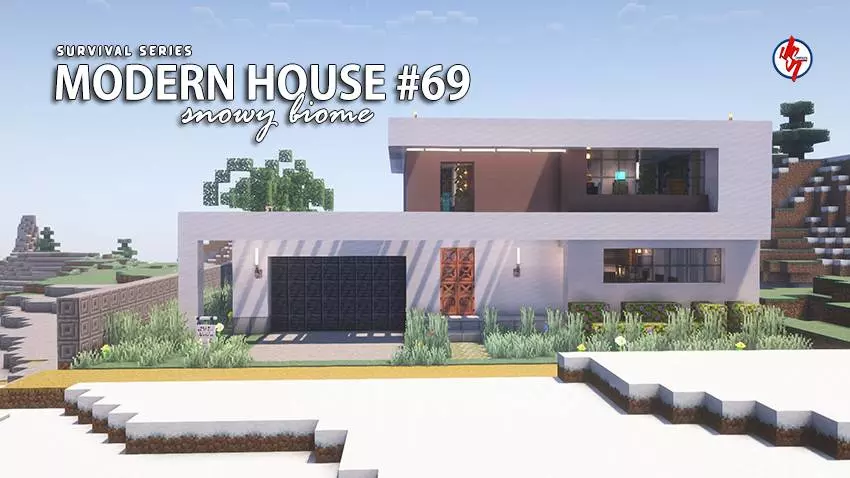
Survival Modern House #69 (Achievements On) map drops you straight into a compact modern build that actually works day one. Your spawn is set inside, storage and stations are placed, and the nearby village means early trades the moment you step out. Because Achievements are On, this can be your long-term save—everything you do counts. I stash basics, sleep once to lock the bed, then jog to town for a Fletcher or Librarian while the area loads.


Snow outside, a modern house inside, and a whole survival world waiting beyond the door. This Minecraft Bedrock map gives you a ready-made home for your next adventure.
Survival Modern House #69 starts you inside a compact base with its interior and exterior already built. There’s storage, space to work, and useful starter items to help you settle in. Take a moment to look through the house before heading out; knowing what you have on hand makes it easier to decide what to gather first. The design fits its snowy surroundings while bringing a clean, modern look to the landscape. Large windows let you look out over the snow, and the compact layout keeps your starting space close at hand. It’s a good setup if you enjoy having a home to return to after exploring but also want the freedom to make that home your own. Rearrange the interior as your collection grows, add more storage when the chests begin to fill, or keep the original design and build your next project nearby.
There’s an existing village close to the house, giving you another place to visit as you get established. Take a walk over, meet the villagers, and see what trading opportunities you can develop during your survival run. You can also use the village as inspiration for a bigger project: connect it to your house with a path, add lighting along the route, or build a small rest stop between the two. The contrast between a modern home and a snowy village gives the area character before you place a single block of your own. Once you’re ready to venture farther, pack food and supplies and use the house as your starting point for exploring. A comfortable base makes it easier to come back, sort through what you’ve found, and plan the next trip. The world is still yours to play through, so there’s plenty to do after you’ve settled in.
The map is presented with achievements enabled, which makes it appealing if you want your survival milestones to count as you develop the world. You might begin by improving the area around the house, then work toward better equipment, trading, and more ambitious builds. Snow gives even a short walk a distinctive atmosphere, especially when you return home after dark and see your base ahead. If you want to expand, consider adding a workshop or a larger storage room while keeping the original house as the center of your settlement. Or leave the build as it is and focus on the adventure beyond the village. To get started, open the downloaded world file in Minecraft and load the map. With a finished home waiting at spawn, you can spend your first day deciding where this snowy survival journey should take you.
Play the snow like a pro. Strays tag Slowness arrows, so light the perimeter and keep shield up on open runs. Use bottom slabs on exterior paths so snow doesn’t cake your walkways, and lay packed-ice lines for fast routes between house and village. Powder snow will eat you if you’re not careful—wear leather boots to ignore it, or carry a bucket to scoop a pit before it becomes a problem. Charcoal is your early fuel; smelt logs while you loot.
Tie the village in. Boat two villagers home into micro-stalls, lock trades, and route an ice path so night returns are painless. Add a lightning rod on the roof and lanterns at eye level so mobs can’t hug shadows near the glass. Survival Modern House #69 (Achievements On) map is small, readable, and perfect for Realms—easy to expand without losing that clean modern vibe.
How to install?
Android: you need to find the downloaded file on your phone, use any file manager for this and import the map into the game by opening it.
IOS: after receiving the map, the device itself will offer to install it.
Windows 10: go to the folder where the files are downloaded, find mcworld there and activate it.
Comments (0)