Survival Fourbox House Map
- 15-12-2025, 05:50
- 629
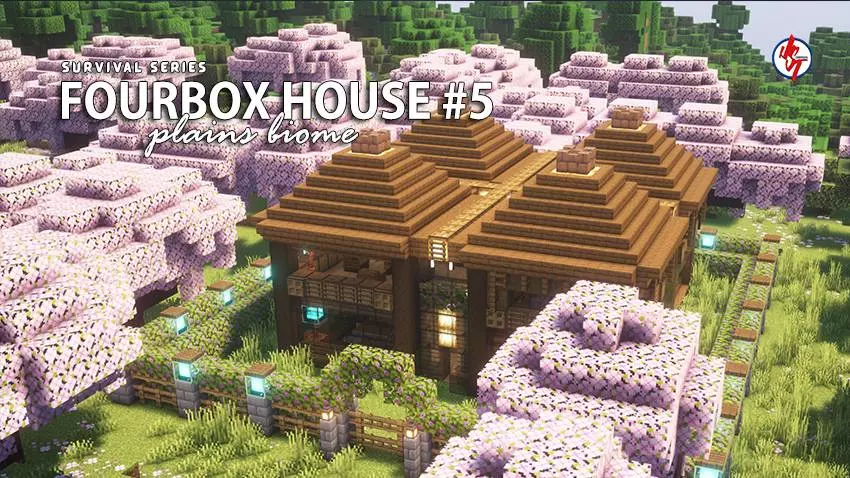
Survival Fourbox House Map is one of those starter builds that’s simple on purpose, and that’s exactly why it works. The whole “Four Box House” idea feels like a smart little survival design you’d actually come up with after getting tired of messy early bases. Instead of one cramped room where everything is stacked on top of everything, you get a clean boxy layout that naturally separates your space. It’s still a mini house, so it doesn’t feel like you’re being handed some giant mansion for free, but it’s structured enough that you can live in it comfortably while you grind out the early game.


It drops you into a Plains survival setting, which is honestly the best biome for a starter world. Flat land makes it easy to expand, farms are painless, and you’ve got tons of room to build extra “boxes” later if you want to keep the theme going. The interior and exterior are already finished, so you’re not walking into an empty shell. It’s the kind of place where you can immediately start sorting loot, cooking food, and planning your next move instead of spending the first day placing doors and panicking at nightfall.
The map being packed with useful items inside is a nice boost, especially if you’re doing a chill survival run or starting a new Realms world with friends. You can jump straight into exploring caves, scouting villages, or setting up farms without that slow “bare hands” phase dragging on forever. And the spawn point being set inside the house is a low-key huge quality-of-life thing—if you wipe somewhere dumb (lava, fall damage, surprise mob swarm), you’re not respawning out in the wilderness like “cool, guess I’m lost now.”
If you like using texture packs or shaders, this map is also a good canvas because boxy builds usually look extra clean with better lighting and sharper textures. It’s a simple survival house, but it’s the kind of simple that stays useful for a long time.
How to install?
Android: you need to find the downloaded file on your phone, use any file manager for this and import the map into the game by opening it.
IOS: after receiving the map, the device itself will offer to install it.
Windows 10: go to the folder where the files are downloaded, find mcworld there and activate it.
Comments (0)