Villager Minion Addon
- 6-04-2026, 02:27
- 2 487
Mods / Addons / Mods 1.26 / Mods 1.21

Villager Minion Addon will allow you to catch a villager and put him in a cage. Moving a villager across Minecraft terrain can take longer than building the house you want them to live in. Boats get stuck on land, minecart routes need preparation, and the villager rarely walks where you hoped. Villager Minion offers a much simpler method: capture a villager in a portable cage, carry them to your chosen location and place the cage down. You can trade with the villager there or release them when their new home is ready.
Start by crafting an Empty Cage and approaching a villager with it in your hand. Interact with them, and the cage becomes a Captured Villager item. You can then take it to the place where you want to set up your trading area. That makes a distant village more practical to work with, especially if the route back to your base crosses hills, forests or water. Prepare the destination first so you have somewhere suitable to place your new arrival when you return.

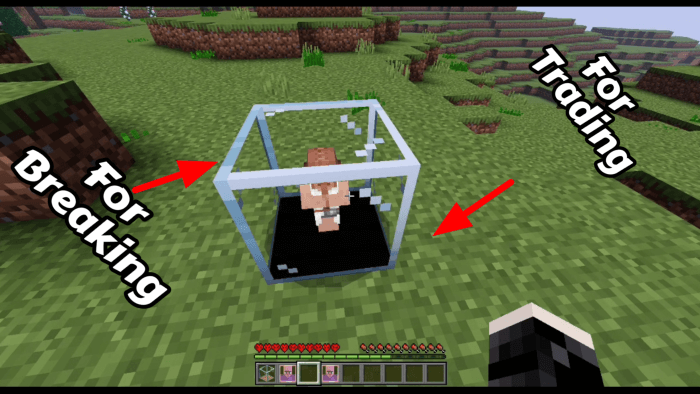
The placed cage has two parts with different uses. Interact with the lower section to trade, or break the upper section to release the villager. Remembering that distinction helps when you’re organising several cages together. Leave enough room to reach each trading point comfortably, and consider adding signs so you can quickly find the trader you want. A clear layout is especially useful once your collection grows beyond the first few villagers.
A compact trading room is an obvious project for the addon. You could build it beside your storage area, where emeralds and trade goods are easy to reach, or make a separate market building in your village. The cages keep the trading positions organised, leaving you free to think about the surrounding design. Wooden stalls, a covered walkway or a stone hall can all give the setup a place in your world rather than making it feel like equipment left outside.
Wandering traders have a cage of their own. The Trade Cage follows the same general arrangement: trading is handled through the lower part, while breaking the upper section frees the occupant. If a trader turns up while you’re busy with another project, this gives you a way to arrange a convenient trading spot. You might keep that area separate from the regular villagers so it’s easy to check the different offers when you visit.
There are a couple of additional trading features worth exploring. A custom Librarian provides direct enchantment offers, and the Village Hero Potion gives discounts from both caged villagers and ordinary villagers. Keep some emeralds ready if you plan to try them. Having a dedicated chest for trade supplies can save trips back and forth, particularly when you’re buying several things or preparing equipment before a longer adventure.
Villager Minion is useful when you want to spend more time arranging your village and less time transporting its residents. The cage system gives you control over where trading happens, while still letting you release villagers into buildings you’ve prepared for them. Begin with one cage, learn which part to interact with and decide how you want the trading area to look. From there, expanding it becomes a manageable building project instead of another evening spent pushing a boat uphill.
Installation:
— Download McPack
— Install McAddon or McPack files, just open it for this;
— Select new textures in the settings;
— Done.
Comments (0)