Custom Dev Commands Mod / Addon
- 29-09-2025, 08:10
- 984
Custom Dev Commands Mod — the toolkit you keep in your back pocket when you’re the one everyone pings for fixes on a Minecraft Bedrock server. The vibe is simple: you get a stack of admin-level commands that work without turning Cheats on, so you can keep your survival or realm feel intact while still having levers to pull when the session needs structure. If you’ve ever wanted proper control without breaking the mood, this is exactly that lane.
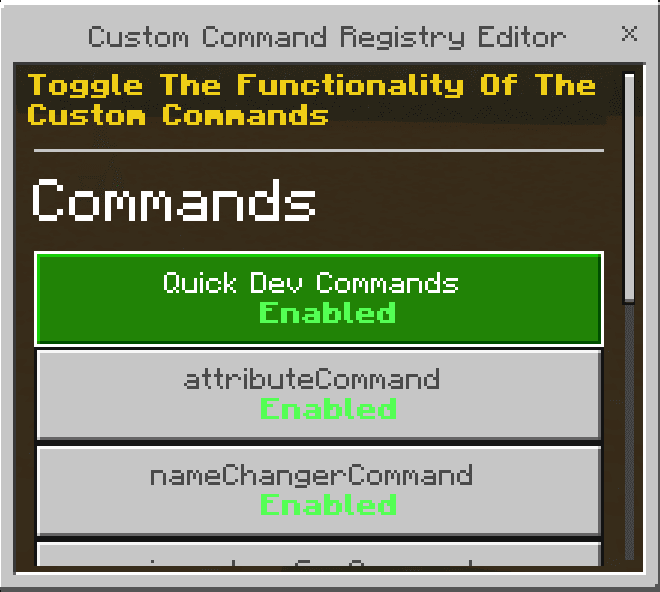
Everything respects permission levels, so only true admins can fire the commands. And it’s not all-or-nothing; the addon ships with a clean toggle menu at /commandconfig. Pop it open, flip individual commands on or off, and you’ve basically got a per-world ruleset you can tune between events, build nights, and boss runs. The state persists, too. If you disabled something last session, it stays off next time you load in until you choose to bring it back. Fresh worlds start with everything enabled by default so you can discover what you actually need, then pare it down.
Day to day, it’s a lifesaver. You can host a no-nonsense survival weekend, trim powers to the essentials, and keep things fair. Next night, re-enable the tools you want for a speed-build contest or a PvP bracket and run the whole thing from one spot. The only catch: because Cheats stay off, Minecraft’s tab-complete won’t kick in for these commands. That’s a Bedrock quirk, not the addon. Type them clean, use the config menu when you can, and you’re golden. There are days when Minecraft looks absolutely gorgeous without me changing a single thing. I'll be walking through a forest after the rain, notice sunlight coming through the trees, and stop for a second because the place looks better than I remembered. That's probably why I'm so particular about visual content in Bedrock. I don't want to lose the little details that make the original game feel familiar. When I'm trying different resource packs or other additions, I pay attention to how ordinary places look, not just whatever appears in the promotional screenshots. My little fishing cabin is a good spot for that. It has wooden walls, a stone fireplace, and windows facing the river. Nothing fancy, but I know exactly how it normally looks. If I'm enjoying the view instead of messing with settings every five minutes, things are probably going well. If not, I can always change my mind.
If you want real control without the “cheats are on� vibe, Custom Dev Commands Mod feels like how admin play should work in Minecraft Bedrock — tight, configurable, and there when you need it, invisible when you don’t.
Installation:
- Download Mod;
- Use Minecraft
- Open the downloaded file to install;
- Select it in the settings;
- Have fun!
Comments (0)