Nam's Sword Rarity Mod / Addon
- 9-11-2025, 17:18
- 833

Nam’s Sword Rarity Addon is a fresh, early build from a new creator, and the goal is simple: make swords feel like drops you actually chase. Instead of every blade blending together, this add-on introduces a rarity vibe so your kit has personality and your upgrades feel earned. It’s a v1 from a first-time dev, so expect quick tweaks and bugfix passes as feedback rolls in—run it in a copy of your world first, then bring it to your main save once you’re happy with how it behaves.
How you use it is where the fun starts. In solo worlds, treat the lower-tier blades as your “season one” starter gear and only step up once you’ve cleared tougher dungeons or boss runs. On realms, fold the rarer swords into event chests or prize pools so PvP nights and raid clears feel special again. If the current version shows rarity in names or tooltips, organize your armory by tier and keep a couple of mid-tier backups for risky trips; if it’s still more of a framework in your build, you can roleplay the rules and let the updates fill in the details over time.
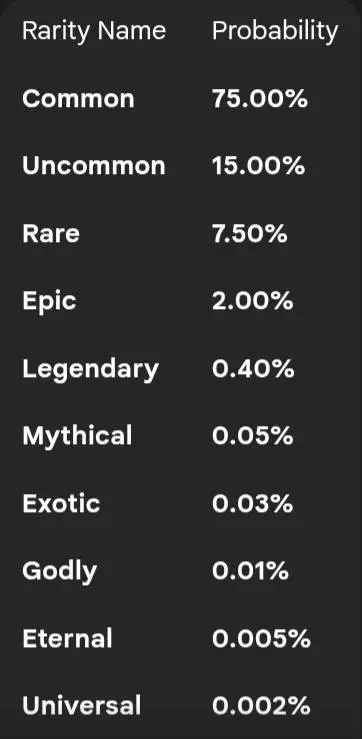
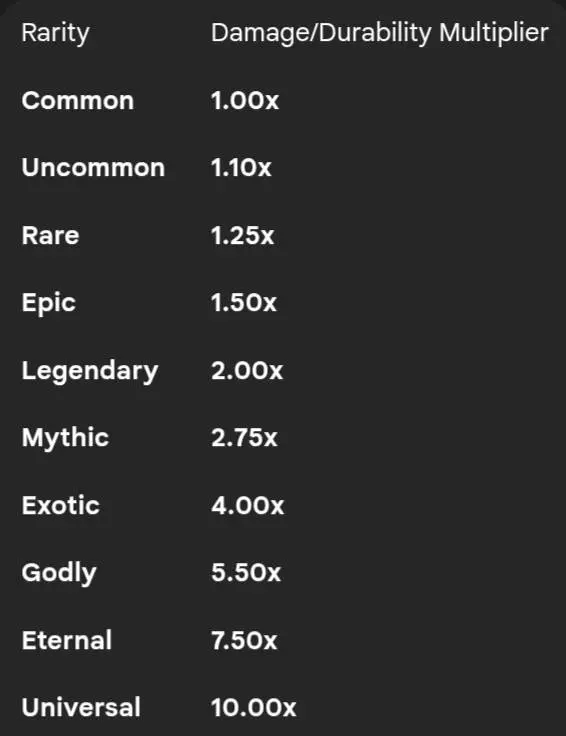
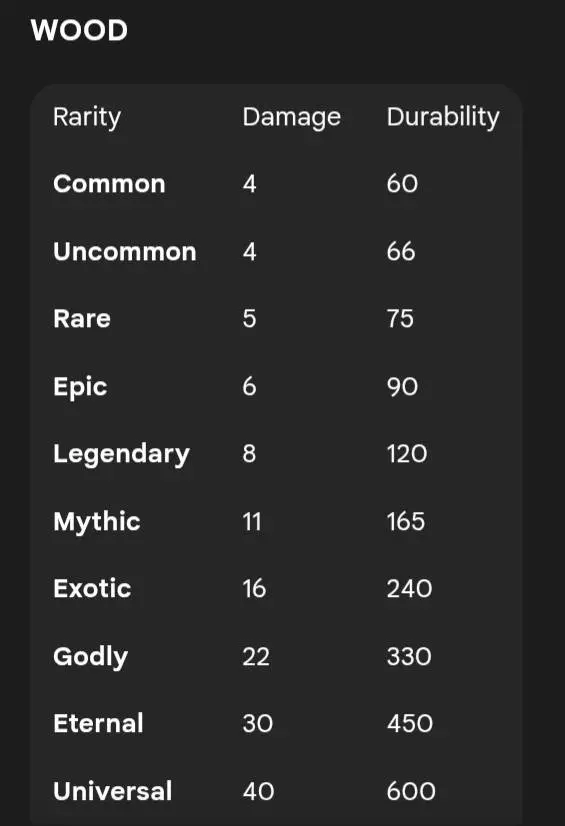
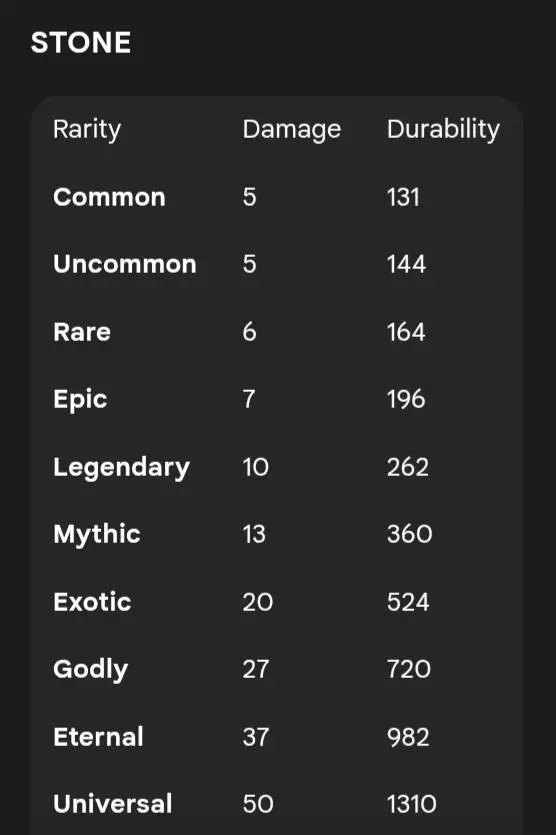
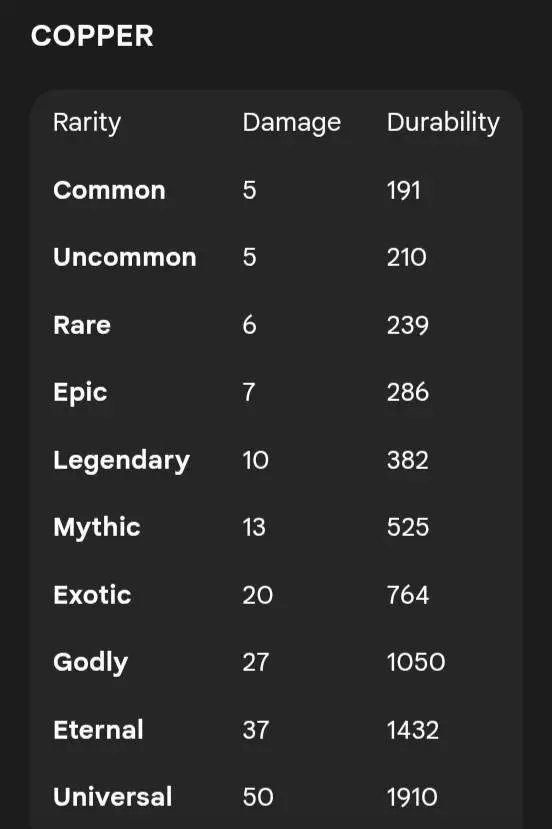
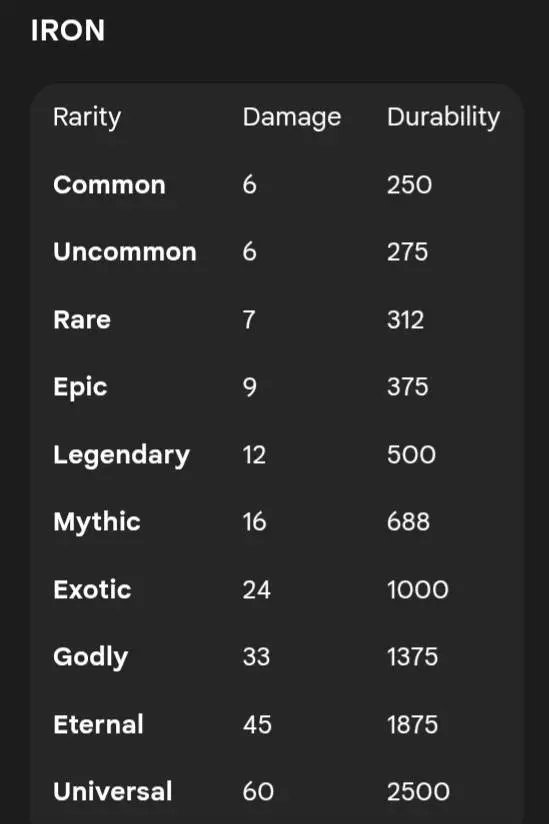
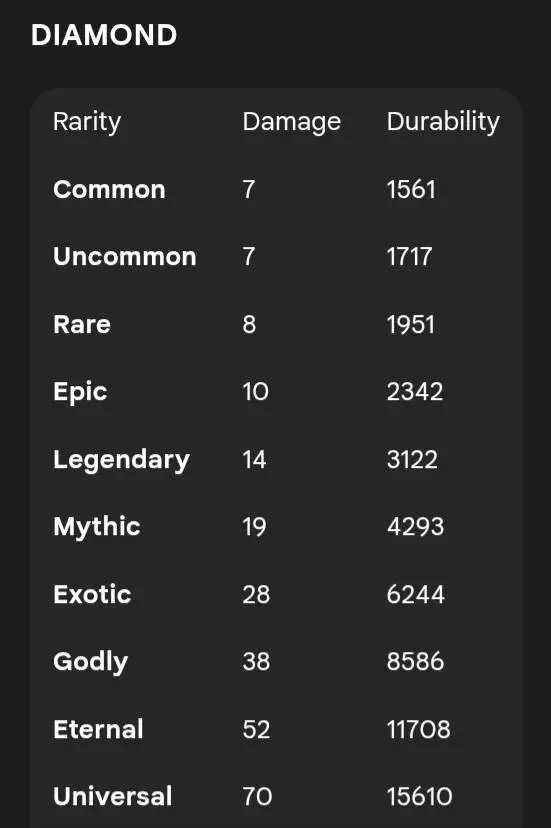
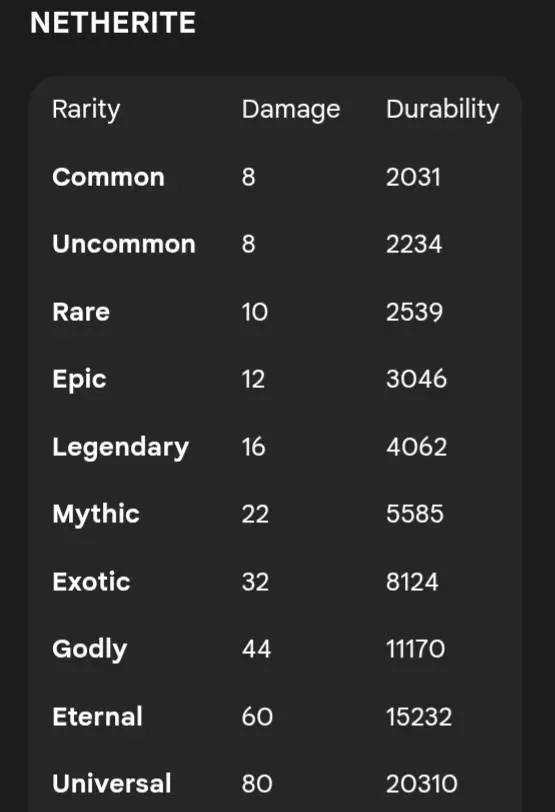
Two Minecraft swords can look familiar and still leave you wondering which one deserves a spot on your hotbar. Sword Rarity adds a chance-based rarity system to vanilla blades, giving you another reason to pay attention to the weapon you’re carrying.
The idea is simple: swords have rarity levels, and the add-on uses probabilities and stat multipliers to distinguish them. That extra layer makes comparing weapons more interesting than checking their material alone. An iron sword is still an iron sword, but its rarity gives you another detail to consider when deciding what to keep. The system focuses on familiar Minecraft swords, so you don’t have to learn a huge collection of unfamiliar weapon types before heading back into your world. Check the information on your weapons and compare what you find as you play. You might decide to keep one blade for everyday trips and save another for a fight where better stats could make a difference. The published information includes rarity probabilities and stat multipliers, though the exact values are presented in images; check the in-game weapon details before making a decision about a particular sword.
That moment of comparison can change how you organize your gear. Instead of throwing every spare sword into the same crowded chest, set aside a place for the blades you want to keep. Bring a backup when you’re heading far from home, especially if you’re exploring a cave system where retrieving your gear could turn into a whole second adventure. If you find a sword you’re excited about, give it a proper test against ordinary hostile mobs before taking it into a tougher encounter. You’ll still need food, armor, and a plan for getting out alive; a good weapon won’t help much if a creeper catches you while you’re staring at your inventory. And if you’re the kind of player who keeps a display room for favorite finds, a sword collection suddenly becomes a little more interesting to look through.
On a shared world, the rarity system also gives players something new to compare. Show a friend the sword you’ve been using, inspect your own collection, or set up a friendly challenge where everyone brings a blade and tries the same combat course. You can make your own rules for a tournament or use swords from your collection as prizes for a server event. Just agree on the conditions first if you want the fights to feel fair: equipment, armor, and player skill all matter alongside the sword itself. Solo players can treat the system as another part of gearing up before a raid, a trip into the Nether, or a long expedition away from home. There’s no need to overhaul your whole playstyle. Keep exploring, keep an eye on the swords you collect, and take a second look before tossing a spare into storage. The blade you almost ignored might be the one you want beside you when things get messy.
Because this is a first release, be kind to yourself and your save: back up, test, and report anything weird so the author can tighten it up. The idea’s strong—give swords identity, give players a reason to grind one more run—and with community feedback this can grow fast into a clean, reliable way to make combat and loot feel new again.
Installation Mod:
- Download the .mcaddon / .mcpack;
- Open the file to import into the game;
- In World Settings → Resource Packs and Behavior Packs, enable it (turn on Experiments if needed);
- Have fun!
Comments (0)