Nic's Carpentry & Furniture Mod / Addon
- 12-11-2025, 07:24
- 760
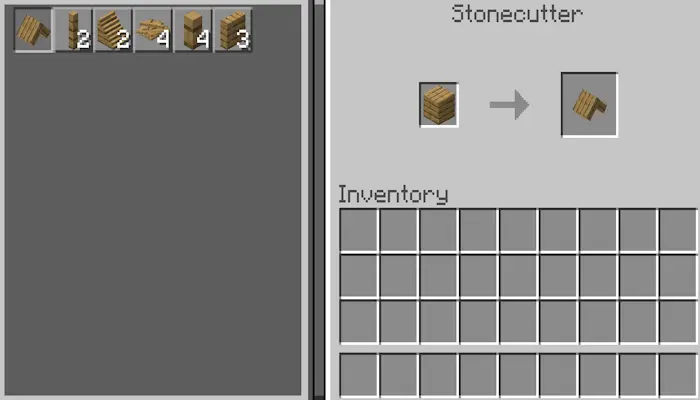
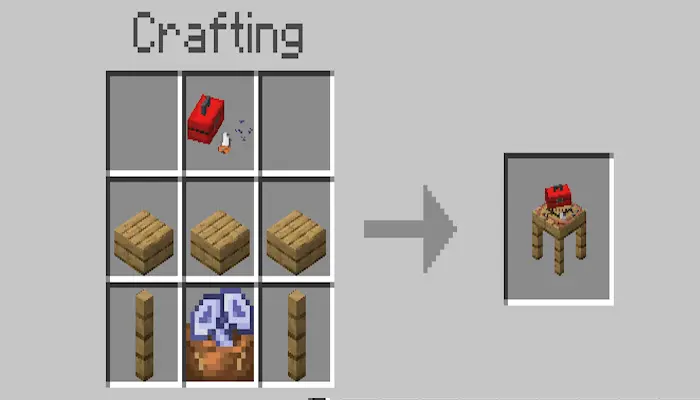
Nic’s Carpentry & Furniture Mod gives builders what the base game never quite did: a simple, believable way to make wooden furniture that looks like it belongs. You start at the Stonecutter to craft the Carpenter Workbench—that’s your hub for everything else. Pop it down, open the menu, and you’re off shaping tables, chairs, and other wooden pieces with a fuss-free workflow. A few recipes call for screws, so spin up a stack first, then watch the catalog open up. If you ever forget a step, tap the green recipe book in your inventory—the whole set is indexed there for quick reference.
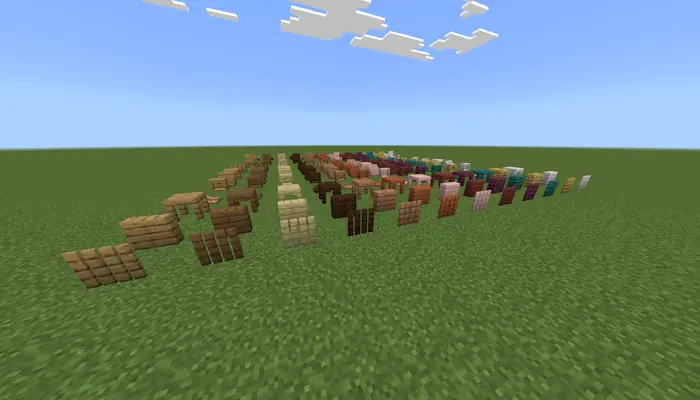


On builds, the pack just clicks. Farmhouse kitchen? Line up a table and matching chairs, then push them tight to the counter for a clean run. Cozy starter cabin? Drop a small dining nook and a reading corner without breaking the color rhythm of your planks. Modern base? Keep lines straight and let the grain do the work. Because it’s texture-pack compatible, the pieces sit naturally with whatever look you’re already running—no jarring colors, no odd shading, just wood that reads right in screenshots and in play.
It’s lightweight, it’s practical, and it respects your palette. Craft the bench, make your screws, and start furnishing rooms instead of improvising with fences and stairs. Once you’ve decorated one space with Nic’s Carpentry & Furniture Mod, it’s hard to go back.
Installation Mod:
- Download the .mcaddon / .mcpack;
- Open the file to import into the game;
- In World Settings → Resource Packs and Behavior Packs, enable it (turn on Experiments if needed);
- Have fun!
Comments (0)