Spawned Eggs – Addon / Texture Pack
- 18-01-2026, 05:14
- 603
Mods 1.21 / Mods 1.20 / Mods 1.19 / Textures
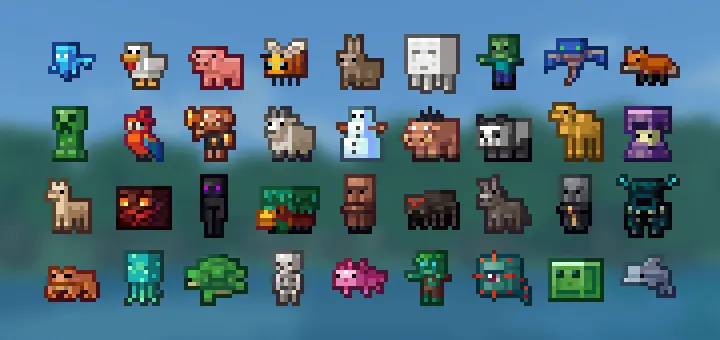
Spawned Eggs Addon / Texture Pack is a clean visual overhaul for spawn eggs, focused on making them instantly readable. The default eggs can be hard to tell apart at a glance, so this pack replaces them with full-body pixel icons of the mobs you’re actually about to spawn. It keeps the style true to the game’s chunky, blocky feel instead of going for anything glossy or off-theme.
In-game, the biggest win is how fast your brain processes what you’re holding. You’re not squinting at similar colors or trying to decode a pattern on an egg anymore—you’re seeing the mob itself, like a little mini figure sitting in your inventory. That makes quick swaps feel smoother when you’re testing things, setting up scenes, or just browsing your spawn options without slowing down to read names. It’s one of those small changes that makes your menus feel less cluttered because the icons actually communicate.

Spawned Eggs Addon / Texture Pack also makes your inventory look more “collected� and intentional, like every egg is its own distinct item instead of a vague variation of the same shape. If you’re building a showcase area or prepping a world where you’ll be spawning different mobs, it’s way easier to keep your flow when each egg is visually obvious. You can line things up quickly, grab what you need, and stay focused on what you’re doing instead of second-guessing the egg in your hand.
A practical tip is to lean into the clarity: keep spawn eggs grouped by whatever you’re doing that session, because the full-body icons make sorting by sight actually work. When you’re moving fast, especially in Minecraft Bedrock where you’re flipping through inventory a lot, being able to recognize the mob instantly is the whole point. Spawned Eggs Addon / Texture Pack doesn’t try to change gameplay or add new mechanics—it just makes spawn eggs look like what they summon, and that simple upgrade feels surprisingly satisfying once you get used to it.
Installation:
- Download Texture;
- Open the downloaded .mcpack to install;
- Select texture in settings;
- Done.
Comments (0)