Chisel for Bedrock Edition Addon
- 24-08-2025, 11:34
- 16 339
Mods 1.21 / Mods 1.20 / Mods 1.19 / Mods 1.18 / Mods 1.17 / Mods 1.16

Chisel for Bedrock Edition is a huge and best addon for many new blocks in Bedrock Minecraft. You get different decorative blocks from different materials. Each block has a unique look or pattern. Use a chisel to give your blocks a unique look and get thousands of new decorations. See the photo how it works.

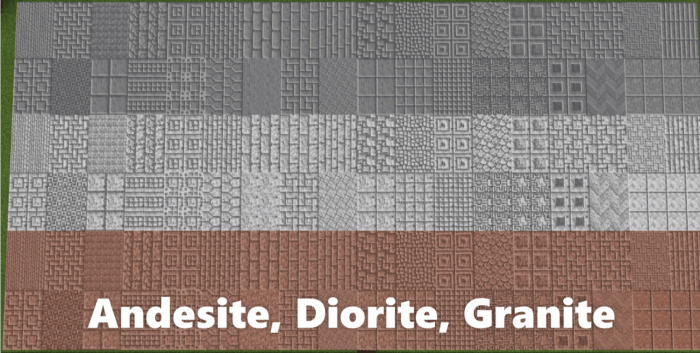




Your next Minecraft build doesn’t need a new shape to stand out—it might just need better blocks. Chisel for Bedrock adds thousands of decorative variations to play with.
The add-on opens up a huge range of patterns for materials you already know. Stone, cobblestone, deepslate, bricks, wood planks, and colored concrete are all part of the selection, alongside blocks such as granite, diorite, and andesite. There are also materials including marble, limestone, and chisel basalt. That gives builders plenty to work with whether they’re putting together a medieval castle, a modern house, or a workshop buried beneath a mountain. A wall that once needed several different materials for detail can now draw on variations of the same one. Try using a patterned block around a doorway, saving another design for the floor, and keeping the rest of the room simple. The contrast can make a familiar base feel much more deliberate without forcing you to tear down everything you’ve already built.
The stonecutter is your starting point for many of these designs. Put in a supported material and browse the available block variations to find one that suits your project. The add-on also includes a craftable iron chisel: use it on chisel blocks to cycle through their variations. That’s handy when you’re standing in front of a wall and want to experiment with its look. You can compare patterns in the space where you plan to use them, rather than trying to picture the finished room from an inventory screen. In Creative, the chisel blocks are grouped in the inventory, making the collection easier to browse. With more than 2,000 variations described on the add-on’s project page, there’s a lot to explore, so picking a few materials for each build is a good way to get started.
What you do with those choices is up to you. Give a castle corridor a heavier look with dark deepslate, use decorative planks to bring detail into a cabin, or experiment with concrete patterns in a city build. Marble and limestone are worth a look when you want a lighter palette, while cobblestone and brick can give a workshop or fortress a more rugged feel. You don’t have to cover every surface in detail, either. A strip of patterned blocks along a hallway or a different texture behind a fireplace can do plenty of work on its own. If a design feels too busy, step back, swap a few blocks, and see which combination reads best from a distance. Chisel for Bedrock is especially appealing for players who enjoy tweaking a build long after the roof is finished. It gives you more ways to make the places you already love feel like yours, one block at a time.
Installation:
- Download Mod;
- Open the downloaded file to install;
- Select it in the settings;
- Be sure to enable the experimental game mode;
- Have fun!
Comments (1)