Five Nights in Minecraft Add-on
- 7-01-2025, 03:12
- 1 521
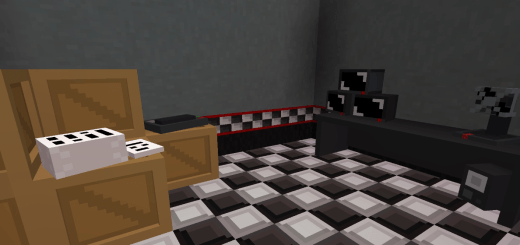
Five Nights in Minecraft Addon fnaf blocks, items and mobs. Mod for you who wants Five Nights at Freddy's in Minecraft. The arcade cabinets are in place, the dining room is ready, and your pizzeria looks great—until the lights go down. Five Nights in Minecraft gives you FNAF-inspired blocks to build a location that feels cheerful by day and seriously creepy after dark.
This add-on is a building collection for fans who want to bring the atmosphere of Five Nights at Freddy’s into Minecraft Bedrock. It includes themed walls and floors, along with crates, arcade machines, and screen models that can give your rooms a more convincing pizzeria look. The best part is choosing how to put those pieces together. You could recreate the feel of a familiar restaurant or come up with a completely original location for your own horror story. Start with the main dining area, leave room for a stage, and decide where the hallways should lead. Even before you add the smaller details, the themed walls and floors help establish what kind of place you’re building.


Five Nights in Minecraft Add-on for Minecraft Bedrock
The arcade machines are an easy way to make a game room stand out. Arrange a few along a wall, give players space to walk between them, and use lighting to make that corner feel different from the dining room. During the day, it can look like the part of the restaurant where everyone would want to hang out. At night, the same room can become a much less comfortable place to search alone. Put crates nearby if you want the area to feel like it has a storage space or a workroom behind it. Those little choices help the pizzeria feel like a place with a purpose instead of a collection of empty rooms.
A FNAF-inspired build needs an office, and the screen models give you a useful decorative detail for one. Place them where a night guard might keep an eye on the building, then plan the hallways and entrances around the desk. You can make the office feel cramped and exposed, or give it a wider view of the rooms outside. The screens help set the scene, but the add-on’s description doesn’t establish a working camera system, so treat them as part of your design rather than counting on them to monitor the restaurant. If you want interactive security features, you can experiment with Minecraft’s own building and redstone tools as a separate project.
The same blocks can tell different stories depending on how you use them. A freshly opened restaurant might have bright lighting, a tidy arcade, and a welcoming entrance. For an abandoned attraction, leave part of the building unfinished, place crates in a back room, and make the route from the entrance to the office feel less direct. Invite friends to explore and give each person a role: a night guard, a visitor who got locked inside, or someone trying to figure out why the restaurant closed. The add-on supplies themed building pieces; the layout, characters, and events are yours to create. You can make the story funny, creepy, or a little of both.
Five Nights in Minecraft is a good fit for builders who enjoy the details that make a FNAF location recognizable. The themed surfaces give you a starting point, while the arcade machines, crates, and screens help each room feel like it belongs in the same building. Try making a compact pizzeria first, then expand it with a larger dining area or extra rooms once you know where you want everything. Whether you’re preparing a roleplay world or building a horror attraction with friends, there’s plenty of room to make the place your own. Just take one last walk through the halls before you call it a night.
Installation:
- Download Mod;
- Open the downloaded file to install;
- Select it in the settings;
- Have fun!
Comments (0)