Real Daylight Cycle Addon
- 18-01-2026, 14:32
- 1 297

Real Daylight Cycle Addon will adjust the clocks in Minecraft and make them according to real life. So if you have a day, then in the game it will be a day and time will flow the same way. It’s getting dark outside your window, and the sun is going down in Minecraft too. Real Daylight Cycle puts your world on the clock, giving each sunrise and nightfall room to breathe.
The addon synchronizes Minecraft Bedrock’s time with a selected real-world time zone. Instead of watching several sunrises pass during a short building session, you’ll see the in-game sky change much more slowly. Log in during your morning and you can spend hours gathering materials, farming, or working on your base while daylight gradually moves across the world. Come back in the evening, and you’ll find a very different atmosphere waiting for you. That slower pace changes how you plan a session. A nighttime mining trip might end with you returning to the surface under the same dark sky you left behind. If you usually play after work or school, make sure your paths and entrances are lit; you could be spending a lot of your regular playtime outdoors after sunset. On the other hand, players who enjoy nighttime building finally have plenty of time to get every lantern in the right spot.
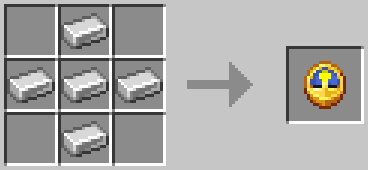
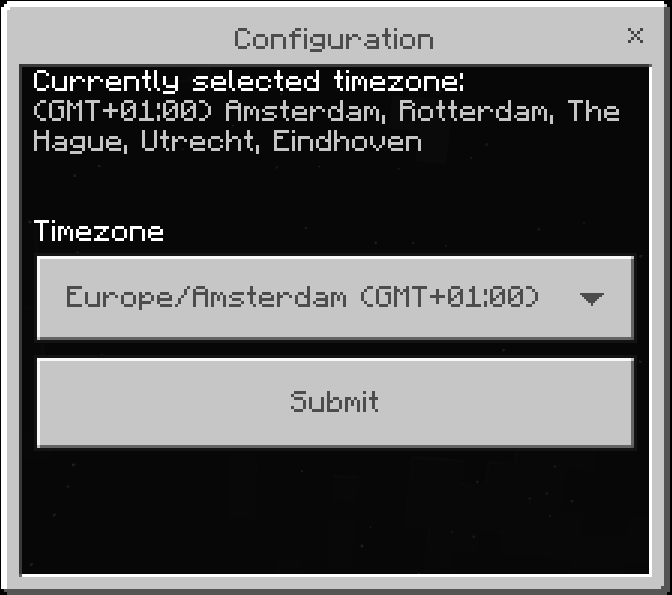
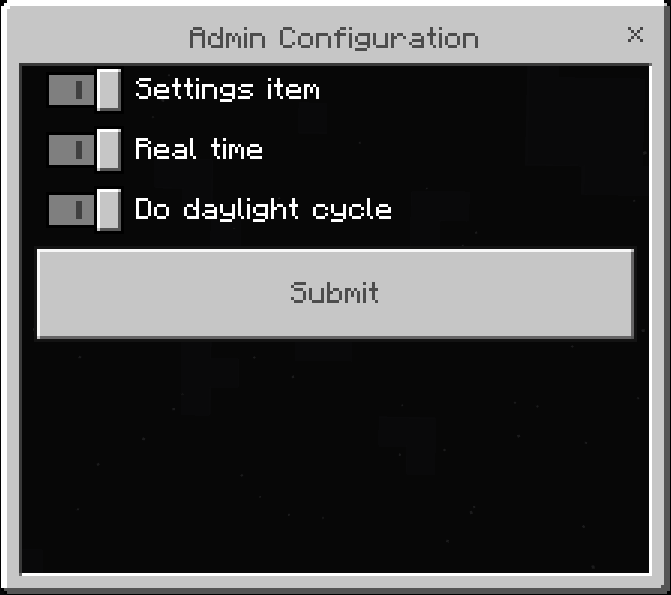
Getting the clock set up is straightforward. When you enter a world with the addon active, a configuration menu lets you choose a time zone. Pick one from the list or enter an offset manually, such as -05:00. The default setting is GMT+00:00, so check your selection if the in-game time doesn’t match what you expected. If your local clock changes for daylight saving time, you may need to adjust the offset to keep the two aligned. You can reopen the menu with the settings clock, which is crafted from five iron ingots arranged in a plus shape. On a touchscreen, long-press to use it; with a mouse, right-click. There’s also a Real Time toggle in the menu when you want to switch between the synchronized clock and Minecraft’s normal daylight cycle. That’s useful if you love the slower sky during a building project but want a quicker day for another session.
A shared world brings an interesting wrinkle: everyone plays under the same in-game sky, even if their own clocks show different hours. Pick a time zone that suits the group, whether that means matching the host’s evening or choosing a schedule that gives everyone a chance to play in daylight. Administrators can manage access to the settings so the clock doesn’t keep changing whenever someone new joins. The addon won’t reproduce your local weather or the exact seasonal length of daylight; its focus is the time of day. What it does give you is a different rhythm for familiar activities. Watch a sunset while finishing the roof of your base, head out for a long night of hunting, or start a farm project on a quiet real-world morning. To try it, open the downloaded addon file, activate it in your world settings, and choose your time zone when prompted. Then take a look at the sky and settle in: the next sunset isn’t rushing anywhere.
Installation:
- Download Mod;
- Open the downloaded file to install;
- Select it in the settings;
- Have fun!
Comments (0)