Better Level Mechanic Addon
- 23-02-2025, 17:54
- 2 290

Better Level Mechanic Addon will improve the gaming experience because you will get better level mechanics in the game Minecraft Bedrock. That zombie near your base is manageable, but the one waiting far from the world’s center might be a different story. Better Level Mechanic adds RPG-style progression to Minecraft Bedrock, giving both you and the creatures around you levels to think about.
Every level gives you another decision about the kind of character you want to build. The add-on lets you spend upgrade points on damage, defense, speed, critical chance, and health. If you like getting up close with a sword, extra damage might help you finish fights faster; if you tend to get surrounded, more health or defense could give you room to recover. Speed offers another direction for players who spend a lot of time moving through the world, while critical chance adds an offensive option to consider. You don’t have to commit to a role just because your friends do. One player can focus on staying alive in a tough fight while another builds toward dealing more damage. Pay attention to how your character handles encounters, then spend future points on the weaknesses you actually notice rather than picking upgrades at random.


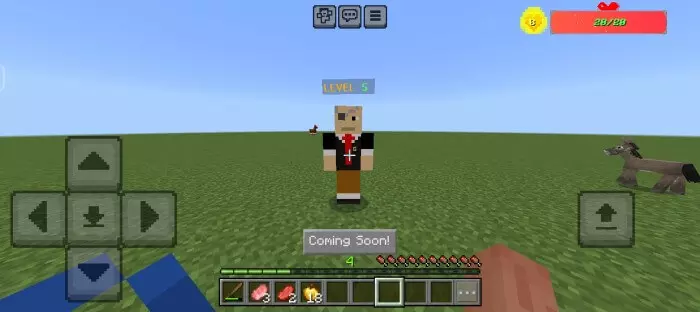
The creatures you encounter have their own levels, and their range depends on distance from the world origin at X: 0, Z: 0. For every 100 blocks away from that point, the possible level range rises by five. That makes the direction and distance of an expedition matter in a way they normally don’t. A trip thousands of blocks from the center can put you up against much higher-level entities than a trip near it, even if the surroundings look familiar. Check your coordinates when planning a long journey, and remember that your base may be nowhere near the world origin. If you’re struggling, heading back toward the center gives you a way to look for a more manageable challenge. Higher-level entities offer more experience, so there’s a reason to venture farther once your equipment and character are ready.
There’s a useful bit of forgiveness built into the progression system: your level is saved after death. That means one bad encounter doesn’t wipe out the character growth you’ve worked for, although you’ll still want to think carefully about your equipment and where you fall. The add-on also includes a craftable Status Card, made with copper ingots, gold nuggets, and an iron ingot. Its activation becomes available at level 10 and costs a level upgrade, so there’s a tradeoff to consider when you reach that milestone. Health and absorption information get their own interface changes as well, giving the RPG system a presence on screen while you play. Between checking your status and choosing upgrades, progression becomes something you actively manage rather than a number you only notice when it’s time to enchant an item. A failed expedition can still sting, but you can take your saved level into the next attempt.
Multiplayer brings one detail worth discussing before the squad heads out: only the player who lands the final blow receives experience from that entity. If everyone wants to develop their character, take turns finishing enemies or agree on another approach that feels fair to your group. You can also experiment with different stat builds and see how they hold up as you travel farther from the origin. A player focused on defense may feel comfortable taking the front position, while a teammate investing in damage looks for opportunities to finish the fight. Those roles are choices you make together, not fixed classes imposed by the add-on. Better Level Mechanic gives a survival world a longer progression arc: build up near safer areas, decide where to spend your points, and head outward when you’re ready to see what stronger mobs can do.
Installation:
- Download Mod;
- Open the downloaded file to install;
- Select it in the settings;
- Have fun!
Comments (0)