Enchantments Menu Addon
- 15-03-2025, 12:19
- 941
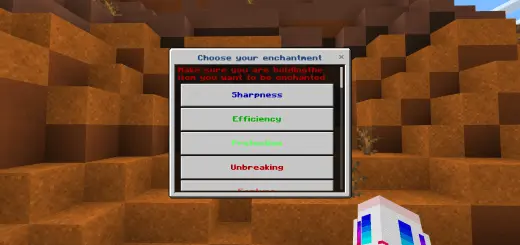
Enchantments Menu Addon is a menu with a complete list of enchantments that you can use in the video game. You’ve finally made a diamond pickaxe, and now you want Fortune on it—not whatever the enchanting table happens to offer. Enchantments Menu brings Minecraft’s enchantments together in one place, making it easier to focus on the upgrade you actually want.
The addon adds an enchantment menu to Minecraft Bedrock, giving you a way to browse the available options while planning your equipment. That’s useful whether you’re putting together your first serious survival loadout or preparing a set of gear for a particular project. Instead of treating every enchanted item as a lucky surprise, you can start with a goal: a pickaxe for mining, armor for exploring, or a weapon for the mobs waiting outside.


Take mining, for example. Efficiency is an easy pick when you’re clearing long tunnels or digging out space for a base. Fortune comes into the conversation when you’re heading out to collect valuable ores. Silk Touch serves a different purpose: it lets you collect certain blocks in their original form, which is handy when you’re gathering materials for a build or saving ore blocks to deal with later. Two pickaxes can look almost identical in your inventory and still have completely different jobs.
Armor choices can be just as personal. Protection is a solid all-around option when you expect a little bit of everything, from skeleton arrows to the occasional bad landing. Feather Falling is the enchantment you’ll appreciate when a mountain shortcut turns out to be a longer drop than it looked. If your next project involves an ocean monument or an underwater base, Respiration and Aqua Affinity are worth keeping in mind before you leave shore.
The menu is also useful for looking beyond your usual favorites. Plenty of players know exactly what they want on a sword but rarely bother with a fishing rod or a pair of boots. Browse the enchantments with a specific activity in mind and you might notice an option you normally skip. Depth Strider can make underwater movement easier, while Looting is an appealing choice when you’re heading out to collect mob drops. The right upgrade depends on what you’re planning to do after you leave your base.
For weapons, think about the fight rather than just the highest number you can find. Sharpness is a familiar choice for a sword you carry everywhere, while Smite is geared toward undead enemies. If you prefer fighting from a distance, Power can make a bow more useful when a hostile mob spots you across a ravine. And when you’ve put time into a favorite piece of equipment, Unbreaking and Mending are enchantments worth considering for its lifespan.
There’s room for experimentation here, too. Make a specialized mining kit for long cave trips, then prepare a separate set of gear for traveling across the ocean. Try equipment you don’t normally carry and see which enchantments make it worth a hotbar slot. A fishing trip, a Nether expedition, and a major building project all call for different tools, so your gear doesn’t have to follow the same setup every time.
Enchantments Menu fits neatly into that planning process. It puts the list of enchantments at your fingertips and gives you a clearer place to start when you know what you want your equipment to do. Pick a project, think about the obstacles ahead, and put together a loadout that feels ready for the job. Your next mining trip might still end with a surprise lava pool, but at least your pickaxe will have been chosen on purpose.
Installation:
- Download Mod;
- Open the downloaded file to install;
- Select it in the settings;
- Have fun!
Comments (0)