Device Viewer Mod / Addon
- 9-04-2025, 11:52
- 1 405

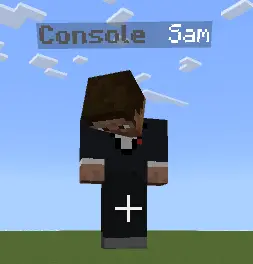
Device Viewer is a great server mod to see who is playing the game from which device: console, mobile, or desktop. Your friend just clutched a fight on a phone, and the entire server needs to know. Device Viewer puts that kind of information right next to players’ names, showing whether they’re joining from mobile, console, or desktop.





[media=https://youtu.be/MbY92u0JAbo]
Minecraft Bedrock brings players together across different devices, but you can’t always tell what someone is using just by looking at their character. Device Viewer handles that automatically. Each platform category gets its own icon, displayed with the player’s name tag and alongside their messages in chat. When someone calls for backup during a raid or shows off a new build, their device icon is right there with the message. Meet up in person, and you can see the same kind of information without stopping the adventure to ask. It’s a small detail, but on a busy server full of familiar names and new faces, those icons add another way to recognize the people you play with.
The feature is especially useful when you’re organizing activities for a mixed group. Maybe you’re planning a parkour course, a PvP tournament, or a fast-paced minigame and want to know what kinds of devices your players are bringing. Seeing the platform categories can give you a starting point for asking players about their experience and deciding how to structure an event. A mobile player might have a suggestion about a tricky jump, while someone on console could spot a part of your arena that feels awkward to navigate. Of course, the icon tells you the device category, not how skilled someone is or exactly what controls they use. The best way to make an event enjoyable is still to listen to the players actually taking part.
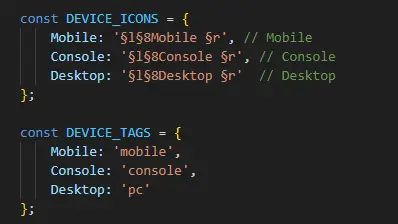
Device Viewer also gives server owners some room to personalize the display. Players who are comfortable editing the addon’s code can change colors and adjust device tags and icons, giving the information a look that fits their community. You might prefer subtle colors that blend into chat or distinctive icons that are easy to spot during a crowded game night. On a survival world, the display can simply become part of the daily rhythm: friends trading messages while mining, building, and arguing over who forgot to close the gate. On a competitive server, it adds a little context to the action without taking attention away from the match. Whether your group is spread across phones, consoles, and computers or you’re just curious about how everyone joins in, Device Viewer makes that part of your multiplayer world visible at a glance. And when a player pulls off something ridiculous, you’ll know a little more about the setup behind the play.
Installation:
- Download Mod;
- Open the downloaded file to install;
- Select it in the settings;
- Have fun!
Comments (0)