Hide Nametags Mod / Addon
- 26-09-2025, 14:20
- 2 429
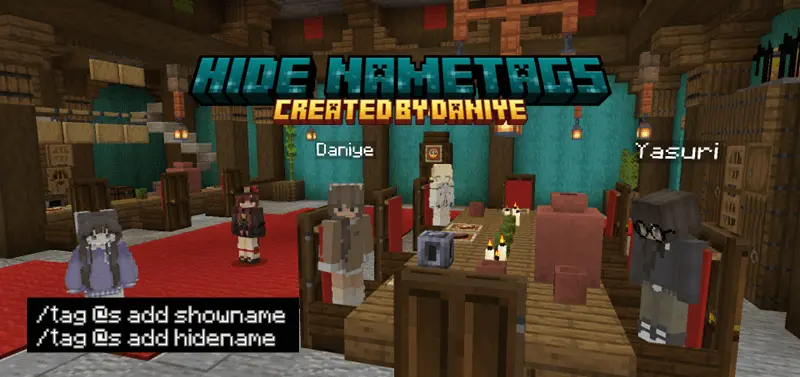
Hide Nametags Minecraft mod — the moment your Minecraft Bedrock worlds stop looking like a theme park and start feeling like a real hunt. Flip it on and the floating billboards vanish. You can wipe name tags for everyone in one go, or target specific players with a command when you’re setting up a scenario. The difference hits instantly: you’re reading footsteps, armor shine, and silhouettes instead of chasing glowing text through leaves.
I’ve run this on stealth raids and it changes the meta in a good way. No more calling out a tag through a wall—now you actually clear rooms, bait sounds, and hold corners like you mean it. In minigames, hide-and-seek goes from “got you, I saw your tag” to genuine tension where a single crouch behind a fence can win the round. Manhunt gets sweatier too; the runner can break line of sight and really disappear, while hunters have to track smart instead of tunnel-visioning on a name.


A floating name can ruin a perfect hiding spot. Hide Nametags removes that giveaway and gives Minecraft Bedrock games a whole new sense of suspense.
The add-on hides player names above characters, making it useful for hide-and-seek, manhunts, PvP matches, and role-playing worlds. Picture a game of hide-and-seek inside a player-built mansion: instead of spotting a name and heading straight for it, the seeker has to check rooms, listen for movement, and pay attention to the space around them. Meanwhile, the hider still needs a good spot. Their character, equipment, and actions can give them away, so losing the name tag isn’t the same as becoming invisible. That makes the hunt feel more personal. You’re looking for another player rather than a line of text, and every open doorway or suspicious movement can make you stop and take another look. The same idea works outdoors, where trees, hills, and buildings give players plenty of places to plan an ambush or make a quick escape.
The download page offers automatic and manual files, giving you options for how to set up your world. The manual edition lets you target individual players with the /tag command. To hide a player’s name, use /tag add hidename; to show it again, use /tag add showname. Replace with the player you want to affect. That control is handy when you’re running an event and want most participants hidden while keeping the host’s name visible, or when only one team needs to stay out of sight. Enter the commands normally rather than putting them in a repeating command block. The project also notes that this add-on doesn’t need experimental settings, though it advises against combining it with packs that modify the player.json file. Choose the setup that fits your game and check the results with your group before the round starts.
Outside competitive games, hidden names can make a role-playing scene or group build feel less cluttered. A busy town square looks different when you’re watching characters move through it without text hovering above every head. It can also be useful when you’re framing screenshots with friends and want the buildings, outfits, and scene to take center stage. If you’re hosting a game, decide beforehand whether everyone should have a hidden name or whether certain players should stay identifiable; that small choice can change how the round plays. The add-on’s approach also differs from asking each player to change a personal display setting, because it is intended to hide the selected names for others in the world. Import the chosen add-on file, select it in your world settings, and get your players together. Then pick a map, establish the rules, and see who can find the best hiding spot without a name floating overhead.
For role-play and content, Hide Nametags Minecraft mod is a lifesaver. City maps feel alive when players aren’t wearing neon signs, and your screenshots/shorts look cinematic with clean frames and zero UI clutter. Need to spotlight a host or actor? Just leave their tag visible and blank out the rest with the command. It’s simple, it’s flexible, and it doesn’t mess with the core loop—mine, build, fight—just removes the floating spoilers so play reads on movement and sound.
If you’re after stealthier PvP, better immersion, or cleaner captures on Minecraft Bedrock, Hide Nametags Minecraft mod nails it: global off when you want pure realism, per-player control when you’re staging a scene, and a whole new respect for shadows when the hunt begins.
Installation:
- Download Mod;
- Use Minecraft
- Open the downloaded file to install;
- Select it in the settings;
- Have fun!
Comments (1)