Nest Decor Mod / Addon
- 13-05-2025, 11:30
- 1 535

Nest Decor Mod new items and furniture for decorating and creating a realistic kitchen, living room, bedroom and even cleaning items in Minecraft. You finally finish the outside of your Minecraft house, walk through the front door, and realize every room is empty. Nest Decor gives you new furniture and decorative blocks to help turn that impressive shell into a place that feels lived in.


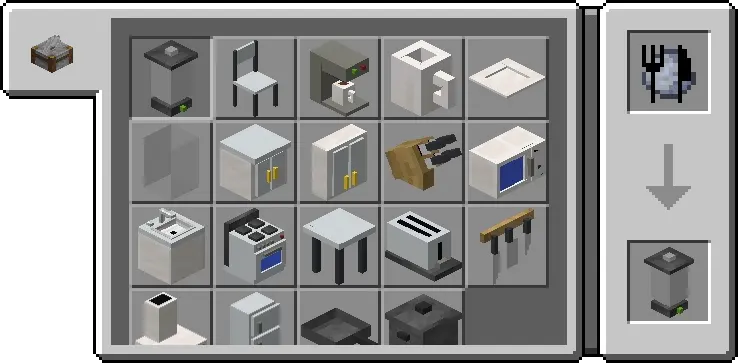

This Minecraft Bedrock add-on is built for players who enjoy working on the inside of a house just as much as the outside. Its furniture and decorations suit modern builds, giving you more options when a room needs something beyond the usual arrangement of stairs, slabs, and trapdoors. Start with the space you use most, then experiment with the available pieces until it feels like somewhere your character would actually want to spend time.
A large living area is a good place to begin. Instead of filling every corner at once, pick a focal point and arrange the room around it. Leave enough space to walk through, use different blocks to break up long walls, and see how the new decorations fit with the colors already in your build. A few carefully placed pieces can give an open room a purpose without making it feel crowded. And if the layout looks awkward, moving things around is half the fun.
The same approach works in smaller spaces. An apartment above a shop doesn’t need a giant floor plan to have personality; it just needs a few details that make it feel different from the building next door. Try giving each room its own look while keeping a consistent style throughout the house. A modern bedroom, a workspace, and a shared living area can all feel connected without being copies of one another. Nest Decor also gives you more material to work with when you’re furnishing a whole neighborhood for a creative project.
Playing with friends? Turn interior design into a building challenge. Give everyone the same empty house and see what they do with it. One player might make a clean, open home with lots of space, while another packs theirs with little details and rooms to explore. Once everyone’s finished, walk through the builds together and steal a few ideas for your own place. The add-on can also be useful for setting up modern homes and other interiors for screenshots or roleplay.
To get started, open the downloaded add-on file with Minecraft and activate its packs in your world settings. Take a look through the available furniture and decorative blocks before planning a room, since the source description doesn’t list every item or its functions. Then pick an unfinished build and give it a makeover. Whether it’s a sprawling mansion or a small house you keep coming back to after exploring, the right interior can make the whole build feel finished.
Installation:
- Download Mod;
- Open the downloaded file to install;
- Select it in the settings;
- Have fun!
Comments (2)