Hidden Bubbles – Addon / Texture Pack
- 26-05-2025, 12:53
- 1 054
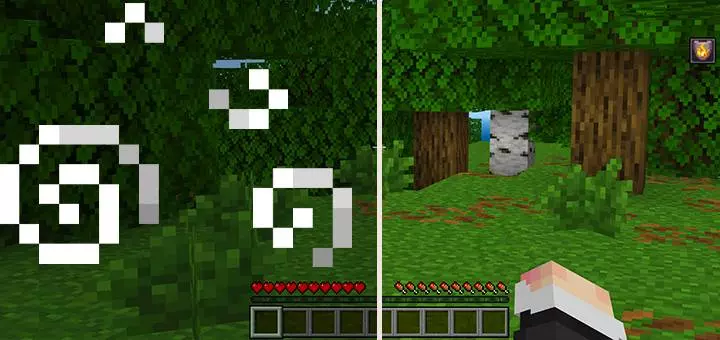
Hidden Bubbles Addon will help in the game and pvp battles so that bubbles no longer block your view when using potions. You drink a potion, rush into a fight, and suddenly a swirl of bubbles cuts across your view. Hidden Bubbles clears away that visual clutter so you can focus on what’s happening in front of you.
This Minecraft Bedrock resource pack hides the bubbles that appear when you use potions. It’s a small change, but one you can appreciate in the middle of a hectic battle. When you’re trying to follow an opponent, aim a bow, or keep track of several mobs, having fewer effects passing across your screen makes the action easier to read. Your potions are still part of your loadout; the pack simply gives you a clearer view while you use them.
PvP is where the difference can be especially welcome. Picture a close fight where both players are moving, jumping, and trying to land the next hit. You take a potion before charging in, then need to keep your opponent in sight as they strafe around you. Hidden Bubbles removes one distraction from that moment. It won’t improve your aim for you, but it lets you concentrate on the fight instead of trying to see past the potion effect.
The cleaner view can come in handy during Survival, too. Maybe you’ve brought potions along for a dangerous trip into the Nether, or you’re preparing to clear a structure full of hostile mobs. Those are situations where it helps to see the path ahead and keep an eye on anything approaching. If you like using potions while exploring, this pack lets you do so without the bubbles repeatedly drifting across your view.
There’s a trade-off worth getting used to: those particles can act as a visual reminder that an effect is active. With them hidden, you may need to pay closer attention to your active effects and their remaining time. That matters when you’re relying on a potion during a long fight or an expedition far from home. Check your status before jumping into the next encounter rather than assuming your boost will last through it.
Setting up Hidden Bubbles is straightforward. Open the downloaded resource pack with Minecraft, let the game import it, and activate it in your settings. Then try a potion in a familiar world and see whether you prefer the cleaner view. It’s a useful pick for players who like a less cluttered screen, especially during combat. Keep your potions ready, watch your timing, and let the action—not a cloud of bubbles—take up the center of your screen.
Installation:
- Download Texture;
- Open the downloaded .mcpack to install;
- Select texture in settings;
- Done.
Comments (0)