Upgradable Chests Mod / Addon
- 21-07-2025, 09:52
- 1 229

Upgradable Chests – Better Storage, Better Style
Tired of the same old oak chest in every build? Upgradable Chests gives you a massive variety of new storage options that actually fit your style. Every wood type in Minecraft gets its own chest — from Acacia to Warped — with both single and double versions. Each one matches its material perfectly, so your storage finally looks like it belongs.
But it doesn’t stop there. You also get chests made from Copper, Diamond, Iron, Gold, Obsidian, Netherite, and more. Some look flashy, some look rough, but they all work great. Use them to organize by item type, match your builds, or just flex.
No commands, no tricks — just craft and place. It’s clean, survival-friendly, and makes your world feel way more customized.

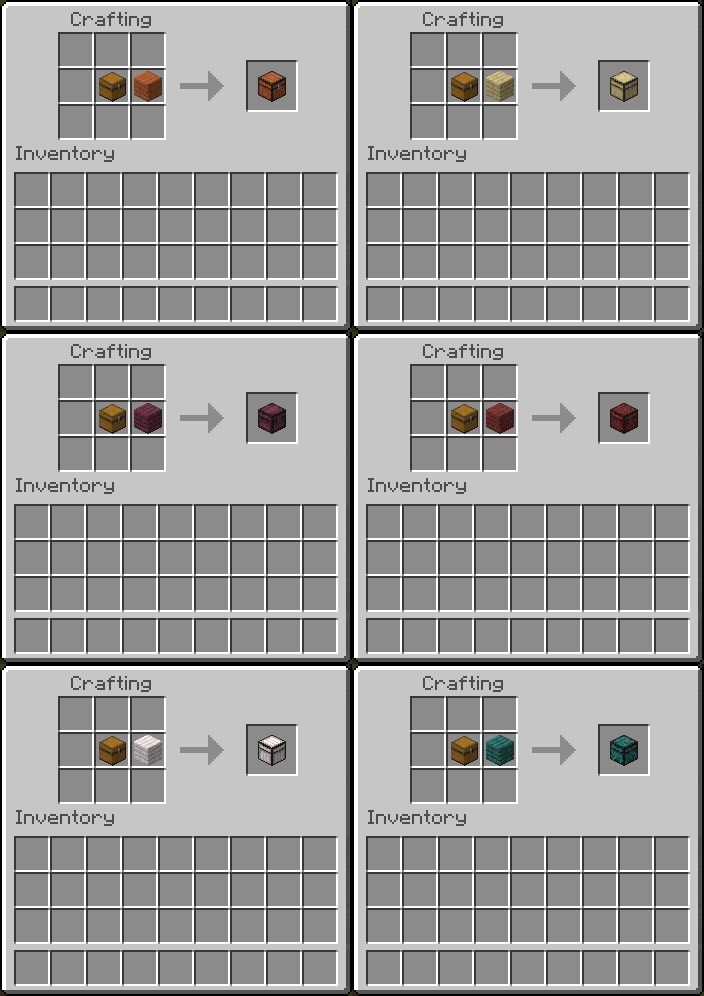


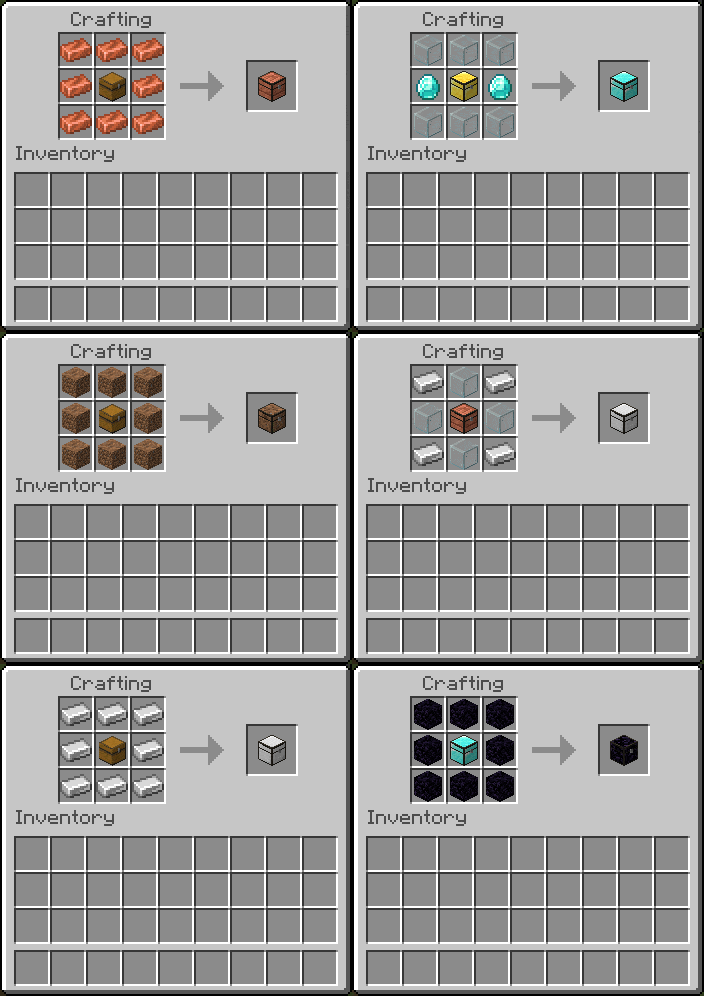
Your storage room deserves more than a wall of identical boxes. Upgradable Chests brings new wood and material designs to Minecraft Bedrock, giving every pile of loot a better-looking home.
The wooden selection is a treat for builders who care about matching their interiors. The addon includes single and double chest designs for woods such as spruce, birch, cherry, mangrove, crimson, and warped. A spruce chest can settle into a cabin among the trees, while a cherry chest gives a softer touch to a house built around a grove. Working on a Nether-themed hideout? Crimson or warped storage could feel right at home there. You can keep things consistent throughout a build or mix chest styles to make different areas stand out. That choice is useful when your base keeps growing: the workshop, kitchen, and enchanting room can each have storage that fits their surroundings. It’s a small detail, but opening a room and seeing furniture that belongs there can be surprisingly satisfying after hours spent placing blocks.
Wood isn’t the only option on the menu. The addon also features chests with materials including copper, iron, gold, diamond, obsidian, netherite, crystal, and even dirt. That range gives you plenty of room to experiment, whether you want a rugged mining outpost or a vault that looks worthy of your best finds. A copper chest might suit an industrial workshop, while obsidian could give a treasure room a darker edge. You can also use the different appearances as a simple visual organization system: choose one look for building blocks, another for ores, and another for the gear you bring on expeditions. You’ll still decide where everything goes, but having distinct designs can make a storage area more personal. The addon also includes upgraded chest recipes; check the available recipes in-game for the details of the chest you want to make.
Both single and double wooden chest designs are included, giving you options for a compact corner or a larger storage area. The addon’s build guide shows a particular placement arrangement for its double chests, so take a look at that guide if you’re planning a big row of them. Exact slot counts and upgrade costs aren’t specified in the descriptions, making it worth checking a chest in-game before reorganizing your entire collection around it. To install the addon, import both the resource pack and behavior pack, then activate them in your world settings. After that, pick a room that could use some attention and start experimenting with its storage. A workshop full of copper and iron, a cozy spruce storeroom, or a diamond-themed treasure vault can all begin with the same question: where are you going to put all that loot?
Installation:
- Download Mod;
- Open the downloaded file to install;
- Select it in the settings;
- Have fun!
Comments (0)