Compatibility with A&S Mod / Addon
- 25-07-2025, 12:48
- 1 803

A&S Mod – Real Animations That Hit Hard
So here’s the deal: A&S Mod got a boost. With this compatibility tweak, all your swords, tools, and custom weapons don’t just work—they move right. That janky swing? Gone. Blocking? Smooth now. Breaking blocks? Looks like it means something. Every action feels like it hits harder, and honestly, that’s the kind of energy you want when you're deep in a fight or grinding through a cave.
It doesn’t mess with your gear stats or add weird stuff. Just clean animations that make using A&S gear actually feel as good as it looks. If you're already rolling with A&S, this is a must. No excuses.

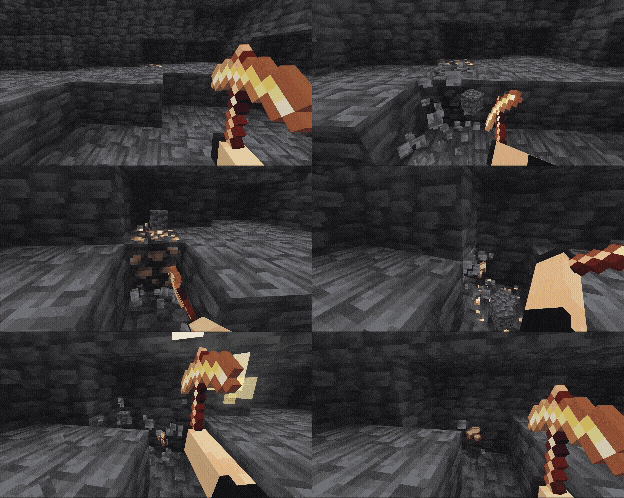
You equip a massive custom blade, swing it at a zombie, and the animation suddenly looks out of place. Compatibility with A&S helps supported weapons and tools keep the first-person style of Actions & Stuff.
The difference shows up in the moments you see most often: holding your gear, swinging at enemies, and using a tool while you explore. Actions & Stuff gives ordinary gameplay a more animated feel, but equipment added by other packs can sometimes miss out on that treatment. This compatibility add-on is designed to bring those first-person animations to supported custom items, helping them feel more at home alongside the rest of your loadout. Think about switching from a familiar pickaxe to a weapon you found in an adventure add-on. Instead of that change pulling you out of the moment, the goal is to make both items feel like they belong in the same world. It’s a visual improvement you’ll notice whether you’re clearing a cave, collecting materials for a build, or testing your latest sword against a group of hostile mobs.
The important word here is “supported.” Compatibility with A&S is made for custom gear from selected add-ons, so don’t assume every weapon you install will automatically receive a unique animation. The supported collection includes equipment associated with packs such as Beyond The Underground, Forsaken Odyssey, Survival Reworked, and Raiyon’s More Vanilla Tools. If your favorite item comes from a different pack, give it a try, but keep your expectations realistic. First-person view is where you’ll want to check the result: equip a supported tool, move around with it, and use it as you normally would. Then compare it with another item in your inventory. The appeal isn’t extra damage or a secret combat move; it’s seeing custom equipment handled in a way that fits the animation style you already enjoy. For players who spend hours mining or fighting in first person, that visual consistency can make familiar gear much nicer to use.
Setup matters when you’re combining several Minecraft Bedrock packs. You’ll need Actions & Stuff and compatible custom equipment for this add-on to have a purpose. Import the compatibility download, activate its behavior and resource components, and place them above the relevant main add-on in your pack lists. After loading into the world, test a supported item before heading off on a long adventure. If the animations don’t appear, recheck the active packs and their order rather than assuming every item is covered. This is the kind of addition that works quietly in the background: you’re still using your favorite gear to explore, build, and fight, but the way it moves can feel more consistent from one item to the next. If you’ve already built a loadout around custom weapons and enjoy the look of Actions & Stuff, it’s worth giving those tools a swing and seeing how they fit together.
Installation:
- Download Mod;
- Use Minecraft
- Open the downloaded file to install;
- Select it in the settings;
- Have fun!
Comments (0)