Wither Armor Mod / Addon
- 5-11-2025, 03:59
- 1 869

💀 Wither Armor & Scythe Addon — Dominate like a real boss
This ain't your average Netherite upgrade. The Wither Armor mod throws in a full dark set of custom armor and a nasty Wither Scythe. You’ll need netherite gear + Nether Stars to craft ‘em — yeah, it’s expensive, but this gear is straight cracked.
The armor gives way more protection than vanilla gear and makes you look like something that crawled outta the void. The scythe? Massive reach, big damage, and clean swing animations. Perfect for flexing in PvP or wrecking mobs like a legend.
All crafting is shapeless — drop the items anywhere on the grid, and boom, you’re geared up. Survival compatible too. If you’re tired of looking basic and wanna roll like the true final boss of your world, this is your set.
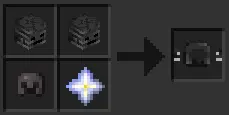
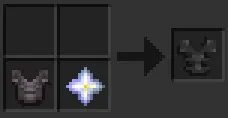
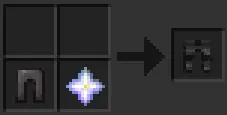
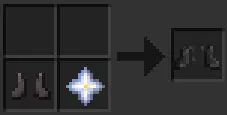
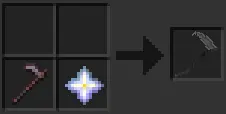
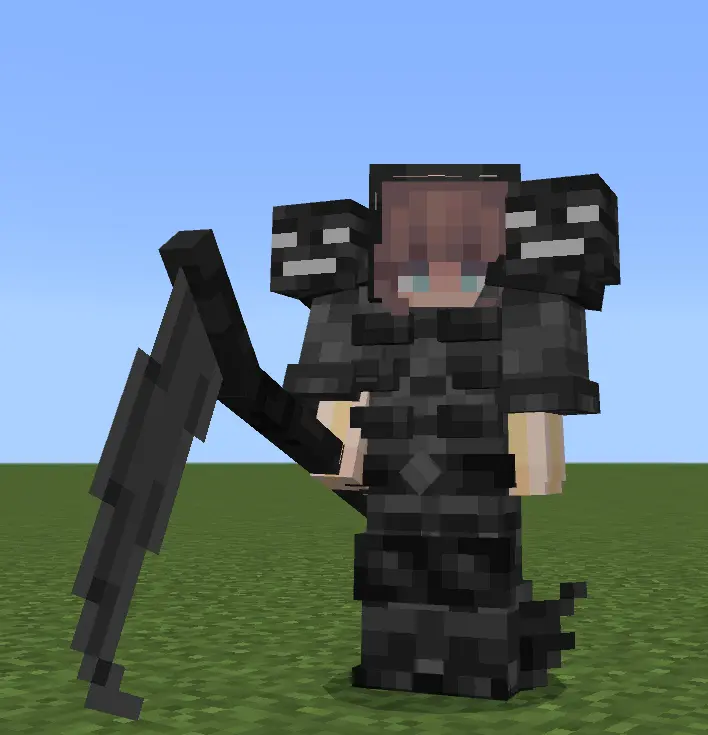
You’ve beaten the Wither, claimed its star, and survived the Nether. Now turn that hard-earned loot into armor worthy of the fight.
Wither Armor adds a dark armor set and a custom Wither Scythe to Minecraft Bedrock, giving experienced survival players another goal after collecting netherite gear. The set is designed to be stronger than standard netherite armor, with a look that fits right in alongside the Nether’s nastiest threats. Put on the complete set and you also gain a Speed effect, adding a little extra movement to your adventures. That bonus gives the full outfit appeal beyond its appearance: whether you’re crossing your base between projects or moving through a dangerous area, the extra pace is part of the package. The scythe rounds out the loadout with a weapon that looks at home in the hands of a Wither-themed warrior. If you’ve spent ages building up your equipment and want a fresh reason to head into battle, this gear gives those late-game resources a new purpose.
Getting the materials is the real challenge. The armor and scythe use netherite gear and Nether Stars in their crafting recipes, so this is a project to tackle after you’ve already made serious progress. You’ll need to prepare for the Wither and gather valuable materials before you can start assembling your new loadout. The recipes are shapeless, meaning the required ingredients don’t have to follow a particular pattern on the crafting grid. Check the in-game recipes for the exact materials and quantities for each piece before committing your supplies. Nether Stars are valuable ingredients, so think about your other plans for them, too. If you’ve been saving one for a beacon, you might want to prepare for another boss fight before choosing which project to tackle first. Either way, finishing the outfit gives you a goal for your next survival session.
Once you’re geared up, take the scythe and armor out for an adventure. A return trip to a Nether fortress, a nighttime expedition across the Overworld, or a dangerous cave run gives you a chance to see your new equipment in action. The dark outfit also makes a striking choice for a Wither-themed base or a screenshot after a hard-won boss fight. If you’re playing with friends, showing up in a full set is an easy way to show how much work went into your survival world. To get started, import the pack into Minecraft and activate it in your world settings. Enable the Beta APIs experiment as required by the addon, then check the crafting recipes and begin gathering what you need. Wither Armor is built around a satisfying goal: face a tough boss, invest its valuable loot, and come back dressed for whatever challenge you choose next.
Installation:
- Download Mod;
- Open the downloaded file to install;
- Select it in the settings;
- Have fun!
Comments (0)