Feather Essentials Mod / Addon
- 6-08-2025, 13:32
- 1 001

Feather Essentials is the lightweight, colorful server toolkit every Bedrock admin needs. This mod doesn't try to be a bloated plugin — it just gives you the core tools to run your server smooth and clean, without a headache. You get things like teleport commands, spawn setting, home points, and basic moderation stuff all packed into one neat, easy-to-use add-on.
The UI? Super clean. Commands are short and easy to remember. Want to teleport a player? Boom — done. Set a home or spawn point? Easy. Kick or ban troublemakers? All there. It’s built for survival or creative servers that just need essentials without 500 command blocks or crazy scripts.
What’s cool is the way it handles everything visually — colorful messages, simple menus, and it just feels friendly to use, even if you’re not some command block wizard. If you're hosting a realm or local server with friends and want solid tools without the bloat, this is the mod you want. Simple, smart, and actually useful.


Your friends are scattered across the map, someone needs a ride home, and chat is filling up with coordinates. Feather Essentials gives a Minecraft Bedrock server useful tools for handling those moments without putting every journey or request on the admin’s shoulders.
Homes and teleport requests can make a busy multiplayer world much easier to navigate. Players can set home locations to return to later, share homes, and request teleports to one another. That’s handy when a friend finds a village thousands of blocks away or the group wants to gather for a build night without spending half the evening running across the map. Server admins can also set up warps for places people visit often, such as a public market, a community farm, or an event arena. Imagine finishing a mining trip with full pockets, heading home to unload, and then meeting the rest of the server at a shared building site. Those little conveniences add up when everyone has different projects and limited time to play. The host can decide how these features fit the world, so a survival server can keep the amount of teleporting that feels right for its community.
For the people running the server, Feather Essentials also offers moderation tools and ways to organize the player experience. Admins can ban or mute players when needed, while ranks can appear alongside names to help distinguish roles on the server. There’s a UI builder for creating custom menus, which opens up some useful possibilities for a community hub. A menu could help players find their way around the features available to them instead of relying on a long explanation every time someone new joins. The add-on also supports events that can run commands when certain things happen in the world. That gives hosts a way to put together interactions for their own server ideas, whether they’re setting up a gathering place or experimenting with an activity for friends. Start small, see what your players actually use, and build from there.
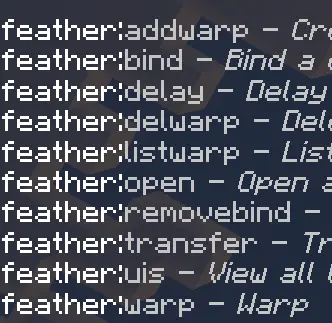
Feather Essentials can also support clans, giving groups a way to team up around a shared identity. That could suit a server with rival kingdoms, a group of builders working on one enormous city, or friends who simply want a common base to return to after exploring. There’s a random teleport feature for players who would rather head somewhere new and find their own patch of wilderness. For help finding available chat commands, type !help and check the options provided in your setup. Import the add-on and enable it in the world settings before inviting everyone in; the current project documentation also says Beta APIs are required. Once it’s running, try the basics with a few friends: set a home, send a teleport request, and make sure your shared destinations are where you expect them to be. A little setup can leave everyone with more time for the part they actually joined the server to do.
Installation:
- Download Mod;
- Use Minecraft
- Open the downloaded file to install;
- Select it in the settings;
- Have fun!
Comments (0)