GraveStones Mod / Addon
- 2-05-2026, 11:09
- 1 716

GraveStones mod — die, get a key, get your gear back without turning your world upside down. The second you go down, the addon hands you a unique key tied to that exact grave. Hold it and it tells you the coordinates and block distance to where you died, so you’ve got a clear heading instead of panic-running in circles. Once you reach the spot, interact with the grave while holding the key and it returns your entire inventory in one clean shot.
A few rules keep it fair on Bedrock servers and Realms. Only the grave’s owner can open it, even if someone else somehow gets the matching key. Keys are one-to-one with their graves, so you can’t brute-force another player’s loot. Lost your key? Craft a replacement and keep moving. If two players die at the same location, the addon places the second grave beside the first, so nobody’s stuff gets buried under someone else’s. Fell into the End void? Your grave spawns at Y=1 with helper blocks to make the recovery actually doable instead of a rage quit. And if you’re running the world, tagging yourself with admin lets you open any grave for moderation or support.
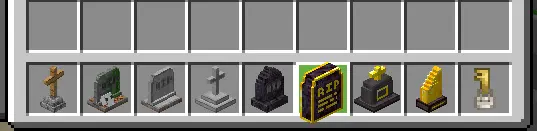


GraveStones gives you a way to recover your belongings after dying in Minecraft Bedrock. Instead of leaving your inventory scattered on the ground, the addon places a grave where you died and gives you a key to help you find it.
After respawning, hold the key to see the coordinates of your grave and the distance to it. That is especially handy when you die somewhere unfamiliar, such as a cave reached through several winding tunnels. You still need to make the journey back, but you have a direction to follow instead of trying to remember every turn. Once you reach the grave, interact with it while holding the matching key to recover your inventory. It is a straightforward way to deal with those moments when a creeper catches you off guard or a jump goes badly and sends you back to your spawn point.
Each key belongs to a particular grave. It will not open a different one, and only the owner can normally retrieve the items, even if another player has the correct key. That makes the addon useful in a shared world where several people are exploring together. If a friend reaches your grave before you do, they can help make the area safer while you travel back, but your belongings remain associated with you. And if you lose your key along the way, you can craft a replacement. You do not have to abandon a trip just because the item that points you toward your grave has gone missing.
The addon also accounts for a few awkward situations. If two players die in the same place, their graves are placed next to each other, giving each person a separate spot to return to. Falling into the void in the End is handled too: the grave appears at height one with blocks to help you reach it. You will still need to make your way back and approach carefully, but there is a place to look for your things. For world administrators, an admin tag or an admin key allows access to any grave, which can be useful when someone needs help recovering their inventory.
There are eight grave appearances, selected according to the experience level you had when you died. Some are simple stone markers, while others have more elaborate designs. It is a small visual detail, but it makes the grave more noticeable than a pile of dropped tools and blocks. When you finally find it after a difficult trip, you can pick up your things in one interaction and get back to whatever you were doing. Before heading out again, it is worth checking your surroundings: the skeleton, drop, or other danger that caused the problem may still be there.
GraveStones is a good fit if you like the challenge of survival but do not enjoy losing hours of collected equipment to one mistake. You still have a reason to be careful, and getting back to a distant cave or the End can be an adventure of its own. The key simply makes that return less frustrating, especially when you were carrying tools and materials you spent a long time gathering. **Keep Inventory must be enabled** for the grave system to work correctly.
In survival, it just feels right. I wiped on a long cave push, popped the key, and followed the numbers straight back—no guesswork, no gear despawn anxiety. On a Realm, it stops loot drama cold: teammates can guard your grave, but only you can open it. The cosmetic side is a neat touch too: there are eight grave variants that appear based on the XP level you had when you died, so the marker subtly reflects the run you lost. If you want a death system that respects your time and keeps PvE/PvP seasons sane, GraveStones mod makes recovering from mistakes fast, fair, and honestly kind of satisfying in Bedrock.
Installation:
- Download Mod;
- Open the downloaded file to install;
- Select it in the settings;
- Have fun!
Comments (0)