Flaming Netherite – Addon / Texture Pack
- 24-02-2026, 05:00
- 602
Mods 1.26 / Mods 1.21 / Mods 1.20 / Textures

Flaming Netherite Texture Pack is a style-focused retexture pack built around one clear idea: netherite should look less metallic, so this pack puts it on literal fire. That concept is simple, but it gives the whole set a much stronger identity than a normal recolor. If you like visual packs that make specific gear stand out the second you equip it, this one has a very clear theme.
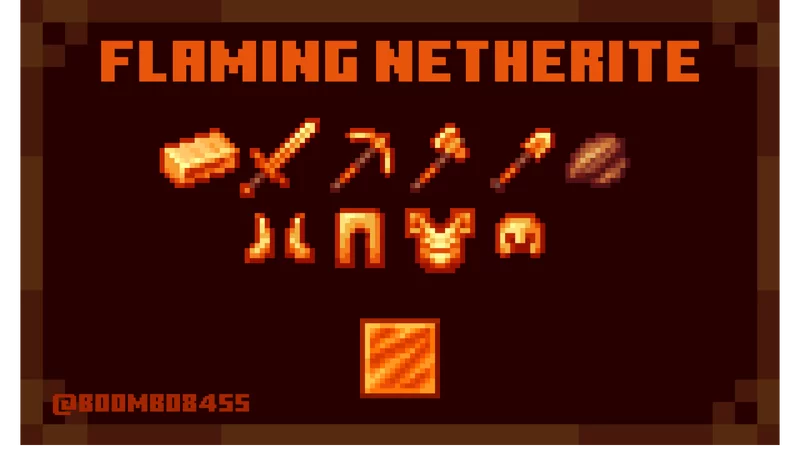
The pack retextures the full netherite gear set, including the helmet, chestplate, leggings, and boots, plus the netherite tools like the sword, axe, pickaxe, hoe, and shovel. It also retextures the netherite block, netherite scrap, netherite ingot, and ancient debris, which is a nice detail because it keeps the look consistent across the whole netherite progression path. That matters in actual play, since you do not just see the final armor and tools—you also spend time collecting ancient debris, handling scrap and ingots, and storing blocks in your base. With Flaming Netherite Texture Pack, the theme can show up through that entire loop instead of only at the end.
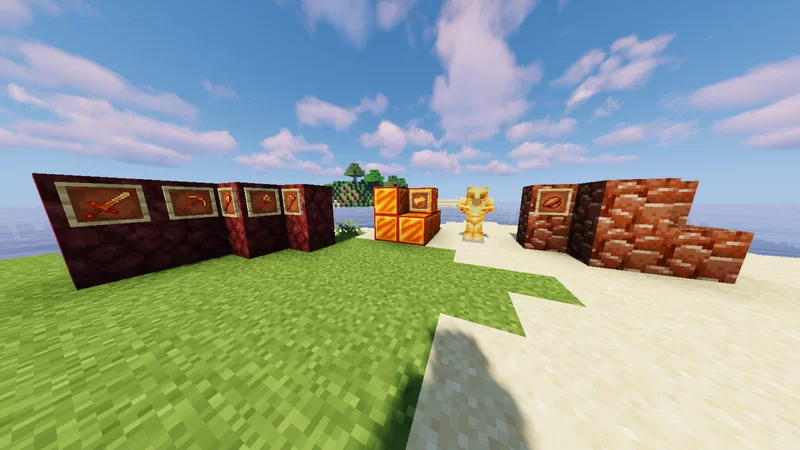

In-game, this kind of pack usually feels best when you are doing nether runs, mining sessions, or moving around with late-game gear where your equipment is always visible. A fire-themed netherite look can make regular survival tasks feel a little more intense, especially during cave mining, fortress routes, or nighttime travel when your armor and tools are on screen a lot. It is also the kind of visual change that can make your screenshots, gear displays, and storage rooms look cooler without pretending to add new mechanics. In Minecraft Bedrock, packs like this work well when you want your main set to have a stronger personality.
A practical tip with Flaming Netherite Texture Pack is to use it in a world where you already spend a lot of time with netherite gear, because that is where the retexture will actually pay off every session. If you are still early-game, you may only notice parts of it on ancient debris or stored materials at first, but once you reach full netherite, the full theme comes together. Flaming Netherite Texture Pack keeps the focus tight and honest: it retextures netherite-related items and materials with a literal flaming look, and that makes your gear feel way more dramatic during everyday play.
Installation:
- Download Texture;
- Open the downloaded .mcpack to install;
- Select texture in settings;
- Done.
Comments (0)