X RAY PRO Mod / Addon
- 27-02-2026, 11:13
- 825
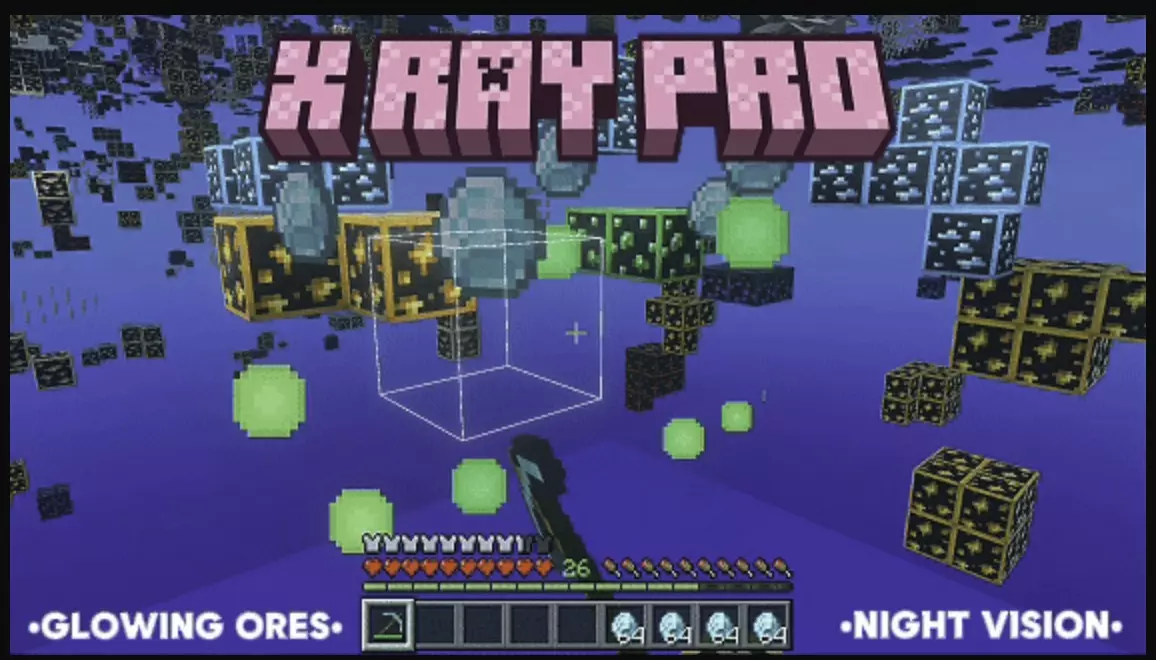
X RAY PRO Cheat is built for pure ore hunting, turning the underground into a see-through space where the important stuff pops first. The pack’s core idea is simple: make terrain invisible and leave ores standing out as bright, glowing targets, so mining becomes more about scanning and grabbing than digging blind.
Once you enable X RAY PRO Cheat, the underground changes immediately because the terrain is meant to disappear while ores remain visible. The description calls out diamonds, emeralds, ancient debris, and more, and it leans into that “can’t miss it� look by using glowing PBR-style ore textures that pop hard against the empty space. It also removes fog completely, so your view doesn’t get blocked underground or in the Nether, and it’s designed to work in both the Overworld and Nether rather than being limited to one dimension. If you’re the kind of player who strip mines at Y-level 12 or spends hours carving long tunnels, this pack is clearly targeting that loop.


X RAY PRO Cheat comes with two subpacks that change how extreme the effect feels. The “X RAY 100%� option is described as maximum visibility, where terrain like water, lava, sculk, end stone, cobblestone, and more is turned invisible for a wide-open ore view. The “X RAY DEFAULT� option keeps some terrain visible for easier navigation, and it specifically keeps gravel visible to help you avoid falls, which is a big deal when you’re moving fast and not trying to drop into something by accident. It also pairs well with Night Vision effects, since the pack is described as compatible with Night Vision for a clearer underground view.
In actual Minecraft Bedrock play, X RAY PRO Cheat will feel like flipping mining into a scan-and-route game where your biggest challenge is staying oriented while you chase visible ore lines. If you want the cleanest ore spotting, go with the stronger subpack, but if you’re doing long sessions and don’t want navigation to feel messy, the default subpack is the safer pick. The pack is also described as lightweight and optimized, so it’s meant to stay smooth while you use it.
Installation Mod:
- Download the .mcaddon / .mcpack;
- Open the file to import into the game;
- In World Settings → Resource Packs and Behavior Packs, enable it (turn on Experiments if needed);
- Have fun!
Comments (0)