What Am I Looking At? (WAILA) Addon
- 20-10-2026, 12:32
- 4 018 223
Mods 1.26 / Mods 1.21 / Mods 1.20 / Mods 1.19 / Mods 1.18

What Am I Looking At? (WAILA) Addon is very popular among players and will show information about the mob or item the player is looking at.



What Am I Looking At? (WAILA) Mod — a tiny, lifesaving overlay for Minecraft Bedrock that answers the question you ask a hundred times a session: “what is that?” The readout sits at the top of your screen and instantly calls out the block or mob you’re pointing at, shows the add-on namespace so you know which pack it belongs to, and even flashes the correct tool to use. No pausing, no tabbing, no guessing. You keep moving and the info comes to you.
Every seasoned survival grinder who plays with modded content knows the exact pain of mystery blocks. You install three or four massive behavior packs onto your realm, head out on an exploratory sprint through deep biomes, and stumble across weird ores, custom crops, or aggressive new creatures you have never seen before. In vanilla, you’re stuck guessing whether a block requires an iron pickaxe or a diamond shovel—or worse, breaking a rare machine block by hand and watching it vanish into thin air without dropping anything. This lightweight utility completely eliminates that guesswork. Point your crosshair at any surface, item drop, or roaming mob, and a clean, non-intrusive tooltip bar drops down from the top of your screen, feeding you live intel with zero hesitation.
Under the hood, the sheer depth of data packed into this sleek HUD element is a massive game-changer. The tooltip doesn’t just spit out the basic name of what you are staring at; it renders an accurate icon of the targeted object, reveals exact health bars and active status effects on surrounding mobs, and even displays the precise namespace of whichever specific addon introduced the asset. That namespace feature alone saves countless hours when troubleshooting complex pack conflicts or tracking down crafting recipes across bloated mod lists. Even better, it acts as an active gear-check by displaying the exact tool needed to harvest the block, complete with a visual indicator confirming whether the item currently sitting in your hotbar is capable of dropping the loot.

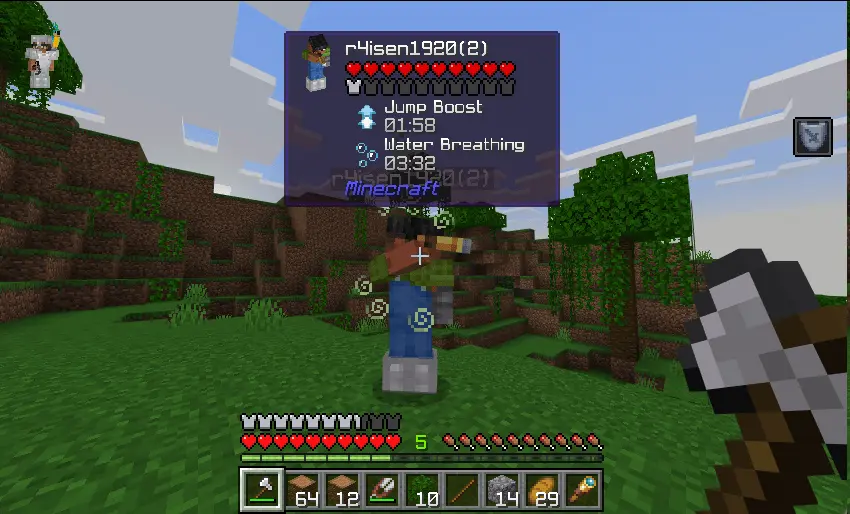
Out in survival, that speed adds up. I’ll cruise a cave, flick my crosshair over a patch, and know whether to keep the pick out, swap to a shovel, or grab an axe without wasting durability or time. Same deal when I’m cleaning up around base: one glance at the HUD and I’m using the right tool instead of brute-forcing everything with a pick. If you run modded Bedrock, the namespace tag is clutch. New crop you forgot the name of? A decorative block you swear isn’t vanilla? WAILA tells you exactly which add-on dropped it, so tracking recipes or reporting bugs doesn’t turn into a scavenger hunt.
Builders get a nice boost too. When you’re mixing palettes, having the accurate icon and proper name in the HUD makes reorder lists and storage labels painless. Redstone passes benefit because you can sanity-check what you’re pointing at—no more breaking the wrong component because it looked similar in your pack. It’s lightweight, it plays nice with other add-ons and resource packs, and it’s the kind of utility you forget about until you turn it off and immediately miss it.
If you want your Minecraft Bedrock sessions to flow—mine smarter, build cleaner, and actually know where your modded blocks come from—What Am I Looking At? (WAILA) Mod is an instant install. Point, read, act, keep rolling.
Installation:
- Download Mod;
- Open the downloaded file to install;
- Select it in the settings;
- Have fun!
Comments (4)