Elemental Swords Addon
- 8-04-2026, 08:19
- 2 822
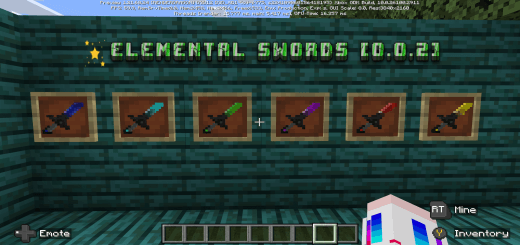
Elemental Swords Addon — a straight combat boost for Minecraft Bedrock, packing seventeen distinct swords so you can run the exact loadout your playstyle needs. Drop it into a survival world and you immediately feel the difference: better reach control, cleaner target swapping, and a reason to keep a couple blades on hotbar instead of babying one vanilla stick all night.
Out in the wild, the variety actually changes how you move. Clearing a village raid? Keep a fast striker in slot one for sprint hits, then swap to a heavier finisher when a captain rolls up with the crossbow squad. Deep-caving with friends, I’ll carry a “main” for standard mobs and a backup for surprise pushes—nothing fancy, just a blade that lets you take space and reset when two zombies and a stray skeleton spawn behind you. Nether runs feel safer too; you can stick to disciplined burst damage, clean the corridor, and keep the blaze spawns from snowballing. Head to the End and you’ve got options for crystal cleanups, chorus dives, and quick taps on strays without overcommitting.


A sword that calls down lightning can make a Minecraft fight look very different from the usual exchange of hits. Elemental Swords adds a collection of weapons with magical abilities, giving you new options for battling mobs and exploring dangerous places. The blades come in different colours and have their own effects, so finding a favourite is as much about how you like to fight as how the sword looks in your hand.
Lightning is at the heart of several weapons in the collection. Some swords call down a concentrated strike, while others send lightning around the player or unleash several bolts. The red sword has an explosive attack, and the blue blade uses a chilling form of energy. Those differences are worth paying attention to when choosing where to fight. A wide attack might be useful against a group in an open area, but you may prefer a more precise strike when there are friendly mobs or important buildings nearby.
To use a sword’s special ability, sneak and interact while holding it. On a computer, that means crouching and right-clicking. Give yourself a little space the first time you try a new blade: seeing the attack in action is the easiest way to understand where it lands and how much room you need. An open stretch of ground away from your home makes a better testing area than the middle of a village you’ve spent weeks building.
Some swords also grant useful effects while you hold them. The collection includes blades associated with abilities such as fire resistance, regeneration, invisibility and slow falling. Those effects can influence which weapon you choose to carry. Fire resistance sounds particularly appealing before a trip into the Nether, while slow falling may be worth trying around cliffs or tall structures. Check the details of the sword you’re using and get comfortable with its effects before relying on it in a dangerous place.
There are recipes for the weapons, with many of the elemental blades using netherite ingots and a material associated with the sword. That gives you something to work towards during survival rather than handing you every option at once. You might start by looking through the available recipes, choose the blade that interests you most and gather what you need for it. Once you’ve tried one, another sword can become the goal for your next mining trip or adventure.
The weapons are worth experimenting with alongside friends, too. You could bring different swords on a journey and see how their abilities work in the same fight. One player might prefer a focused lightning strike, while another enjoys an attack that covers more ground. Just agree on a safe place to practise first, especially if someone is carrying an explosive blade. A friendly test is much more fun when everyone’s house is still standing afterward.
Elemental Swords adds a magical edge to combat without taking away the need to prepare. Armor, food and a route home still matter when you head into a cave or take on a raid. The difference is that you now have more interesting choices when an enemy appears. Pick a blade, learn what it does and take it somewhere you can put its power to the test.
On servers, the addon shines in PvP and minigames. Duels feel more skillful when you can pick speed vs. weight to match the opponent, and team fights in tight lanes get way more readable when your squad isn’t all swinging the same thing. No weird gimmicks—just a bigger toolbox that makes combat flow. Use the swords how you want: stash a set by your portal, keep a travel blade in your ender chest, and rotate based on the job. If you want your Minecraft Bedrock fights to feel sharper without breaking survival, Elemental Swords Addon delivers—seventeen blades, real choices, cleaner wins.
Installation:
— Download McPack
— Install McAddon or McPack files, just open it for this;
— Select new textures in the settings;
— Done.
Comments (0)