Rainbow Robes Skin Pack
- 26-09-2025, 05:45
- 711

Rainbow Robes Skinpack — a simple, punchy wardrobe that lets you change the whole vibe of a session in Minecraft Bedrock with one click. You get a base character and nine robes in distinct colors—red, orange, yellow, green, cyan, blue, purple, gray, and black—so picking a look for the night is as easy as matching your mood or your build palette. I’ve been rotating these across a couple worlds and it just works: bright when you want to stand out, neutral when you’re playing it low-key, always readable from a few chunks away.
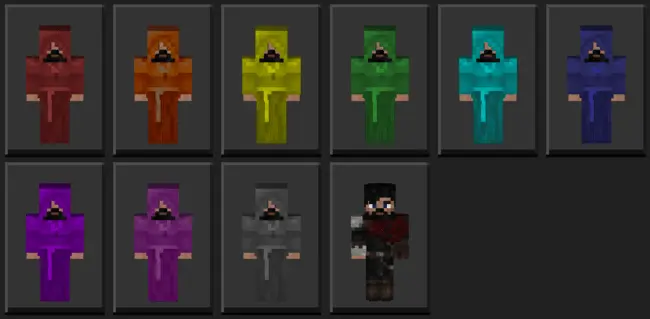
In survival, the robes make organizing your crew painless. Call roles by color and the team basically labels itself—blue handles scouting, green farms, red leads raids—no extra chatter needed. On servers, they double as instant uniforms for Bedwars/SkyWars or quick parkour races; you line up at spawn, everyone locks a different robe, and the screenshots already look coordinated before the countdown starts. For role-play, it’s effortless: run a mage college, a city guard with color divisions, or a traveling troupe that changes robes to match districts and festivals. The palette snaps into most builds, so you never clash with the scene.
There's a dude on our Realm who always asks whether we're actually going to use something before we install it. It's a fair question, even if his timing can be annoying. We'll be excited about a new addon, discussing what looks interesting, and he'll ask where it would fit into our regular survival sessions. Sometimes nobody has a good answer. We just saw something cool and wanted to try it. Other times, somebody already has a project in mind and starts explaining how they want to use it. I've gotten into the habit of keeping those conversations pretty casual. We don't need to turn every download into a committee meeting, but it helps when everyone knows what we're adding to a shared world. If we're just curious, we can open a separate save and have fun there. Nobody has to commit to anything. Our friend still asks the question every single time, though.
Swapping is fast in the Minecraft Bedrock dressing room, which makes these perfect between matches or while you’re touring a new map. One minute you’re in cyan for coastal runs, the next you’re in purple for a Nether trip, then black for a stealthy cave dive. Nothing fancy to learn, no gimmicks to juggle—just a tight set of robes that give you clear identity and a little style everywhere you go. If you want a pack that fits any world and keeps your look fresh without overthinking it, Rainbow Robes Skinpack is an easy win for Minecraft Bedrock.
How to Install Skins in Minecraft Bedrock
- Download a .png skin (64×64 or 128×128).
- Open Minecraft Bedrock.
- Go to Profile (hanger icon) → Edit Character.
- Tap Owned → Import → Choose New Skin.
- Select your .png file.
- Pick a model: Classic (Steve) or Slim (Alex).
- Confirm to equip and play.
Comments (0)