Ultimate Skin Vault
- 1-10-2025, 07:47
- 936
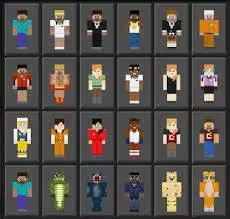
Ultimate Skin Vault — 405 skins in one place so you never load into Minecraft Bedrock looking the same twice. It’s a closet, a costume trunk, and a flex wall rolled into one pack, built for swapping personas as fast as your plans change. One night you’re a steel-helmed knight holding the gate; next morning you’re a muddy-boot farmer tending the valley; by evening you’re a neon cyborg sprinting rooftops like the server’s your parkour course. And when the mood is chaos, grab a goofy fit and photobomb your friends’ screenshots like you own the lobby.
On SMPs this thing is a cheat code for identity. Call a role before raid time and match the skin: builder for the town expansion, hero for boss hunts, zombie for the Halloween dungeon, clean civilian for marketplace days. In PvP, readable silhouettes help your team sort who’s who mid-brawl, and for content creators the variety pays off instantly—fresh thumbnails, consistent roleplay casts, and themed events where everyone shows up looking the part. It’s all cosmetic, so achievements, timing, and hitboxes stay vanilla while your style does the heavy lifting.
The hardest part of joining tonight’s Minecraft session might be choosing what to wear. Ultimate Skin Vault packs 405 skins into one collection, with everything from knights and farmers to zombies and cyborgs waiting in the dressing room.
That’s enough variety to give each world its own character. Building a castle with a courtyard, watchtowers, and a suspiciously deep dungeon? Pick a knight and look the part while you work on the gates. Starting a quieter survival world in a valley? A farmer or builder fits right in among the crop rows and half-finished barns. The collection also includes heroes, futuristic looks, and sillier designs for the days when you’d rather make your friends laugh than look intimidating. Many of the skins come from Minecraft’s older console collections, so longtime players may recognize some familiar faces while browsing. If you’ve never played with those classic packs, you can simply enjoy having a big selection ready whenever you want a change. Take your time in the character preview: 405 skins is a lot to scroll through, and the one you pick first might have some competition a few pages later.
The collection becomes even more useful when your group enjoys roleplay. A shared village needs more than adventurers charging into caves: someone might run the market, maintain the farms, or stand guard at the entrance while everyone else argues about where to build the next house. Pick skins that fit those roles, then let the stories develop as you play. For a Halloween event, have everyone choose a spooky character before exploring a dark forest or a player-made haunted house. On another night, you could switch to futuristic designs and show up for a tour of a modern city. The pack gives you enough choices to change the cast without changing the world itself. It’s also handy for group screenshots: ask everyone to choose an outfit for the occasion, gather outside the finished build, and try to get the picture before somebody jumps in front of the camera.
In singleplayer, a skin can be a small way to mark a new chapter in a long-running save. Use one look while establishing your first base, then choose another when you move into a castle or begin exploring the Nether. You can also keep a favorite as your regular character and save the rest for seasonal builds or minigames. These skins change your appearance, so you’ll still need to craft armor, gather supplies, and survive the usual trouble Minecraft throws your way. Once the pack is imported, open the character selection screen and browse the collection. Try a few different looks in your world before settling on one; a skin that catches your eye in the preview might look even better standing in front of your latest build. Ultimate Skin Vault is a handy wardrobe for players who like variety, classic designs, and the freedom to show up as someone different whenever the mood strikes.
The best part is the freedom. Rotate a new look every session for more than a year and still have options left, or anchor a signature skin and swap seasonal alts when your world evolves. No unlock grind, no coin gate—just pick, equip, and play. If your Minecraft Bedrock routine needs a shot of personality, Ultimate Skin Vault hands you 405 ways to walk into the same world and make it feel brand new.
How to Install Skins in Minecraft Bedrock
- Download a .png skin (64×64 or 128×128).
- Open Minecraft Bedrock.
- Go to Profile (hanger icon) → Edit Character.
- Tap Owned → Import → Choose New Skin.
- Select your .png file.
- Pick a model: Classic (Steve) or Slim (Alex).
- Confirm to equip and play.
Comments (0)