True Adventures SkinPack
- 1-10-2025, 16:10
- 613
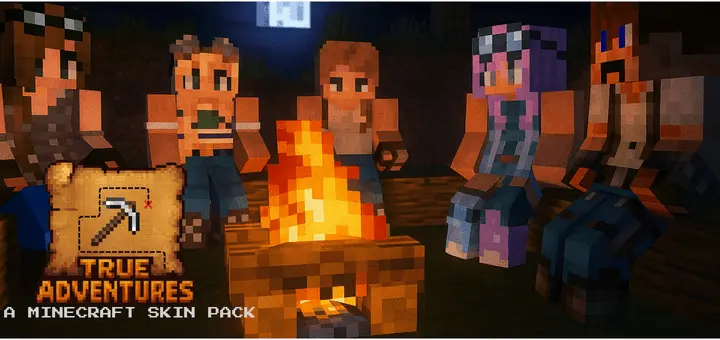
True Adventures — a skin pack built for players who actually leave spawn and don’t come back for days. I loaded it up on Minecraft Bedrock, picked a rugged trail look, and the vibe shifted fast: same survival loop, but my character finally matched the way I play—moving light, scouting biomes, and pushing farther than is smart at night.
Each of the 15 skins leans into a different kind of run, so you can dress for the plan without breaking the vanilla feel. Rolling a fresh seed? Grab a practical, travel-ready outfit and chart rivers, pin villages, and tag caves. Setting up a mountain base? Swap to a cold-weather style and start cutting goat paths and rope-bridge lines. Diving shipwrecks and warm oceans? Pick a fit that reads right on docks and coral routes. The silhouettes stay clean in rain, fog, and torchlight, which helps on raid nights and when you’re threading the Deep Dark without tripping sensors.
Multiplayer is where it really clicks. Call roles by look and your squad reads at a glance—pathfinder on point, base hand running supplies, cave scout marking veins, sailor ferrying loot between outposts. Screenshots land better too: progress pics feel like story beats instead of random snaps, and thumbnails pop even on default lighting. No behavior changes here—achievements stay on, hitboxes are stock, and PvP timing feels normal. Just equip from the Bedrock skin selector, spawn in, and let the wardrobe keep pace with the adventure. If you live for long hauls, biome loops, and survival that actually covers ground, True Adventures gives you fifteen ways to look the part while you do the work.


Your inventory is packed, the map ends at the next river, and home is already a long way behind you. True Adventures gives you 15 Minecraft Bedrock skins for the kind of trip where you’re never quite sure what’s over the next hill.
The collection is built around adventurer-style characters, with different looks to choose from before you head out. Pick one for a fresh survival world, switch things up for an adventure map, or find a skin you’re happy to keep for an entire season. There’s enough variety for a group of friends to choose different characters while still looking like they’re setting off on the same expedition.
A new skin can be a fun way to start a new world. Maybe this character is the one who finally maps the coastline instead of settling near spawn, or the one who sees a mountain range and immediately decides to build a base on top. Pack a bed, gather some food, and start walking. Once you find a place worth keeping, the screenshots of that first campsite can become the beginning of your world’s story.
True Adventures also fits a multiplayer survival server where everyone has their own favorite thing to do. One friend can scout for villages, another can disappear into a cave for half an hour, and someone has to stay behind and make sure there’s food when everybody gets back. Choose your skins before the trip and take a group picture at spawn. A few weeks later, take another one outside the base you’ve built together and see how much the world has changed.
If you like creating stories, the pack gives you a starting point without telling you who your character has to be. Set up a camp beside an old ruin, build a ship for an ocean journey, or turn a mountain cabin into a stop for travelers. The skins don’t add special abilities or equipment, so the supplies and the plans are up to you. Your character might look ready for a long journey, but you’ll still want to check the durability on that pickaxe before heading underground.
To use the collection, open the downloaded pack file with Minecraft Bedrock and let the game import it. Then head to the Dressing Room, find True Adventures, and choose the character you want to play. The listed release supports several 1.21 versions, including 1.21.93; check compatibility if you’re using a different version. Once you’ve picked a look, grab a map and choose a direction. You can always come back to build a bigger house later.
How to Install Skins in Minecraft Bedrock
- Download a .png skin (64×64 or 128×128).
- Open Minecraft Bedrock.
- Go to Profile (hanger icon) → Edit Character.
- Tap Owned → Import → Choose New Skin.
- Select your .png file.
- Pick a model: Classic (Steve) or Slim (Alex).
- Confirm to equip and play.
Comments (0)