Mooshroom Collection Skin Pack
- 3-10-2025, 11:36
- 1 360
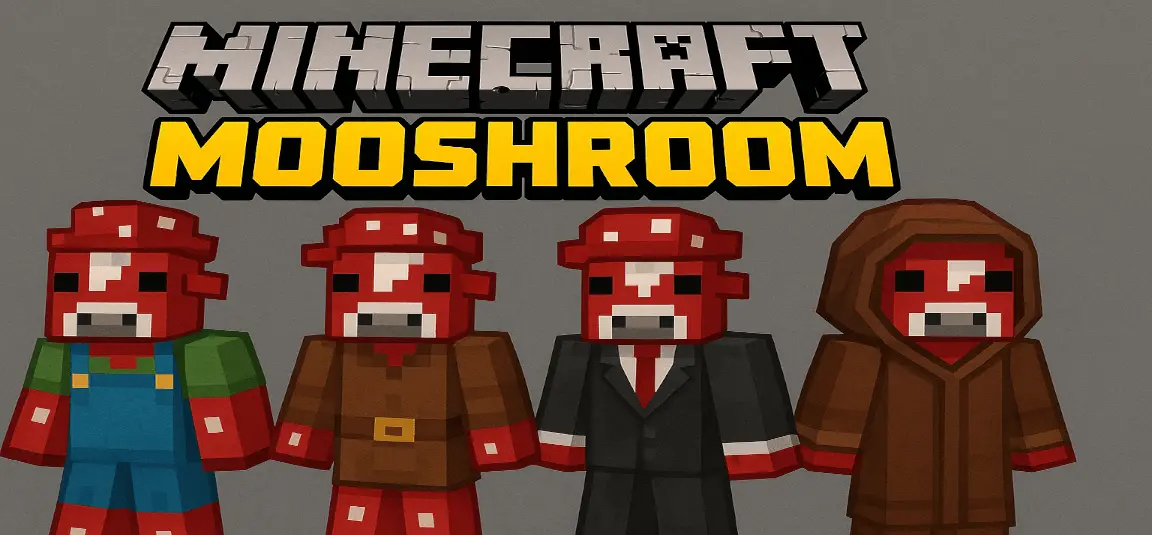
Mooshroom Collection — a warm, nature-leaning skin pack for Minecraft Bedrock that channels the feel of overgrown pastures and quiet mushroom groves. The palette does the heavy lifting here: soft purples like dusk over a flower field, calm greens pulled from fresh grass, and those signature red accents that instantly read “mooshroom� without shouting. It’s the kind of look you throw on for peaceful runs—tending crops at sunrise, walking the tree line for berries, or idling at the campfire while the sky goes blue to black.
In survival, the skins feel right at home around barns and spruce builds. The gentle shading keeps shapes readable, so teammates can spot you along fences or wheat rows without mixing you up with mobs. If you bounce between biomes, the purples sit nicely in dark oak shadows while the red touches pop just enough in meadows and village squares. For co-op nights, the pack leans friendly and approachable—you look like you belong on a trail with a lead in one hand and bread in the other.

Our Saturday Minecraft sessions have one unofficial rule: nobody gets to complain about someone else's terrible ideas until we've actually tried them. That rule exists because one of my friends comes up with the weirdest suggestions imaginable. We'll be exploring some Bedrock content, and he'll suddenly want to move the entire experiment into a cave or build something completely unnecessary around it. Most of the time, we tell him he's lost his mind. Then we try his idea anyway. Occasionally, it turns out better than anything the rest of us suggested. Other times, we end up staring at a ridiculous creation and wondering why we wasted forty minutes on it. Either way, those sessions are usually hilarious. Playing with people who approach Minecraft differently keeps things from getting stale. You never know when somebody's awful suggestion will become the coolest part of the evening. We still haven't forgiven him for the underwater chicken enclosure, though.
For PvP and mini-games, you’re still good: silhouettes stay vanilla, there’s no hitbox change, and achievements remain unaffected since this is purely cosmetic on Minecraft Bedrock. The colors don’t smear into noisy patterns, so motion reads clean when you sprint across scaffolds or climb a ladder during a raid. It’s a chill, consistent aesthetic that doesn’t fight your builds or your UI.
If your world leans wholesome—animal pens, mushroom roofs, cozy lantern paths—the Mooshroom Collection gives you a matching fit from spawn to endgame. It’s a simple upgrade to how you look in Minecraft Bedrock: soft, friendly, and instantly recognizable, with that mooshroom charm carrying you from sunrise chores to sunset strolls.
How to Install Skins in Minecraft Bedrock
- Download a .png skin (64×64 or 128×128).
- Open Minecraft Bedrock.
- Go to Profile (hanger icon) → Edit Character.
- Tap Owned → Import → Choose New Skin.
- Select your .png file.
- Pick a model: Classic (Steve) or Slim (Alex).
- Confirm to equip and play.
Comments (0)