Ninpu Sentai Hurricaneger Skin Pack
- 12-02-2026, 16:30
- 899
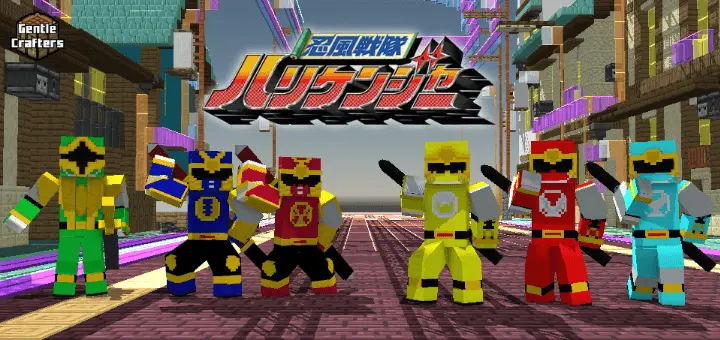
Ninpu Sentai Hurricaneger Skin Pack comes with a full-on anime/sentai-style backstory you can actually roleplay in your Minecraft Bedrock world. It starts at the Hayate’s Way Ninja Academy, where three students don’t really fit in, but their teacher, Sensei Mugensai, sees something in them and trains them every morning. That “underdog students� setup is already a fun vibe for survival, because it feels like you’re starting weak but getting sharper with every session.
Then the story flips hard: while everyone else is at the graduation ceremony, the evil space ninjas called the Jakanja attack the school and kill most of the students. Sensei Mugensai escapes using a special technique to turn himself into a hamster, which is honestly the most Minecraft-coded twist ever. The three survivors get taken to a hidden base and become the legendary Hurricanegers, setting up the whole “secret team fighting a bigger threat� theme.


The rivalry angle is baked in too. Two ninja brothers from the Ikazuchi Way Ninja Academy show up as the Gouraigers, chasing the same mysterious evil power the Jakanja are after. That’s perfect for co-op play because it gives you instant roles: three players as Hurricanegers, two as Gouraigers, and you’ve got built-in tension before the team-up. Later, the Gouraigers abandon the dark mission and join forces with the Hurricanegers, which is a clean story beat for when your group decides to stop messing around and actually grind a big project together.
As things get worse, Shurikenger descends from the sky as a mysterious ninja warrior with unmatched skills and a wild personality, becoming a strong ally that boosts the squad. In gameplay terms, that’s an easy “late-join hero� role for a friend who hops on later, or a way to spice up your world when your base is established and you want a new character vibe. Ninpu Sentai Hurricaneger Skin Pack is best when you lean into the squad story—start as misfits, survive the attack, build a hidden base, deal with rivals, then roll out as one ninja team against the Jakanja.
How to Install Skins in Minecraft Bedrock
- Download a .png skin (64×64 or 128×128).
- Open Minecraft Bedrock.
- Go to Profile (hanger icon) → Edit Character.
- Tap Owned → Import → Choose New Skin.
- Select your .png file.
- Pick a model: Classic (Steve) or Slim (Alex).
- Confirm to equip and play.
Comments (0)