Teenager Skin
- 9-07-2026, 14:22
- 301
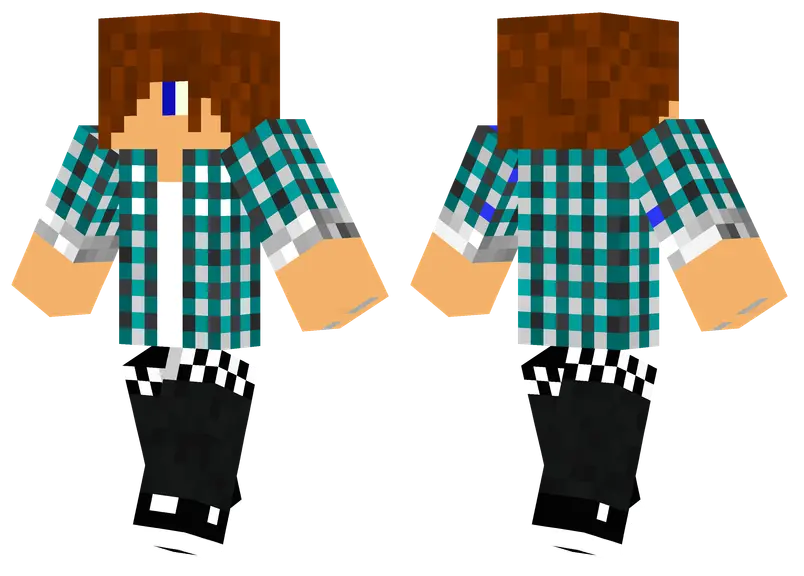
Rocking long hair and a signature blue outerwear piece, the Teenager Skin delivers a laid-back, indie vibe that instantly elevates your multiplayer presence. It is a fantastic choice if you want an avatar that actually looks like a modern, everyday player.
Finding an avatar with a decent long-haired style can be a serious pain in the current marketplace. The vast majority of creators stick to the exact same recycled, short-cropped haircuts, which gets incredibly boring after a while. This MCPE custom skin breaks that mold by giving your character a messy, relaxed hairstyle that pairs perfectly with a vibrant blue jacket. It’s got an effortless aesthetic. Whether you are chilling in a busy hub server or grinding out a fresh survival SMP with your friends, this design feels completely natural.
Yesterday, my squad booted up a brand-new high school roleplay map on Pocket Edition, and half the guys showed up looking like medieval knights or cursed memes. It totally ruined the vibe until we forced everyone to swap over to proper streetwear avatars. Once we loaded in with hoodies, ripped jeans, and fresh sneakers, the whole session felt way more immersive. You actually feel like part of a modern crew when you are cruising down custom asphalt roads in a minecart or hanging out at a block-built skatepark.
What makes these custom teen skins hit different compared to the free preset garbage in the character creator is the outer-layer pixel work. Whoever textured these outfits understood how to use the 3D hat and jacket layers to create real depth. You get hoodies with drawstrings that slightly pop off the chest, headphones resting around the neck, and sneakers with actual color-blocking instead of flat, blurry squares. The shading on the hair—especially the लोकप�रिय e-boy swoops and aesthetic pastel styles—looks super sharp even when you are playing on a tiny phone screen with low brightness.
Since the creator stuck to standard character dimensions, you won't run into frustrating visual bugs when it is time to suit up. Your diamond and netherite gear will fit perfectly without clipping through the jacket's geometry. The shading on the clothing is also remarkably clean, ensuring the colors stay sharp on whatever device you play on. If you're burned out on overcomplicated, flashy outfits and just need a solid, stylish Minecraft Bedrock skin for daily use, this one hits the mark. Grab this teenage player model and give your blocky persona a much-needed wardrobe update.
How to Install Skins in Minecraft Bedrock
- Download a .png skin (64×64 or 128×128).
- Open Minecraft Bedrock.
- Go to Profile (hanger icon) → Edit Character.
- Tap Owned → Import → Choose New Skin.
- Select your .png file.
- Pick a model: Classic (Steve) or Slim (Alex).
- Confirm to equip and play.
Comments (0)