MagicPuffin Skinpack
- 13-05-2025, 13:37
- 675
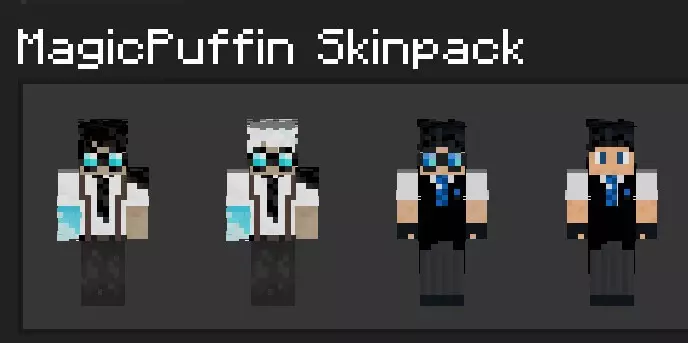
MagicPuffin Skinpack addon magical skins in a special style. Look at the photo how the skins in this pack look. A snow-covered mountain, a frozen lake, and a character who looks like they belong there—MagicPuffin Skinpack has the winter aesthetic covered. These four Minecraft Bedrock skins bring a cool, magic-inspired style to your next adventure.
The collection takes its inspiration from cryomancy, the fantasy idea of wielding ice magic. You don’t need a spellbook or a complicated backstory to enjoy the look, though. Pick a skin, head into your world, and let the outfit set the mood. It’s an especially good fit if you’ve been searching for a character that feels at home in snowy villages, icy castles, or a survival base tucked into the mountains.
There are four designs to choose from, with a few differences that are easy to appreciate when you try them in the dressing room. Two have different hairstyles, one white and one black, while the other two come from the original set of MagicPuffin designs. One of those gives you a look without glasses. Try each one from the front and back, then pick the details you like most. You can keep a favorite for everyday play or switch things up when you want a slightly different look.
The icy theme opens up some fun possibilities for roleplay. Maybe your character is an explorer crossing a frozen wilderness in search of a place to build. Maybe they’re the quiet owner of a mountain library, surrounded by enchanted books and maps. You could even team up with friends and give each player a place in a winter settlement, from the builder working on its walls to the traveler heading out for supplies. The skins give you a starting point; the rest of the story is yours to make.
Of course, you don’t have to stay in a snowy biome. The cool-toned style can stand out just as well in a desert village, a busy multiplayer lobby, or a lush forest. Wear one while you work on your latest build, join a minigame with friends, or take screenshots of an adventure map. If your group likes coordinated outfits, you can each choose a different design from the pack and keep a shared theme without everyone looking exactly alike.
To install the pack, open the downloaded file with Minecraft and let the game import it. Then visit the dressing room, find the skin pack, and select the look you want to wear. These are cosmetic skins: they change your character’s appearance but don’t grant ice powers or alter gameplay. Whether you’re planning a winter-themed world or just want a fresh look for your usual server, MagicPuffin gives you four chilly options to try.
Comments (0)