Double Slab Refresh – Texture Pack
- 27-02-2026, 11:07
- 690
Double Slab Refresh – Texture Pack is a builder-focused resource pack made for one of the most annoying little texture problems in Minecraft Bedrock: double slabs that don’t feel visually “finished� when you stack them. The whole point here is that the pack adds separate textures to double slabs, which opens up a lot of clean building options, especially if you like making detailed walls, layered foundations, or smooth transitions where slabs are doing most of the work. When double slabs get their own look, stacked slabs stop feeling like a cheap trick and start feeling like a real block choice you can design around.
The description also calls out two practical uses: beautiful buildings and beautiful gradients. That’s exactly where a double slab refresh pack pays off. If you’re doing gradients, you’re usually trying to create soft color and material transitions across a wall or roof, and repeating slab faces can make that look noisy or inconsistent. With Double Slab Refresh – Texture Pack, double slabs can read more like their own block state, which makes those gradients look cleaner when you step back and view your build from a distance. It also helps in tighter builds where you’re using slabs for micro-detailing and you don’t want stacked slabs to look identical to single slabs.


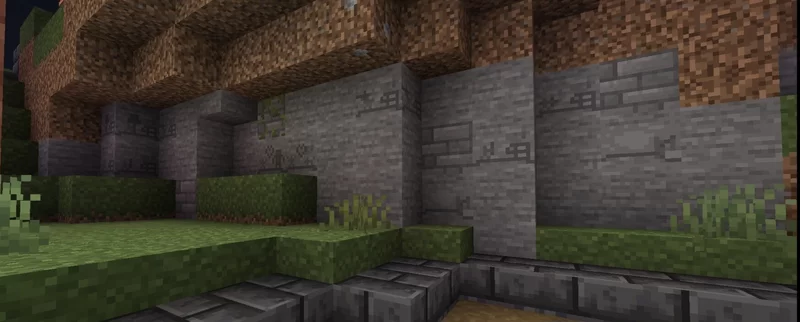
This pack is also very specific about what it does and doesn’t touch. Double Slab Refresh – Texture Pack does not contain any copper or wooden plates, so the focus is not on every slab type in the game. The description highlights that stone and prismarine slabs have variations, which gives you two very useful material families to work with. Stone slabs are everywhere in survival builds because they fit almost any style, from medieval castles to modern basements. Prismarine slabs are huge for ocean builds, temples, aquariums, and any coastal project where you want that clean blue-green palette. Having variations for those two sets can change the feel of a lot of common build themes without forcing you into some weird texture overhaul. I have a bad habit of collecting materials for buildings I haven't actually designed yet. Last month I gathered several chests of stone because I was absolutely convinced I wanted to build a giant fortress. Then I discovered a little valley surrounded by cherry trees and decided a fortress would look ridiculous there. So now I've got enough stone for a small mountain and absolutely no idea what to do with it. Situations like that have made me much more willing to change my plans while playing. Sometimes a location gives you a better idea than anything you imagined beforehand. Sometimes you find something interesting and realize your original project wasn't nearly as exciting. I used to feel obligated to finish everything I started, but that's an excellent way to turn Minecraft into homework. The fortress materials are still sitting in storage. Maybe I'll build a castle someday. Right now, the valley needs a bakery.
A practical way to use Double Slab Refresh – Texture Pack is to try it on a test wall first. Stack stone slabs and prismarine slabs into a few patterns, then step back and see how the separate double-slab textures change the shape readability and gradient smoothness. If you’re a Minecraft Bedrock builder who cares about clean layering and nicer transitions, Double Slab Refresh – Texture Pack is a focused upgrade that makes stacked slabs feel intentional, especially for stone and prismarine-based builds.
Installation:
- Download Texture;
- Open the downloaded .mcpack to install;
- Select texture in settings;
- Done.
Comments (0)