Gojo Satoru Visual Theme – Shaders
- 15-04-2026, 15:22
- 495
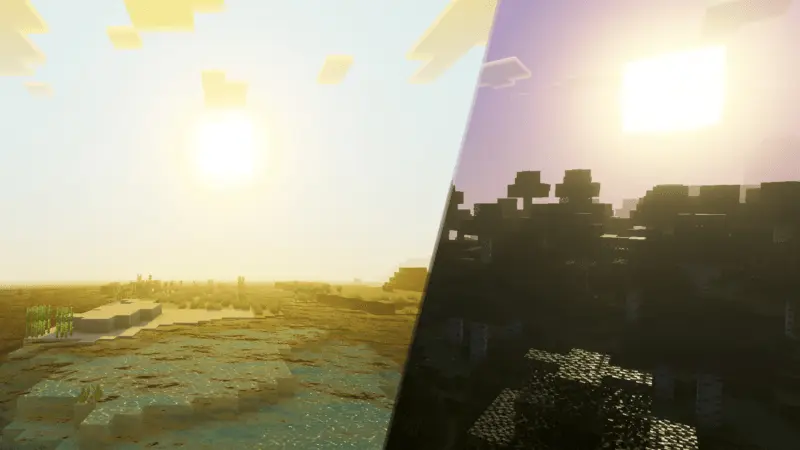
Gojo Satoru Visual Theme - new Gojo Satoru anime style shaders for Minecraft. The theme focuses on the way the world looks as you play, so try it somewhere familiar first. Load your favorite survival world, step outside your base, and look across the landscape. The stronger visual style can give a familiar view a different feel without requiring you to start a new adventure. If you’ve already built a place inspired by the series, this is a good excuse to revisit it and see how it looks with the pack active.
Light is a big part of the appeal. The theme makes the scene feel brighter and more vivid, adding to the sense that your Minecraft world has picked up some of Gojo’s larger-than-life presence. Take it somewhere with room to see the surroundings: a mountain overlooking your village, an open field, or the roof of a city build you’ve been working on. Move around and see how the look suits different locations rather than judging it from a single screenshot. A dramatic setting can make even a simple walk back from the mines feel like the opening shot of an anime episode. You might still be carrying a stack of cobblestone, but at least the trip home has some flair.
The pack also adjusts the appearance of water, giving you another reason to visit a river or coastline. If you’ve built a bridge near your base, stop there for a moment and look around instead of sprinting straight across it. Players who enjoy taking screenshots can experiment with familiar landmarks, character skins, and different viewpoints. A Gojo-inspired skin would be an obvious choice, but you could also gather friends for a Jujutsu Kaisen-themed photo session or build an arena for your own battles. Those are ideas for your world rather than features you need to unlock: the theme is there to change the atmosphere while you decide what to do with it.
Gojo Satoru Visual Theme is a visual pack, so don’t expect it to hand you Limitless abilities or summon Gojo as a character. You can use the new look while mining, building, exploring, or playing with friends just as you normally would. To install it, open the downloaded pack with Minecraft and activate it under Resource Packs in your settings. Then load a world and give yourself a little time to see how it looks during your usual activities. If the visuals affect performance on your device, adjust your video settings and find a balance that feels comfortable. After that, pick a favorite spot, strike a pose, and give that blocky world some sorcerer-level confidence.
Installation:
- Download Shader;
- Open the downloaded .mcpack to install;
- Select texture in settings;
- Done.
Comments (0)