Outlined Ores – Texture Pack
- 31-05-2025, 10:38
- 1 345
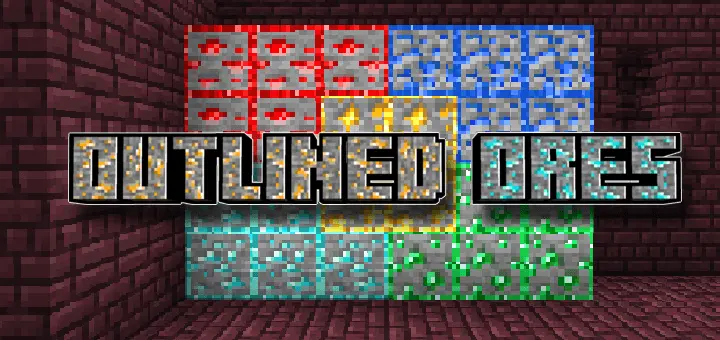
Outlined Ores – Texture Pack will specifically highlight ores a little, this will be useful in dark mines to make it easier to see where ores are found. You’ve cleared a cave, packed up your torches, and started heading home when your friend spots a diamond ore block right where you’d been standing. Outlined Ores makes those easy-to-miss blocks stand out, so you can spend less time squinting at cave walls and more time filling your inventory.
The idea is simple: ore blocks get an outline that separates them from the stone around them. You still have to explore, dig, and bring the right pickaxe; the texture pack just makes exposed ores easier to notice. That’s useful when you’re moving through a huge cave and trying to keep track of everything at once. Between watching for skeletons, checking the ceiling for creepers, and finding a safe way down, it’s easy to walk straight past a patch of iron. An outline gives your eyes something more obvious to catch while you’re looking around.


Deepslate caves are where I’d want this most. The walls are dark, the tunnels twist around each other, and after a while every ledge starts looking familiar. You might be focused on the diamonds at the far end of a cavern while missing redstone or lapis closer to your feet. With outlined ore textures, a quick look around is more useful, especially when you’re checking the sides of a ravine or the wall behind a waterfall. You’ll still want torches for navigation and mob control, though. Being able to spot an ore block doesn’t make the zombie walking up behind you any friendlier.
Outlined Ores also fits the kind of mining trip where you don’t have one specific resource in mind. Maybe you went underground for iron but found coal for your furnaces and copper for a build along the way. Seeing those blocks more clearly makes it easier to decide what’s worth stopping for before you move on. The same goes for playing with friends: when someone calls out that they found a vein, it’s a little easier to pick it out from the rest of the wall. You can still miss things if you rush, so take a second to look above and below you before leaving an area. The best find in a cave sometimes ends up being the one you almost walked past.
This Minecraft Bedrock texture pack is a practical choice if you like the familiar mining routine but want ores to be easier to recognize. It doesn’t point you toward blocks buried behind solid stone, and it won’t make a vein bigger or change what your pickaxe can mine. You’ll still have to deal with lava, bring enough food, and figure out how to get your loot home. What it can do is make the resources already in front of you easier to pick out from the surrounding blocks. Load up your world, grab a few spare pickaxes, and take another look at that cave you thought you’d already cleaned out.
Installation:
- Download Texture;
- Open the downloaded .mcpack to install;
- Select texture in settings;
- Done.
Comments (0)