Camp Big Falcon Map
- 19-02-2026, 08:26
- 422
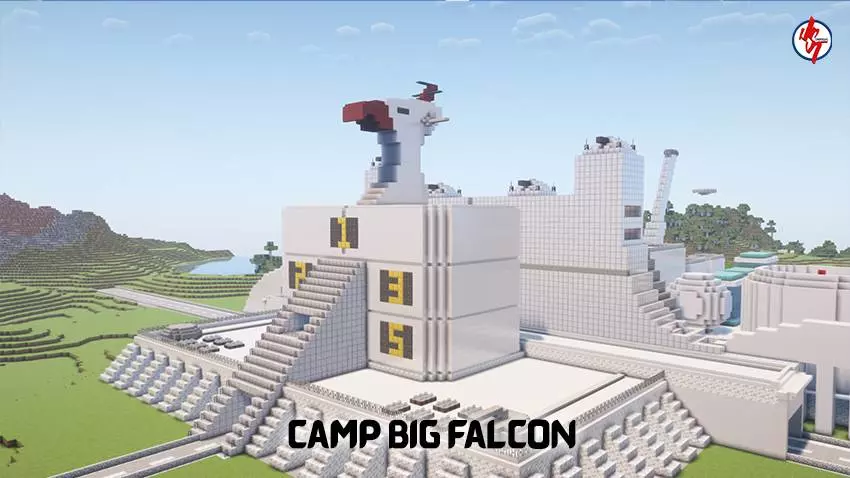
Camp Big Falcon Map is built around one main flex: you’re getting the life-size scale of Camp Big Falcon, so the map is all about exploring the space and feeling how big it is when you’re actually moving through it. It’s the kind of world you load when you want to roam, look around, and take in the layout like you’re visiting a real place instead of just running a challenge or grinding survival.
Because it’s life-size scale, the best way to play it is slow and curious. Don’t just sprint past everything—walk it like you’re touring a set. If you’re on Minecraft Bedrock, this is perfect for chill sessions where you’re not trying to “beat” anything, you’re just hanging out, checking angles, and finding the spots that feel the most like a real camp area. It’s also a solid pick if you like showing maps to friends, because big builds are always better when somebody’s there like “yo, look at this.”


The extra highlight here is the Voltes V content. In Camp Big Falcon Map, you’ll see the amazing Voltes V machine at the back of the Camp Big Falcon, which gives the map a second “destination” moment so it’s not just one area and you’re done. That back-of-camp reveal is the kind of thing you save for the end of your walk-through—start at the camp, take your time getting familiar with it, then make your way back and let the Voltes V machine be the big payoff.
A practical tip is to treat it like a screenshot map: pick a few favorite spots in the camp, then set up your camera angles and lighting so you can grab clean shots or even record a quick tour. If you’re playing with friends, split up and have one person start at the camp while the other heads toward the back to “discover” the Voltes V machine first, then meet up and compare what you found. Camp Big Falcon Map is basically a scale-build exploration map, and the Voltes V machine gives it that extra “okay, that’s actually sick” moment when you finally reach the back of the camp.
How to install?
Android: you need to find the downloaded file on your phone, use any file manager for this and import the map into the game by opening it.
IOS: after receiving the map, the device itself will offer to install it.
Windows 10: go to the folder where the files are downloaded, find mcworld there and activate it.
Comments (0)