Survival House #11 Map
- 9-05-2025, 15:24
- 1 422
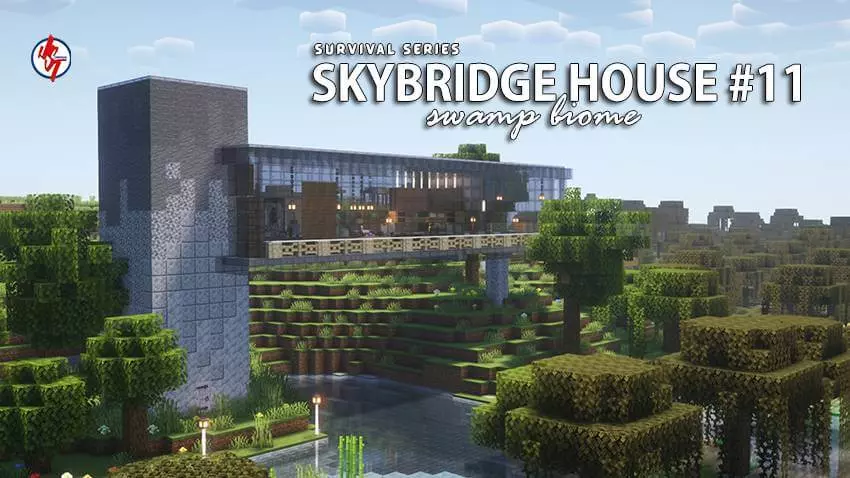
Survival House #11 (Achievements On) Map with a modern well-designed house. The map supports survival on it. A house above a swamp isn’t the first place most players choose to settle, and that’s exactly what makes this one memorable. Survival House #11 gives you a ready-made home connected by a skybridge, with a whole Minecraft world waiting beyond it.
The house comes with its interior and exterior already built, so you can move in and start exploring right away. You’ll spawn inside, with useful items waiting to help you settle into your new surroundings. Take a walk through the rooms, look over what’s available, and decide what you want to do first. You could head straight out for resources, or spend a little time making the place feel like your own before the first night arrives.


The swamp setting gives the map plenty of character. Water, trees, and patches of land make for a different view from a typical plains base, while the elevated house offers a place to look out over it all. The skybridge is more than a nice detail to admire from below: it gives the home a distinctive shape and makes the trip between its sections part of the experience. It’s the sort of build that might inspire you to add another walkway or create a separate spot overlooking the water.
There’s an existing village nearby, too. Once you’ve had a look around your new home, take a trip over and see what’s there. Having a village in the area gives you another destination for your survival adventures and a reason to make a path through the landscape. You could improve the route, build a bridge where the terrain gets awkward, or simply leave the swamp as it is and enjoy finding your own way around.
The map is designed for survival, so the finished house is a starting point rather than the end of the project. Gather materials, explore beyond the swamp, and bring back whatever you need for your next addition. Maybe you’ll build a waterside dock, start a farm on a nearby patch of land, or expand the house to make room for friends. Achievements are enabled on the map, giving you room to pursue your usual goals while playing from an already established base.
To get started, import the downloaded world into Minecraft Bedrock and open it from your world list. Once you’re inside, step out onto the skybridge and take in the surroundings before choosing where to go. Whether you want a comfortable place to begin a long survival game or a house to explore and make your own, this swamp home has a setting worth settling into.
How to install?
Android: you need to find the downloaded file on your phone, use any file manager for this and import the map into the game by opening it.
IOS: after receiving the map, the device itself will offer to install it.
Windows 10: go to the folder where the files are downloaded, find mcworld there and activate it.
Comments (0)