Um Item Collector Mod / Addon
- 24-10-2025, 08:29
- 768

Um Item Collector Mod — tidy up your world without crawling around picking up every last scrap. Place a collector where the loot lands, set the pickup range to fit the space, and it quietly pulls in nearby drops while you keep building, fighting, or farming. When you only want certain items, flip on the whitelist and add targets so the block ignores junk and grabs the good stuff first. Achievements stay on, so you can use it in a legit survival file without flipping any switches.

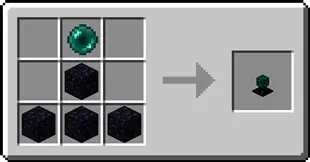
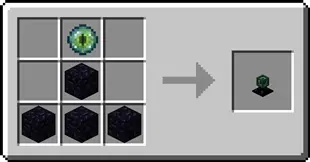
Your mob farm works great until the loot ends up scattered across the floor. UM Item Collector gathers those drops for you and sends them straight into storage, so you can get back to playing.
The setup is straightforward: place a container where you want the items to go, then put a collector on top of it. Any eligible dropped items within its working area are picked up and deposited into the block underneath. There are two collectors to choose from. The basic collector covers an area of up to 6 by 6 blocks, while the advanced collector reaches up to 8 by 8 blocks and adds item filtering. Both have an interface where you can adjust the collection area and its vertical range. That height setting is useful when your farm has more than one level: you can tune the collector around the spot where drops actually land instead of guessing whether the default area reaches them. Open the collector’s interface, adjust the area and Y-axis controls, and toss a few spare items nearby to see if your setup catches them.
The advanced collector’s whitelist gives you more control over what goes into your chest. Suppose you’re running a skeleton farm and want to keep the bones and arrows together. Add those items to the filter, then check the container after a test run to make sure everything is going where you expect. The same idea works around a tree farm if you’re after saplings, or beside a crop field when you want to gather the harvest without picking up everything else nearby. Pay attention to the collector’s range when you build: an area that overlaps your storage room or a friend’s workbench might grab an item someone meant to leave on the ground. A smaller collection area can be the better choice in a busy base, even when the advanced collector can cover more space.
There are plenty of places to put these blocks to work. Set one under a mob farm’s drop area, use one near a construction site where broken blocks keep bouncing out of reach, or place one beside a crop harvester while you focus on replanting. You can also give a frequently used work area its own chest for stray resources, then empty it when you return from a mining trip. The important part is having a suitable container directly below the collector and keeping an eye on its available space; a storage block can only hold so much. UM Item Collector is particularly appealing if you enjoy designing farms but would rather spend your time improving the build than running around collecting every drop by hand. Achievements are listed as supported, too, making it an option for a survival world where you still want to earn them. Start with one collector, watch where your items land, and adjust the coverage until the chest is doing the cleanup you used to do yourself.
Out in survival, it shines anywhere items spill. Park one beside a crop harvester so wheat and seeds get scooped while you replant. Drop another under a simple mob grinder to gather bones and arrows without lining the floor with hoppers. Mining session? Leave a collector near your quarry ramp so overflow cobble and ore don’t litter the staircase while you haul the valuable stacks. Fishing shacks, bee farms, dripstone lava setups—if it drops on the ground, the collector saves you the cleanup run.
Dialing in the range matters. Keep it small for tight rooms so it doesn’t steal items from another contraption, or widen it on open platforms where drops bounce. The whitelist is your filter: list valuables (gunpowder, iron, saplings), let everything else sit, and swing back with a shovel if you actually want the leftovers. It’s a simple loop—place, set radius, pick whitelist—and the payoff is hours of smoother play. No clutter, no sprinting in circles, just clean collection that respects how you already like to build and farm.
Installation Mod:
- Download the .mcaddon / .mcpack;
- Open the file to import into the game;
- In World Settings → Resource Packs and Behavior Packs, enable it (turn on Experiments if needed);
- Have fun!
Comments (0)