Cinematic Editor Mod / Addon
- 22-02-2026, 01:17
- 1 226
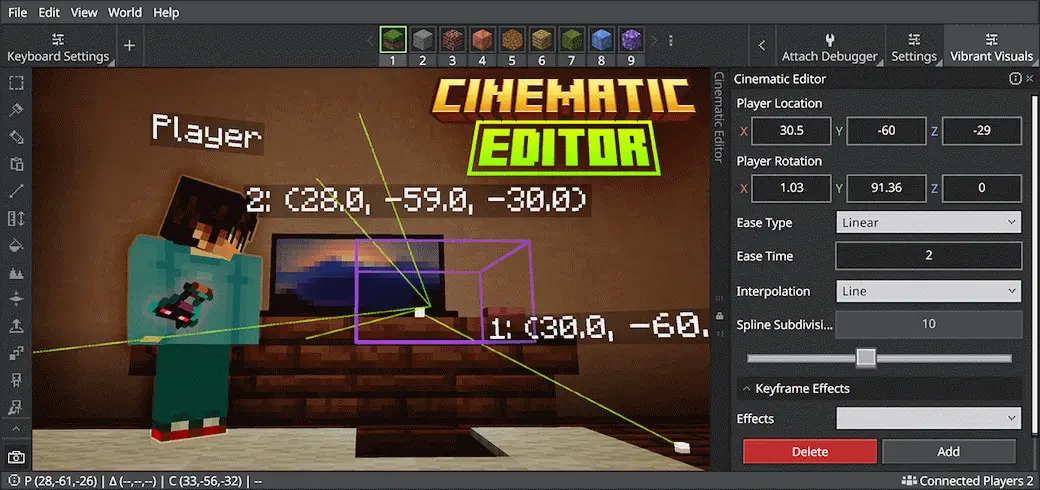
Cinematic Editor Mod is for anyone who makes their world look cool and actually wants to show it off properly. Normally, recording in Minecraft is a lot of awkward flying, weird angles, and hoping your camera movement doesn’t look like you’re panicking. This mod solves that by giving you camera control built specifically for changing perspectives and designing cinematic scenes. It’s less about “new survival content� and more about giving you a creator tool that makes your footage look intentional.
The big deal is perspective control. Being able to shape shots means you can finally capture things the way you see them in your head—smooth passes over a city build, dramatic angles in a dungeon, or clean close-ups of a redstone contraption without your crosshair ruining the vibe. In real use, it makes screenshots and video clips feel like an actual trailer instead of raw gameplay. If you’re the type who posts short clips, does build tours, or makes showcase videos for addons, Cinematic Editor Mod is basically a time-saver and a quality boost at the same time.


It’s also flexible in how you install it. You can use it as a standalone Minecraft Add-On, or as a Minecraft Editor extension inside Minecraft Editor. That’s nice because it fits both types of creators: people who just want a tool in their normal world, and people who are already building or staging scenes inside the Editor workflow.
Practical tip: plan your shots before you start moving the camera. Pick the moment you want to highlight—an entrance, a skyline, a boss room, a farm—and then use the camera controls to tell a story with movement instead of spinning around randomly. Cinematic Editor Mod is basically a creator-focused camera toolkit for Minecraft Bedrock that helps your builds, maps, and scenes look as good on video as they do in your head.
Installation Mod:
- Download the .mcaddon / .mcpack;
- Open the file to import into the game;
- In World Settings → Resource Packs and Behavior Packs, enable it (turn on Experiments if needed);
- Have fun!
Comments (0)