Better Bossbars – Addon / Texture Pack
- 28-02-2026, 04:47
- 470
Mods 1.26 / Mods 1.21 / Textures
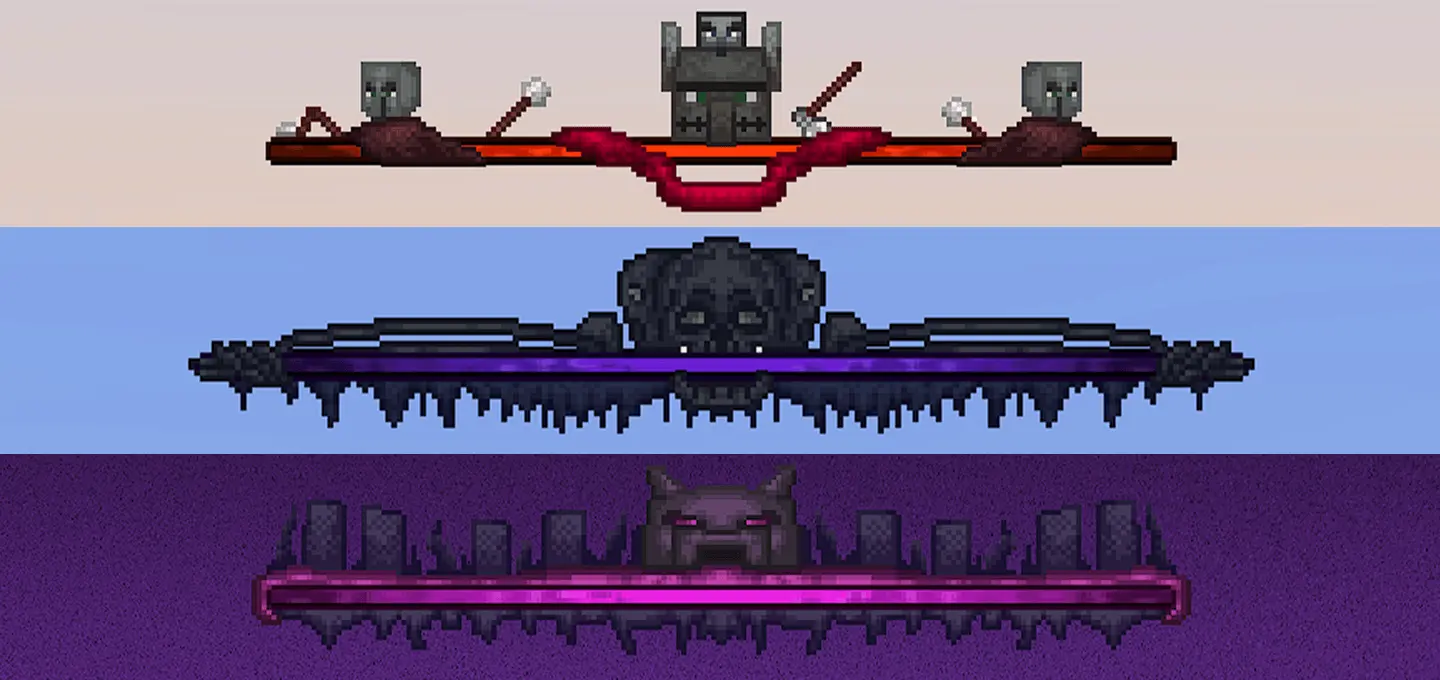
Better Bossbars Addon / Texture Pack is one of those small UI changes that can make a fight feel a lot cooler without touching the actual gameplay. The pack adds three new boss bars and replaces the default ones used for the Wither, the Ender Dragon, and Raid events. That means the moments where the game is supposed to feel intense now have a stronger visual style instead of the old plain bars most players are already used to seeing.
The main appeal of Better Bossbars Addon / Texture Pack is the atmosphere it adds. The new bars are described as more fantastical, dramatic, and better-looking, and that kind of change fits boss fights really well. When a Wither fight starts or the Ender Dragon health bar appears, that bar is one of the first things your eyes go to, so giving it a stronger design can instantly make the whole fight feel more important. The same goes for raids, especially when you are defending a village and want the event to feel like a real battle instead of just another routine survival problem.


In normal Minecraft Bedrock play, packs like this work best because they stay simple. Better Bossbars Addon / Texture Pack does not try to overload the game with a hundred extra UI edits. It focuses on three important boss-related bars and upgrades those moments only, which makes it easier to keep in your regular setup for a long time. If you like texture packs that improve the presentation of the game without changing mechanics, this is exactly that kind of add-on.
The pack also sounds easy to use, since the provided description says all you need to do is download the texture and activate it inside Minecraft. That makes Better Bossbars Addon / Texture Pack a clean visual improvement for players who want boss fights and raid events to look sharper, more fantasy-styled, and more dramatic every time those bars show up on screen.
Installation:
- Download Texture;
- Open the downloaded .mcpack to install;
- Select texture in settings;
- Done.
Comments (0)