Placeable Items Blocks Mod / Addon
- 15-03-2026, 05:22
- 708
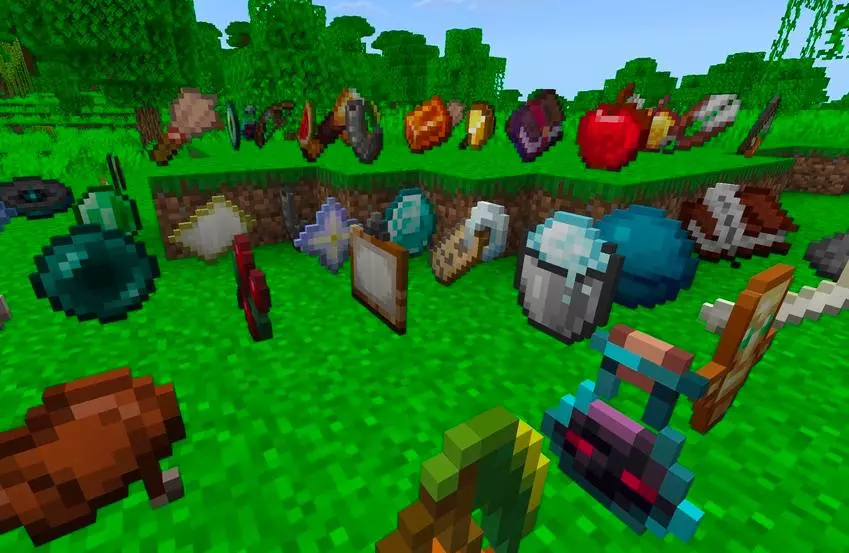
Placeable Items Blocks Mod is useful for those who want to place items as blocks in the game Minecraft Bedrock. A Minecraft house can have a great shape, a carefully chosen roof, and a garden outside, yet still feel a little empty when you step through the door. Placeable Items Blocks helps with those finishing touches. It adds more than 199 decorative blocks based on familiar Minecraft items, giving you more ways to make rooms look lived in. Instead of keeping every interesting object tucked away in a chest, you can use item-shaped decorations as part of the build itself. The selection includes items inspired by tools, weapons, food, materials, and rarer objects. That makes the addon useful for everything from a small cottage to a busy market street. If you enjoy building places that look as though someone actually uses them, there are plenty of details here to experiment with.
A kitchen is an easy place to start. Pick a few food decorations from the selection and arrange them around your cooking area to suggest a meal in progress. A workshop could use tools and materials near the workbench, while a blacksmith’s shop might have weapons on display for customers. You don’t need to fill every available space, either. One or two objects in the right spot can tell a story: a tool left near a half-finished project, supplies arranged in a storeroom, or goods set out for a market day. Try mixing the item blocks with the furniture and building blocks you already use, then step back and see which arrangements suit the room. The familiar Minecraft style means the decorations can sit comfortably alongside the rest of your build without making it feel like a completely different game.
Shops, adventure maps, and roleplay worlds can make good use of these details too. A row of market stalls becomes easier to tell apart when each one displays a different kind of merchandise. An armory can look ready for a group of travelers, while a treasure room can show off a collection of rare-looking objects. For a map, decorative items can help suggest what a location is for before a player reads a sign or opens a chest. They can also make abandoned places more interesting: a workshop with supplies still on display might leave visitors wondering who worked there and why they left. These are decorative blocks, so it’s best to think of them as part of the scenery rather than assume they work like the original items. Browse the available selection and test the objects you want to use as you build.
There is one practical detail to know before planning a project: the addon description says the placeable blocks are available in Creative mode and cannot be crafted. If you want to decorate a survival base with them, you’ll therefore need access to Creative mode to obtain the decorations. To get started, open the downloaded addon file to import it into Minecraft, then activate the resource and behavior packs in your world settings. After loading the world, look through the available item blocks and try a few combinations. A good first project might be a small shop or a single furnished room, where you can see how much character the extra objects add before moving on to a larger build.
Installation Mod:
- Download the .mcaddon / .mcpack;
- Open the file to import into the game;
- In World Settings → Resource Packs and Behavior Packs, enable it (turn on Experiments if needed);
- Have fun!
Comments (0)