Terraria Magic Mirror Mod / Addon
- 22-04-2026, 05:55
- 428
Terraria Magic Mirror Mod craft item for teleportation to a safe place. This will craft Magic Mirror from the game Terraria into your Minecraft Bedrock.
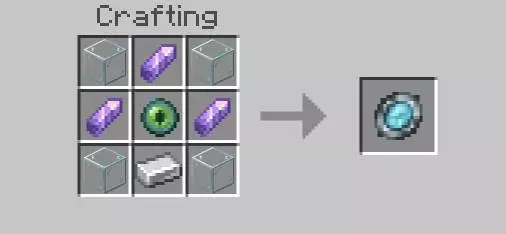
Your inventory is packed, your pickaxe is almost broken, and home is somewhere on the other side of a mountain range. Terraria Magic Mirror gives Minecraft Bedrock players a way back: hold up the mirror, wait for its magic to finish, and return to your spawn point. If you’ve played Terraria, the idea will feel familiar. In Minecraft, it’s a handy companion for those trips that start with a sensible plan and end with you miles away, carrying three kinds of wood and no idea which direction your house is in. The mirror is craftable, so you can make it part of your survival kit and take it along whenever you’re heading somewhere unfamiliar.
Using it takes a little more than a quick tap. Hold the use button until the short casting animation finishes, and the mirror sends you to an available spawn destination. It also has its own sound and particle effects, making the return trip feel like a spell rather than a menu shortcut. That casting time matters when you’re in trouble. If a mob is already swinging at you, don’t assume you can pull out the mirror and disappear instantly. Give yourself enough space to use it, keep an eye on your health, and remember that a shield and a clear escape route are still useful things to have. The mirror can help you leave a dangerous situation, but getting a moment to activate it is up to you.
Your personal spawn point is the destination to check before you set out. If you’ve set one with a bed or the spawnpoint command, that’s where the mirror is intended to take you. If there’s no personal spawn, the addon can use a world spawn explicitly set by an administrator. Without a valid destination, it won’t teleport you, so test the mirror near home before relying on it at the bottom of a cave. Where you place your bed matters, too. Set your spawn at a temporary campsite and the mirror may bring you back there instead of your main base. That could be useful if you’re exploring a distant region, but it’s worth remembering before you pack up camp and move on.
For long survival sessions, the mirror gives you a reason to explore farther without planning the entire return walk. Head out looking for a new building site, search for a biome you haven’t visited, or mine until your inventory is full. When you’re ready to unload, use the mirror and get back to your storage. If you want to revisit a great discovery later, note its coordinates before leaving; teleporting home won’t automatically show you the way back. The linked download is an .mcaddon file. Open it to import the addon into Minecraft Bedrock, then enable its resource and behavior packs in your world settings. Check your spawn, take the mirror for a short test, and then go see what’s beyond that mountain.
Installation Mod:
- Download the .mcaddon / .mcpack;
- Open the file to import into the game;
- In World Settings → Resource Packs and Behavior Packs, enable it (turn on Experiments if needed);
- Have fun!
Comments (0)