Utility HUD Mod / Addon
- 4-05-2026, 14:56
- 854
Mods 1.26 / Mods 1.21 / Mods 1.20

Utility HUD Minecraft mod will add many features Armor Durability, Offhand Slot, Potion Effects Overlay, Fast Offhand Swap, Fast Totem, Item Counter, Attack Crosshair. This will be useful in PVP and survival.
Utility HUD brings useful equipment and inventory information onto the screen in Minecraft Bedrock. Armor durability, potion effects, item counters, and quicker offhand controls help you keep track of your supplies when a fight gets busy.
Armor durability is one of those details that’s easy to forget until a piece of equipment breaks. Having it visible gives you a better chance to notice worn gear before heading into another fight. You might still have plenty of hearts, but a damaged helmet or chestplate is a good reason to reconsider how long you stay out. The offhand display keeps another part of your equipment in view, while the potion effects overlay makes active effects easier to follow. Together, these features put several useful checks closer to where your attention already is. They’re particularly handy during longer trips, when your equipment’s condition can change considerably between leaving home and returning.
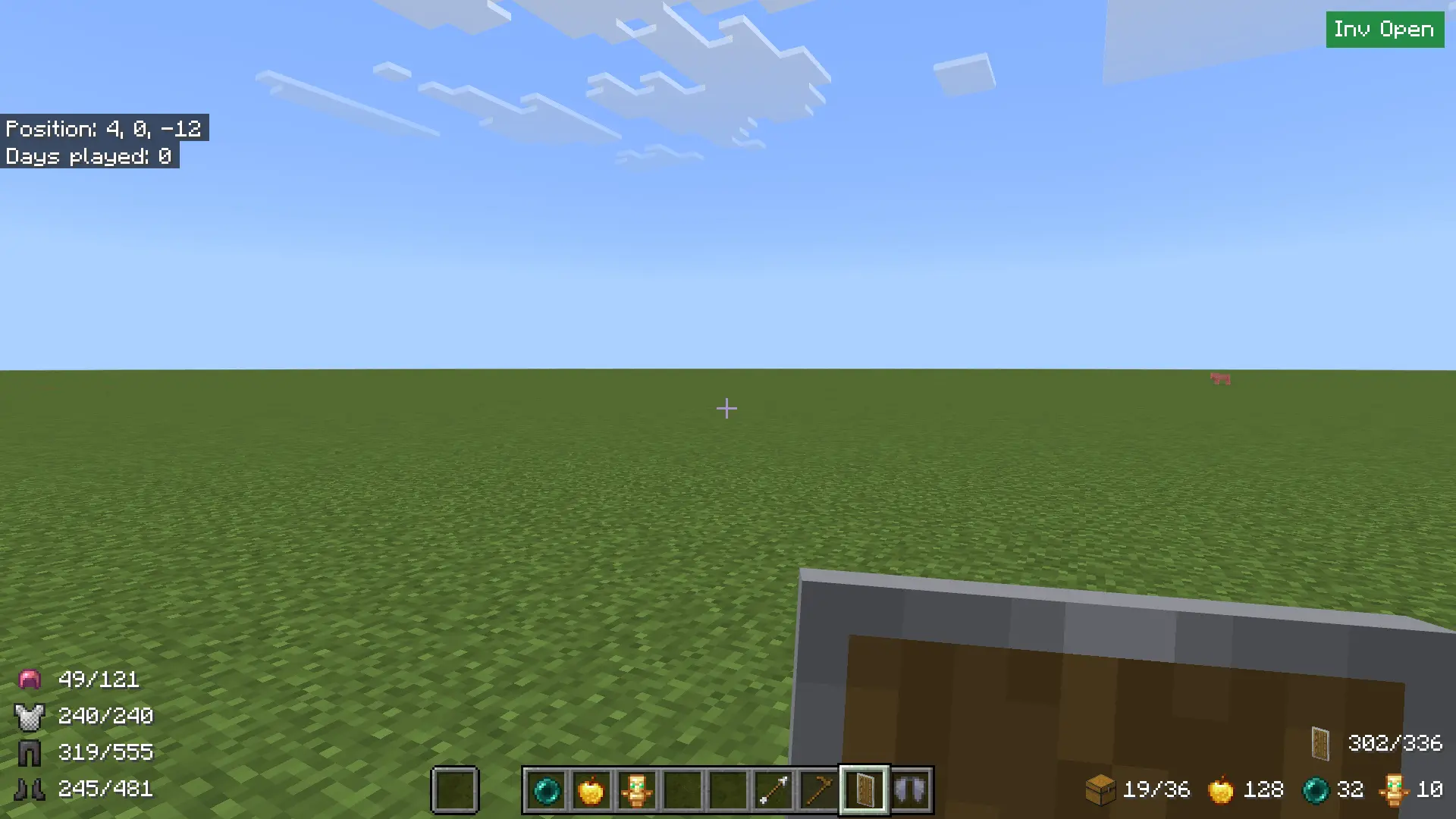


Fast Offhand Swap and Fast Totem handle the more practical side of the interface. Switching a compatible item into your offhand takes fewer steps, and the totem shortcut gives you a quicker way to equip a Totem of Undying from your available supplies. That’s useful when you need to get ready for another encounter and would rather spend less time moving items around. Fast Totem is a control you use to equip a totem, so timing still matters. Keeping spares available and remembering to use the shortcut remain part of your preparation. The convenience comes from making that action easier to reach when you need it.
The item counter helps with a different problem: losing track of what’s left in your inventory. It tracks important supplies such as golden apples, ender pearls, and totems, along with available inventory slots. Those numbers can influence your next decision in a fight. A low pearl count might make you save your escape option, while dwindling healing supplies could be a reason to pull back. Free-slot information also has a place in ordinary survival. When you’re collecting resources or looting structures, knowing how much room remains helps you decide whether to keep exploring or make a storage trip. It’s useful information to have before you start leaving things behind.
An attack crosshair rounds out the pack’s combat features, giving the center of the screen another interface option alongside the equipment displays. The overall selection suits players who pay attention to their loadout and want those details within easy reach. PvP gives the shortcuts and supply counters an obvious purpose, but armor wear and potion effects matter during survival adventures too. A difficult cave trip can demand just as much attention to your remaining gear. Utility HUD puts those details where you can check them more readily, leaving you to decide when to heal, replace equipment, retreat, or keep going.
Installation Mod:
- Download the .mcaddon / .mcpack;
- Open the file to import into the game;
- In World Settings → Resource Packs and Behavior Packs, enable it (turn on Experiments if needed);
- Have fun!
Comments (0)