HEALTH INDICATOR HUD Mod / Addon
- 12-05-2026, 01:53
- 2 338

I dropped the Health Indicator HUD mod into my Bedrock world, and honestly, it’s one of those small upgrades you don’t realize you needed until you try it. Now, every mob you look at has a clean health bar floating above it, so you instantly know how close it is to going down.

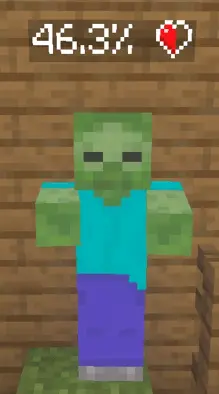
Trading melee hits with an iron golem or a mutated boss while having zero clue how much punishment they can actually take is the worst kind of blind guesswork. The Health Indicator HUD Mod Addon wipes out that annoying mystery on Minecraft Bedrock by sticking clean, accurate vitality bars right above every mob in your line of sight.
Fighting anything tanky in vanilla survival usually feels like swinging at a brick wall until it suddenly falls over. You land six consecutive critical hits with an enchanted diamond sword, but because default mobs only flash red with no numeric readout, you have no way to tell whether that raid captain is about to drop or still sitting comfortably at eighty percent health. It completely ruins your tactical pacing. Instead of making smart choices about when to push forward or back off to regenerate your own hearts, you end up wasting potion buffs or running away from enemies that were literally one tap from getting eliminated.
This lightweight interface upgrade directly solves that headache by giving you instant visual feedback across every hostile, passive, and neutral creature in your world. The floating display renders right over their heads, dynamically tracking damage dealt from your melee weapons, bows, tridents, and even splash potion throws. You can actually see the exact hit points tick down in real time. It fundamentally changes how you approach crowd control during dangerous night patrols or trial chamber excursions. If a creeper sneaks into your flank while you duel a pack of skeletons, a quick glance at its overhead bar tells you if a fast sweep attack can delete it immediately or if you need to pop a shield block and disengage.
What makes this HUD tweak shine is how seamlessly it integrates into your standard user interface without cluttering your screen during massive brawls. Plenty of custom UI modifications overwhelm your field of view with bloated icons and messy color palettes, making chaotic team fights unreadable. Here, the display elements stay sharp and minimal, giving you critical battle info without blocking your crosshair tracking. The performance impact remains virtually non-existent, meaning your frame rate stays totally locked whether you play on a budget mobile device, an Xbox console, or a desktop setup.
Setting it up in your world takes just a couple of standard steps through the resource settings. Once you import the files and toggle the pack onto your active world list, the new tracking triggers automatically without breaking achievements or demanding messy experimental script toggles. It works smoothly alongside your favorite survival texture packs and custom mob packs, making it a permanent staple for your regular loadout. Slap this onto your client, take the guesswork out of your combat encounters, and turn every chaotic boss arena into a calculated victory.
It works on everything — from cows and sheep to skeletons, creepers, and even bosses. I love that in big fights you can see exactly when a mob is on its last legs, so you know whether to push in or switch targets. It’s also super handy for testing out new weapons or addons, because you can see exactly how much each hit is doing.
After a few hours with it, combat just feels sharper and more tactical. No more guessing, no more wasting hits — you’re always in control. Health Indicator HUD makes every fight in Minecraft Bedrock feel a little more like a real RPG, and now I can’t imagine playing without it.
Installation:
- Download Mod;
- Open the downloaded file to install;
- Select it in the settings;
- Have fun!
Comments (0)