Outline Visuals – Shaders
- 16-04-2026, 02:33
- 624
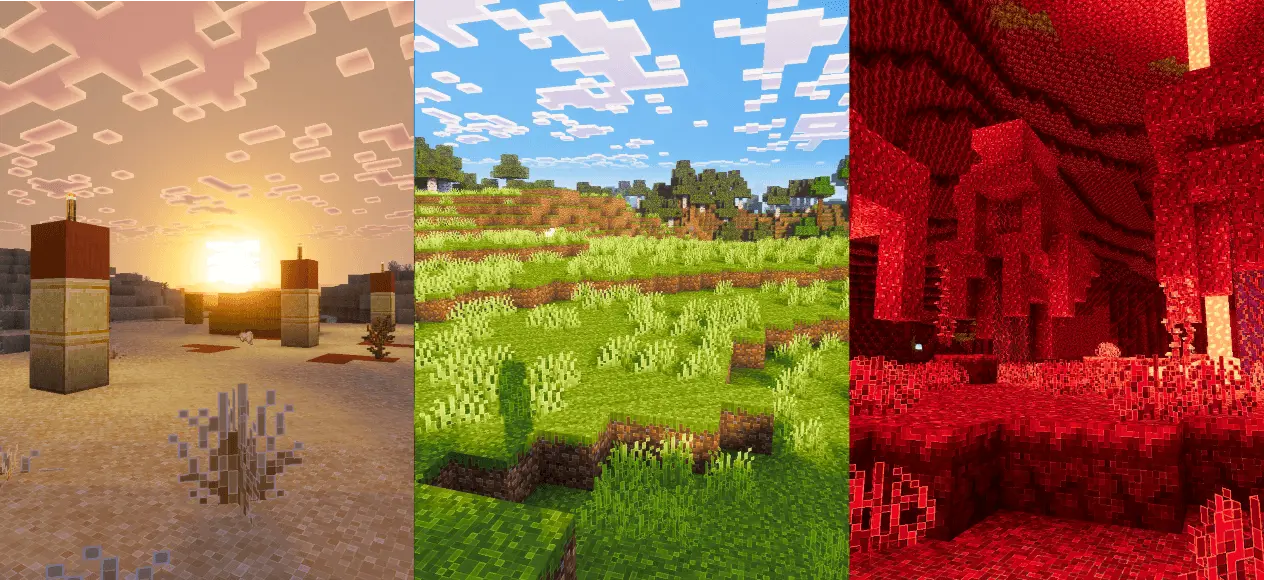
Outline Visuals – Shaders nice smooth and clean lighting, water, sky, textures, blocks along with the new Outline Visuals Minecraft shaders.


Some texture packs make Minecraft look like a completely different game. Outline Visuals takes a more familiar world and gives it a sharper, more colorful appearance. Blocks and items have clearer outlines, while the lighting, colors, and water receive a visual refresh. The result is easy to notice when you step out of your house and look around: the landscape still feels like Minecraft, but the details have a more defined look.
The outlines are the feature that gives the pack its character. They help individual blocks stand out, which can make a wall, roof, or path easier to read at a glance. If you enjoy building, take a look at a house you’ve already finished and pay attention to the edges around its windows and the materials used on its exterior. The same arrangement of blocks can feel different when their shapes are more clearly defined. It’s a good opportunity to revisit an old build without needing to rebuild it.
Colors and lighting play a part too. Grass, trees, stone, and other familiar parts of the landscape have a cleaner appearance, while the lighting gives the world a warmer feel. Try walking through a forest during the day, then return to the same area as the sun gets lower. A place you’ve crossed dozens of times can look different when the colors and light change around it. The pack is especially enjoyable if you like stopping to look at the scenery instead of running straight to your next destination.
Water receives its own visual changes, so it’s worth visiting a river, lake, or coastline after activating the pack. If your base is beside a pond, take a look from the shore and then from inside the house. Builders who enjoy creating bridges, docks, and waterside homes may find that their surroundings have a fresh look without having to change any of the blocks they placed. A familiar fishing spot can be a pleasant place to pause and see the effect for yourself.
Outline Visuals can also give screenshots a distinctive style. The defined edges help buildings and objects stand out, while the updated lighting and colors add atmosphere to the scene. You could photograph a village from a nearby hill, frame your house against the evening sky, or take a picture of a path through the trees. Try a few different times of day before choosing your favorite view; the same location can leave a different impression depending on when you visit it.
To see the pack’s intended visual effects, enable Vibrant Visuals in your graphics settings. Open the downloaded resource pack with Minecraft, activate it, and then load a world where you know the surroundings well. Your own survival base is a useful place to start because you’ll already be familiar with its colors and shapes. From there, take a walk, visit the water, and see how the outlined style looks in the places where you spend the most time.
Installation:
- Download Shader;
- Open the downloaded .mcpack to install;
- Select texture in settings;
- Done.
Comments (0)