Holding Skin Pack
- 1-10-2025, 08:02
- 795
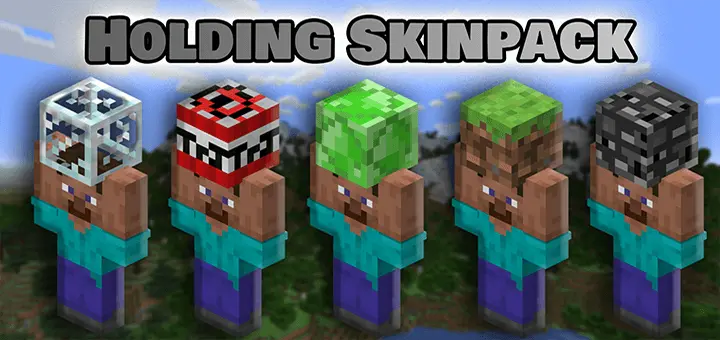
Holding Skin Pack — Steve, but mini and carrying the loot himself. This Minecraft Bedrock skin pack riffs on the classic icon by making him look like he’s clutching a block right up front, using the head space trick so the “held” block becomes the star of the fit. It’s pure cosmetics—no stat changes, no weird hitboxes—just a funny visual that lands instantly in lobbies, realms, and minigames.
In practice it’s an easy vibe boost. Queue into a parkour or PvP hub and you’ll get the double-take: tiny Steve waddling in with a slab of stone or a chunk of ore. Running survival? Swap skins to match the job—grab a wood variant when you’re logging out a forest, switch to a mineral look for a caving session, or pick a prop-style option when you’re hosting a build tour. It’s also gold for roleplay: merchants “holding” valuables, miners “hauling” the payload, or a whole squad themed to different resources for a screenshot dump after raid night. Movement, combat, and crafting feel normal; the gag just rides along while you play Minecraft Bedrock like usual.


Steve has found a block he likes, and apparently he’s taking it everywhere. Holding Skin Pack gives Minecraft Bedrock’s familiar hero a funny makeover, making him look small and permanently occupied with carrying his latest find.
The trick is in the skin design. Instead of showing Steve with his usual proportions, these looks place a large block up front and make him appear to be holding it with his arms. The result is immediately silly: your character can walk into a friend’s house looking as though they’ve brought an entire chunk of the landscape as a gift. The selection includes different block and resource-inspired looks, so you can browse for one that suits your plans. Choose a wood-themed design when you’re working on a forest build, or pick a mineral look before heading underground with your mining crew. The object is part of the skin itself, which means it stays part of your appearance while you run around, build, and explore. You can still equip and use your regular items; the block Steve appears to be carrying is there for the joke.
Holding is an easy pack to bring into a multiplayer session when your group wants something a little less serious. Imagine everyone showing up to a building contest as a tiny Steve carrying a different material, then trying to make a house using the block that inspired their look. You could also use the skins for a market scene: one player runs a mining stall, another handles timber, and a third arrives looking like they’re hauling the day’s delivery. For a group screenshot, line up outside your storage room and let each person represent a different part of the operation. The designs work just as well when there’s no plan at all. Sometimes the funniest moment is simply turning around after a long cave run and seeing your friend standing there with an enormous block in front of them. Give the group a minute to appreciate the outfit before asking who forgot the torches.
The pack is cosmetic, so the miniature appearance doesn’t mean you’ve become a smaller player or gained the ability to carry extra blocks. Your inventory, movement, and survival challenges work as usual. That’s worth remembering before you try squeezing through a gap that only looks big enough for your tiny character. Import the pack, open the Bedrock character selector, and look through the available designs before choosing one to wear. You can keep the same block as your signature look or switch when you move on to a different project. Try posing beside a matching storage chest, walking through a busy server lobby, or bringing your favorite design to a parkour map. Holding Skin Pack takes one familiar Minecraft character and gives him a wonderfully goofy job: looking after a block that seems almost as big as he is. Whether you’re playing with friends or just want a laugh while working around your base, Steve is ready to lend a hand.
Setup is as simple as dropping the pack in and picking your favorite variant in the Bedrock skin menu. If a server has strict cosmetic rules, you’re still good—the pack uses a visual trick that stays within normal skin behavior, so it keeps the vanilla feel without tripping gameplay flags. Achievements and progression remain untouched. Want to push the look even harder? Pair the skin with a matching block palette in your base and it’ll look like Steve’s literally advertising the build theme. If you’re after quick laughs, clean thumbnails, or just a fresh way to represent your grind, Holding Skin Pack delivers exactly that—a playful, instantly readable twist on the most iconic face in Minecraft Bedrock.
How to Install Skins in Minecraft Bedrock
- Download a .png skin (64×64 or 128×128).
- Open Minecraft Bedrock.
- Go to Profile (hanger icon) → Edit Character.
- Tap Owned → Import → Choose New Skin.
- Select your .png file.
- Pick a model: Classic (Steve) or Slim (Alex).
- Confirm to equip and play.
Comments (0)