Many Brown Mooshrooms Skin Pack
- 1-10-2025, 17:57
- 761
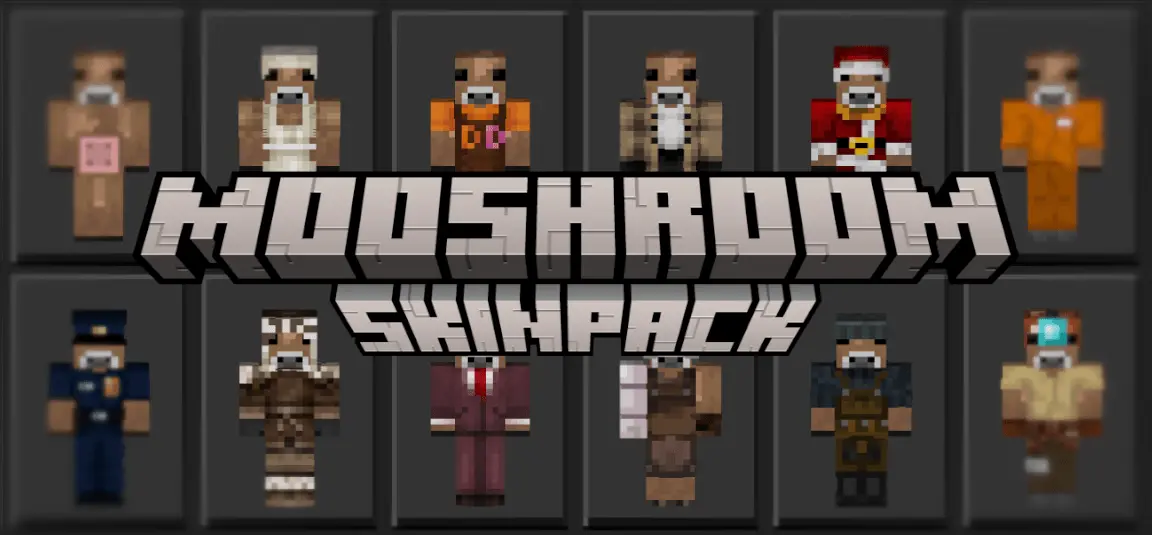
Many Brown Mooshrooms — a character pack built for anyone who’s ever thought “what if my skin had mushrooms and a day job.” It’s twelve brown-mooshroom looks for Minecraft Bedrock, each with its own little story: a flour-dusted baker, a tie-tucked office worker, a cozy fisherman, a snowy winter getup, a spooky mining twist, and yes, a caffeinated “Dunkin’ Mooshroom” vibe that reads instantly in a lobby. No mechanics change, no weird hitboxes—just fun silhouettes that pop in thumbnails and on busy servers.

Brown mooshrooms are rare enough to make any Minecraft player stop and stare. This skin pack gives them a whole wardrobe, from a baker’s outfit to a look for snowy adventures.
Many Brown Mooshrooms is a collection of Minecraft Bedrock skins inspired by the mushroom-covered cow. Instead of offering just one version of the mob, it dresses the familiar brown mooshroom for different jobs and occasions. There’s a baker, an office worker, a fisherman, a winter look, and even a spooky mining-inspired design. If you’ve ever wanted your character to look like a mooshroom with somewhere important to be, you’ve got options.
The baker feels right at home behind a counter in a village bakery. Put together a little shop, stock a chest with bread and cake, and invite your friends over after a long mining trip. The fisherman is an easy pick for a quieter day: build a dock, grab a fishing rod, and see what you can catch before sunset. Neither skin gives you a special job in the game, but both can make an everyday project a lot more fun to play out.
For something a little stranger, try the office worker. There’s something funny about showing up to a server meeting as a mushroom cow dressed for work, especially when everyone else is wearing Netherite. Set up a desk in your base, sort the chests you’ve been avoiding, and call it a productive day. When you’re ready to head underground, the spooky miner look is there for a trip through the caves. Just remember to bring actual armor and a pickaxe; the outfit is there for style.
The winter design gives you another reason to visit a snowy biome. Make a cabin near a frozen river, take a boat out on the ice, or meet up with friends for a snowball fight. On a shared world, everyone can choose a different mooshroom look and start a little mushroom-themed village. A bakery, fishing dock, and mine entrance are all easy places to begin, and each player gets a character that fits their favorite project.
To install the pack, open the downloaded file with Minecraft Bedrock and look for it in your Dressing Room after it imports. The available collection has received updates, so the exact selection may depend on the version you download. Browse the skins, pick the mooshroom that matches your plans, and take it out into your world. Whether you’re baking, fishing, or simply wandering around as a very unusual office worker, there’s a look here for the occasion.
I ran this pack through a weekend realm session and it stuck. The baker fits right at home in a village market stall, the fisherman sells the boardwalk base next to a mangrove dock, and the office look is perfect when you’re touring a redstone factory like it’s a 9–5. Swap to the winter mooshroom when you sprint a mountain seed, then throw on the spooky miner before you dive an abandoned mineshaft and it feels like your character’s actually living out the plan. Because everything stays vanilla under the hood, PvP and parkour still feel clean—you just look more memorable doing it.
For group play, the twelve skins make team roles easy. Put the fisherman on scouting rivers, the baker on food duty, the office worker as “project manager” calling raid rotations, and keep the spooky miner in the caves. Every shot you take for a progress post or realm trailer lands better because the skins are readable at a glance and match Minecraft Bedrock’s style without clashing. Equip from the skin menu, jump into your world, and lean into the mooshroom energy—Many Brown Mooshrooms gives you a dozen distinct fits that make survival runs, roleplay nights, and server screenshots feel a little more alive.
How to Install Skins in Minecraft Bedrock
- Download a .png skin (64×64 or 128×128).
- Open Minecraft Bedrock.
- Go to Profile (hanger icon) → Edit Character.
- Tap Owned → Import → Choose New Skin.
- Select your .png file.
- Pick a model: Classic (Steve) or Slim (Alex).
- Confirm to equip and play.
Comments (0)