OS Emotis Skin Pack
- 1-10-2025, 10:40
- 535
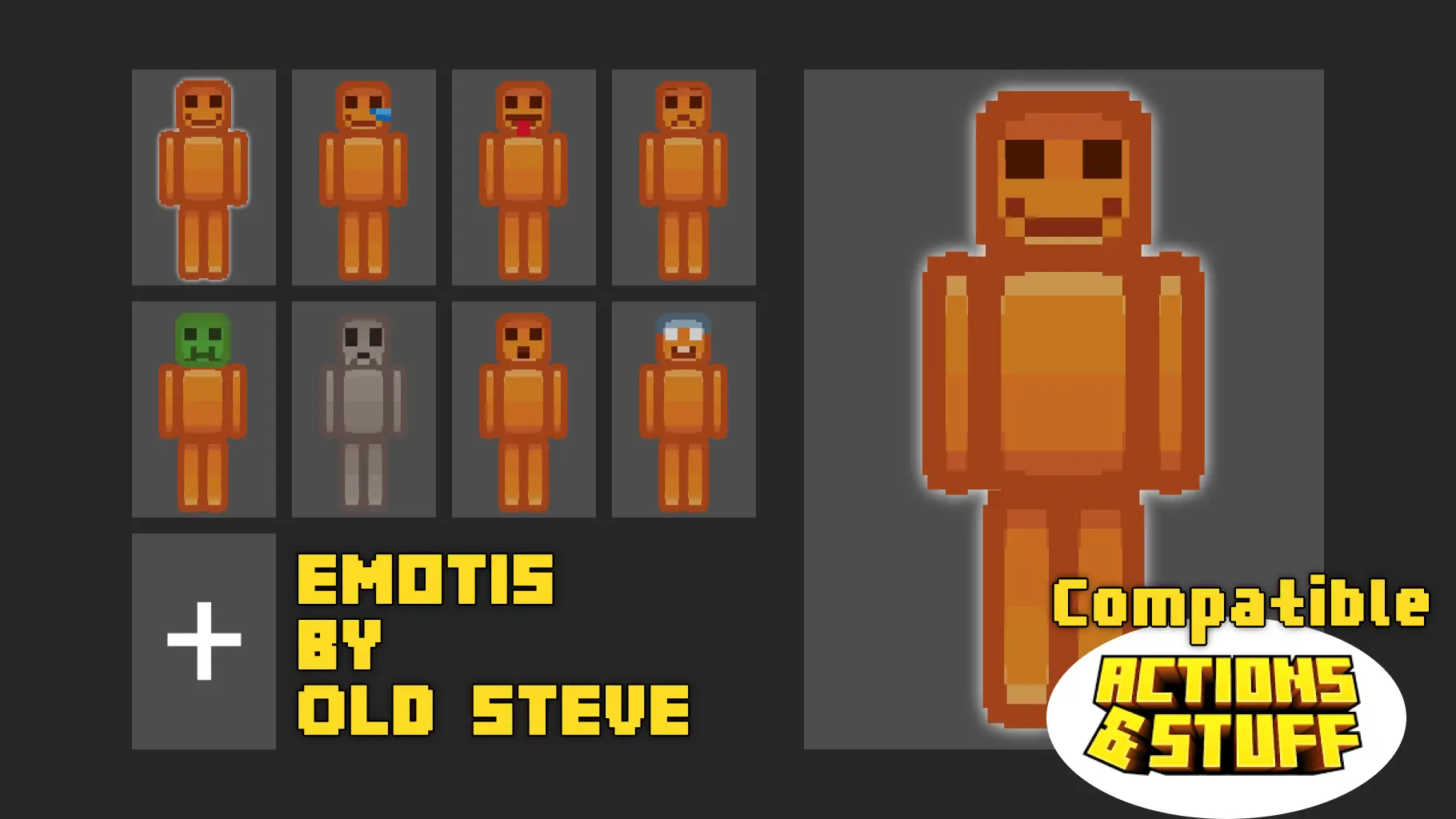
OS Emotis — eight feelings turned into skins for Minecraft Bedrock, built for those moments when chat’s too slow and you want your look to do the talking. Each character rides a different vibe, from sunny optimism to full-on panic, so you can swap identities to match the session. Rolling into a chill building night? Pull on Sunny and stroll the village like you own the sunrise. Hosting a horror map or Deep Dark run? Shokk is perfect for that heartbeat-in-your-ears energy. No mechanics change, no weird hitboxes—just a clean way to set the tone the second you spawn.
The pack shines in multiplayer. In a manhunt, have the “fear” skin sprinting ahead while “calm” anchors the regroup point; callouts become natural because everyone reads your role at a glance. Minigames love it too: queue BedWars as the cocky grin, switch to focused “determination” before the final push, then flex a smug “victory” look on the win screen. For survival co-op, I like tying the skin to the job—hopeful for farming days, stoic for mining marathons, anxious joker for Nether runs where anything can and will go sideways. Screenshots and thumbnails pop because the colors and expressions sell the scene without clashing with vanilla textures.


Your friend just fell into lava with a full inventory of diamonds, and somehow your character’s face says it all. OS Emotis brings eight colorful, expressive skins to Minecraft Bedrock, each with a different mood for your next session.
Sunny represents joy and is an easy pick for a relaxed day of building, farming, or showing friends around your latest creation. Zappy brings a playful expression that feels right for minigames and harmless pranks, while Wowza looks ready for the moment someone reveals an enormous surprise build. Then there’s Shokk, whose fearful face is a particularly appropriate choice before entering the Deep Dark. Moody represents sadness, Tibi has a bittersweet expression, and Germi brings disgust to the lineup—useful when your friend proudly presents a house made entirely from whatever blocks were left in the bottom of a chest. Bony rounds out the collection with a skeleton-themed design. Each character has a name and a look of its own, so browse the full group before settling on a favorite. You might find that the skin you choose for a peaceful building session is very different from the one you want for a horror map.
The pack has plenty of potential for multiplayer games and screenshots. Let each friend pick an Emotis character, line up in front of your base, and see how the different expressions change the picture. Sunny standing beside Shokk already suggests a story: one player is ready for an adventure, while the other has clearly seen what’s waiting inside the cave. For a minigame night, you could choose characters before each round or give everyone a random mood to play. Zappy might be a fun choice for parkour with friends, especially when someone misses the same jump five times. Wowza can accompany the player seeing a finished build for the first time, while Bony is ready for a spooky map or a walk through a skeleton-filled dungeon. None of those roles are fixed, of course. Give the cheerful character the scariest job if that makes your group laugh.
OS Emotis changes your character’s appearance, leaving you free to use the skins in the kind of Minecraft world you already enjoy. Wear Sunny while working on a colorful village, take Moody along for a rainy fishing trip, or choose Shokk before your first attempt at finding an ancient city. The expressions are part of the character designs; they don’t automatically change when something happens in-game. If your mood shifts after losing a fight, you can visit the character screen and pick another skin yourself. To get started, import the pack into Minecraft, open the dressing room, and browse the eight characters before saving your choice. You can keep one as your signature look or switch between them for different builds, adventures, and group photos. Whether you want to look cheerful while planting crops or appropriately terrified while a Warden approaches, there’s an Emotis ready to join the session.
Setup is easy: equip an Emotis skin in the Bedrock selector and go. You can hot-swap between rounds to steer the lobby’s mood or keep one signature face and let the world react to you. Whether you’re roleplaying, streaming highlights, or just trying to make your friends laugh when the raid bell rings, OS Emotis gives you eight simple, loud ways to be understood in Minecraft Bedrock—no words required.
How to Install Skins in Minecraft Bedrock
- Download a .png skin (64×64 or 128×128).
- Open Minecraft Bedrock.
- Go to Profile (hanger icon) → Edit Character.
- Tap Owned → Import → Choose New Skin.
- Select your .png file.
- Pick a model: Classic (Steve) or Slim (Alex).
- Confirm to equip and play.
Comments (0)