Rainbow Friends Skin Pack
- 1-10-2025, 08:04
- 1 212
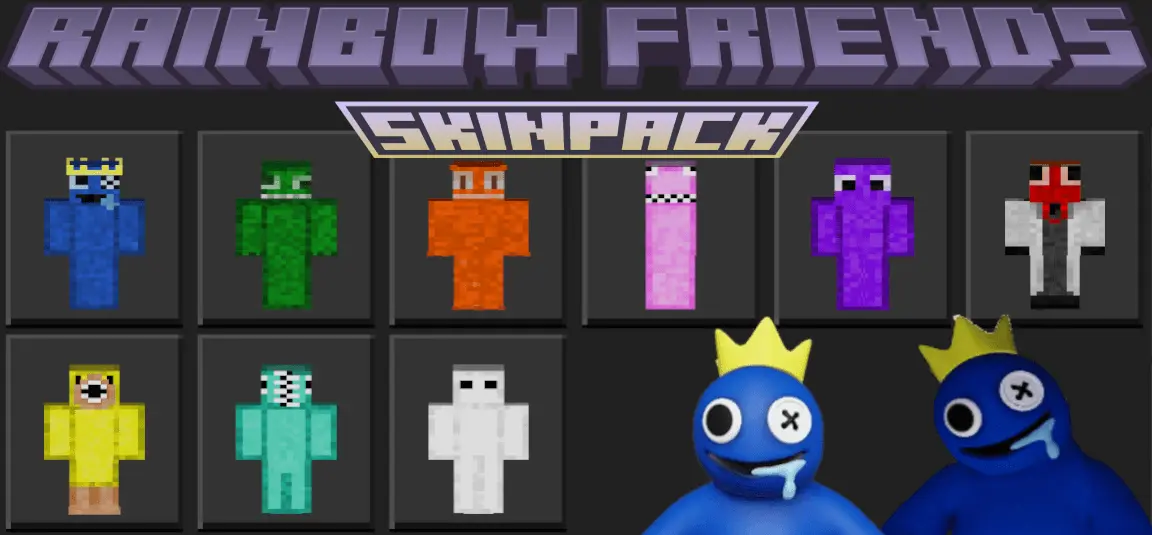
Rainbow Friends — nine instantly recognizable skins that flip your Minecraft Bedrock session into Odd World energy the moment you spawn. Blue Friend, Green Friend, Orange, Pink, Purple, Red, Yellow, Teal, and White are all here, each with that off-kilter vibe that works beautifully in dark halls, maze maps, and late-night realm events. It’s just skins—no gameplay tweaks—so achievements stay on and your movement feels normal, but the mood changes fast.
I ran a survival evening with friends and rotated through a couple of looks. Blue Friend for village patrols at dusk felt menacing without being over the top; swap to Green Friend and you’ve got this lanky silhouette that’s perfect for stalking alleyways around a castle build. On minigame nights, the pack shines. Call teams by character—Blue/Red vs. Green/Orange—or host manhunt with Purple lurking in tunnels and vents while the rest of us scramble for the exit. The silhouettes read clean from a distance, so callouts are quick, and screenshots hit harder because everyone looks like part of the same universe without clashing with vanilla blocks.
If you’re into roleplay, pair these with horror maps or dimly lit bases and you’ve got instant atmosphere: Orange sprinting along catwalks, Teal and White holding doorways while Red prowls the courtyard. For creators, it’s easy thumbnail bait—distinct colors, sharp shapes, and a vibe that sells “something’s wrong here” before a single clip rolls. Setup is simple: equip a Rainbow Friends skin in the Bedrock selector and jump in. Whether you’re running hide-and-seek, building an Odd World-style park, or just throwing a spooky party on your server, Rainbow Friends lands the tone fast and keeps the session memorable.
You turn a corner in your Minecraft base and Blue is waiting at the end of the hallway. It’s probably your friend wearing the Rainbow Friends skin—but that doesn’t make the surprise any less effective.
This Minecraft Bedrock skin pack includes nine colorful looks inspired by Rainbow Friends. You can choose Blue, Green, Orange, Pink, Purple, Red, Yellow, Teal, or White, giving your whole group a chance to pick a favorite. The bright colors are easy to recognize, whether you’re gathering in a lobby, exploring a survival world, or sneaking around a map your friends built for game night.
Blue is a natural choice if you want to play as one of the most recognizable faces from the game. Green and Orange are there too, along with Purple for anyone who likes a character that feels right at home in a dark corridor. Red, Yellow, Pink, Teal, and White round out the collection. You can stick with one skin for your whole adventure or switch between them when your group changes games.
A hide-and-seek map is a great place to start. Build a maze with winding hallways, storage rooms, and a few spots where players can hide, then choose who gets to chase the rest of the group. Take turns being the Rainbow Friend so everyone gets a shot at both sides. Add a timer, pick a meeting point for the players who escape, and see how long it takes before somebody gives away their hiding place by laughing in voice chat.
If building is more your thing, try making an abandoned amusement park or a colorful play area with a few unsettling corners. A bright entrance can lead into a darker maze, with signs pointing visitors toward rooms they probably shouldn’t enter alone. Invite friends to explore once it’s finished and let them pick skins from the pack before they arrive. It doesn’t need to be a huge map; a few clever turns and one perfectly timed appearance can make a small build memorable.
The pack changes your character’s appearance, so the skins don’t add Rainbow Friends mobs or special abilities. You’ll need to make the map and set the rules yourself. To install it, open the downloaded .mcpack file with Minecraft Bedrock and let the game import it. Then head to the Dressing Room, choose your favorite Friend, and invite your group. Just check the hallway before you leave your base—someone may already be waiting around the corner.
How to Install Skins in Minecraft Bedrock
- Download a .png skin (64×64 or 128×128).
- Open Minecraft Bedrock.
- Go to Profile (hanger icon) → Edit Character.
- Tap Owned → Import → Choose New Skin.
- Select your .png file.
- Pick a model: Classic (Steve) or Slim (Alex).
- Confirm to equip and play.
Comments (0)